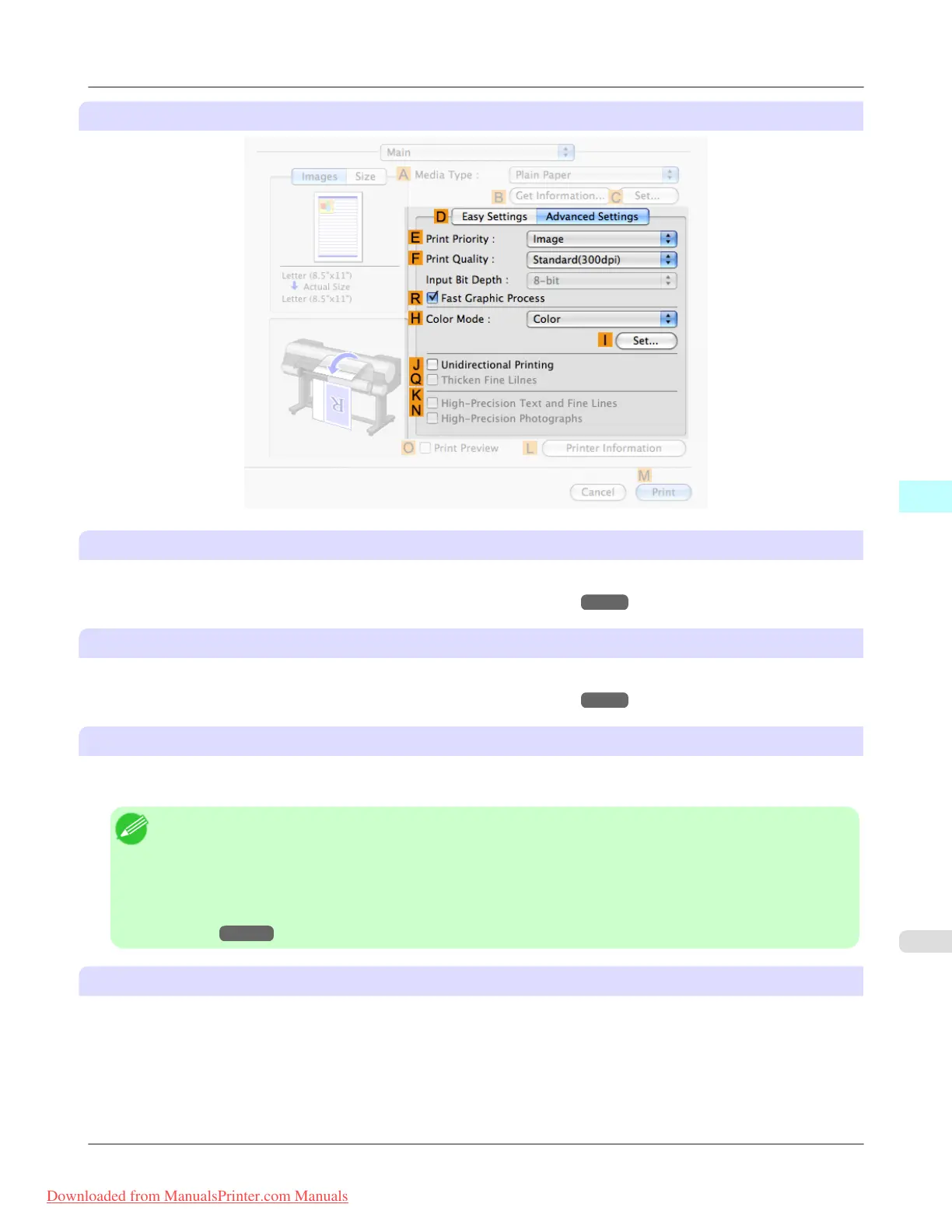
Configuration using Advanced Settings
E Print Priority
Choose the graphic elements that you want to emphasize for printing.
• Giving Priority to Particular Graphic Elements and Colors for Printing →P.51
F Print Quality
Choose the level of print quality.
• Giving Priority to Particular Graphic Elements and Colors for Printing →P.51
N High-Precision Photographs
Print with improved gradation and uniformity, particularly for high-precision photographs. However, this takes more time
than regular printing.
Note
• N High-Precision Photographs may not be selected depending on the A Media Type you select.
• N High-Precision Photographs and K High-Precision Text and Fine Lines cannot be checked at the same
time.
• To improve print quality, you may need to adjust the position of the printhead. (See "Enhancing Printing
Quality →P.837 ")
G Input Bit Depth
Choose the levels of gradation in print data, either 8-bit or 16-bit. Optimal results when printing data with rich gradation are
possible by choosing 16-bit. For example, this option is particularly suited to printing images created after specifying 16
bits per channel in Photoshop.
(Mac OS X 10.4 or later)
Mac OS X Software
>
Printer Driver
>
iPF8300 Main Pane
5
489
Downloaded from ManualsPrinter.com Manuals














 To Next Page