EasyManua.ls Logo

Canon ipf8300 - Page 929

Canon ipf8300
1150 pages
Print Icon
To Next Page IconTo Next Page
To Previous Page IconTo Previous Page
Loading...
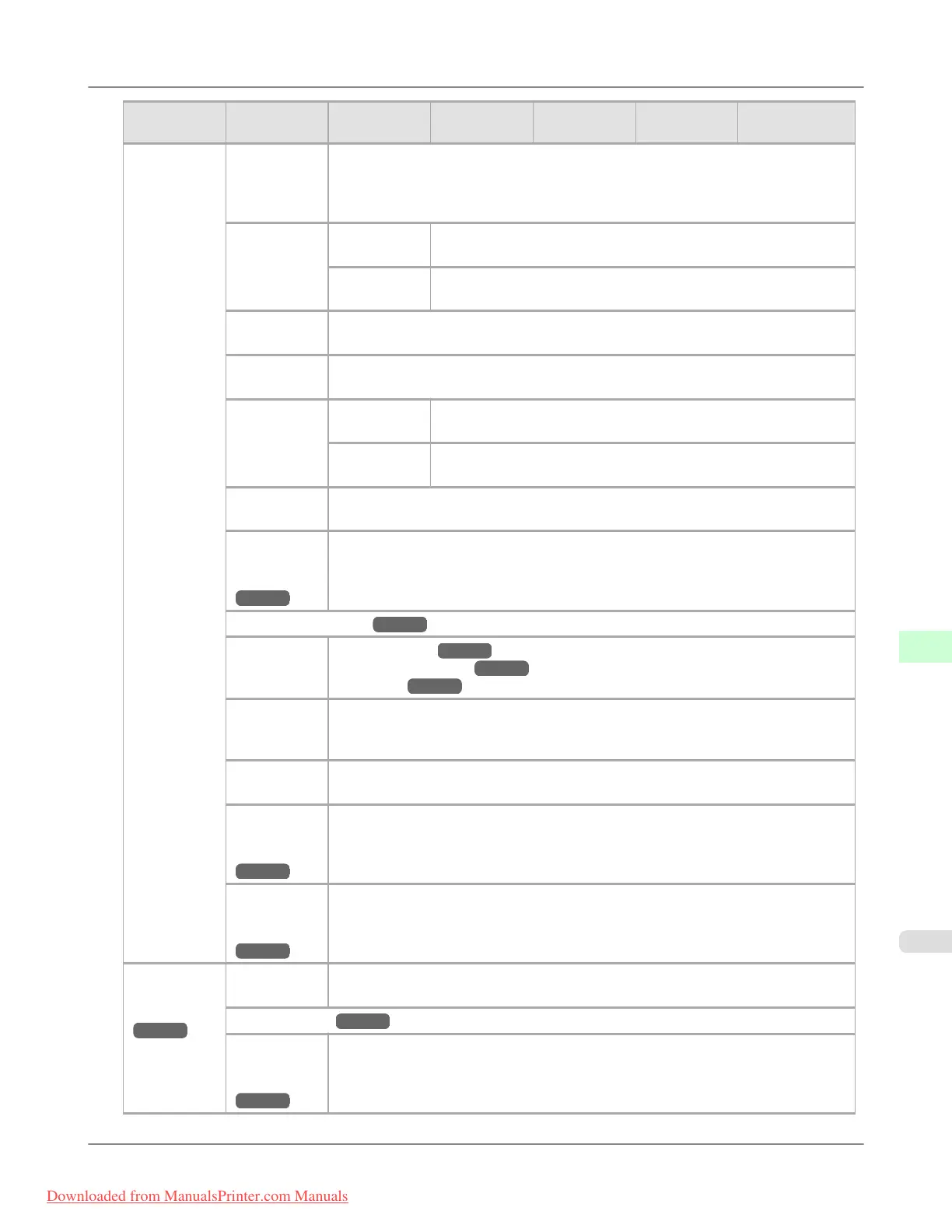
First Level
Second Lev-
el
Third Level Fourth Level Fifth Level Sixth Level Seventh Level
System Set-
up
Detect Mis-
match
Pause
Warning
None *
Hold Job
Paper Size
Basis
Sht Selection
1
ISO A3+ *
13"x19"(Super B)
Sht Selection
2
ISO B1 *
28"x40" (ANSI F)
Keep Paper
Size
Off *
On
Rep.P.head
Print
Off
On *
Nozzle
Check
Frequency Standard *
1 page
Warning Off *
On
CarriageS-
canWdth
Automatic *
Fixed
Use Remo-
teUI
(*5
→P.912 )
On *
Off
Reset PaprSetngs (*5 →P.912 )
Erase HDD
Data
High Speed (*5 →P.912 )
Secure High Spd. (*5 →P.912 )
Secure (*5 →P.912 )
Output
Method
Print *
Print (Auto Del)
Save: Box XX
Print After
Recv
Off *
On
Common
Box Set.
(*5
→P.912 )
Print
Print (Auto Del) *
Show Job
Log
(*5
→P.912 )
Off
On *
Take-up
Reel
(*12
→P.912 )
Use Take-up
Reel
Disable *
Enable
Auto Feed (*13 →P.912 )
Skip Take-
Up Err
(*14
→P.912 )
Off *
On
Printer Parts
>
Control Panel
>
iPF8300 Menu Structure
9
911
Downloaded from ManualsPrinter.com Manuals

Table of Contents

Related product manuals