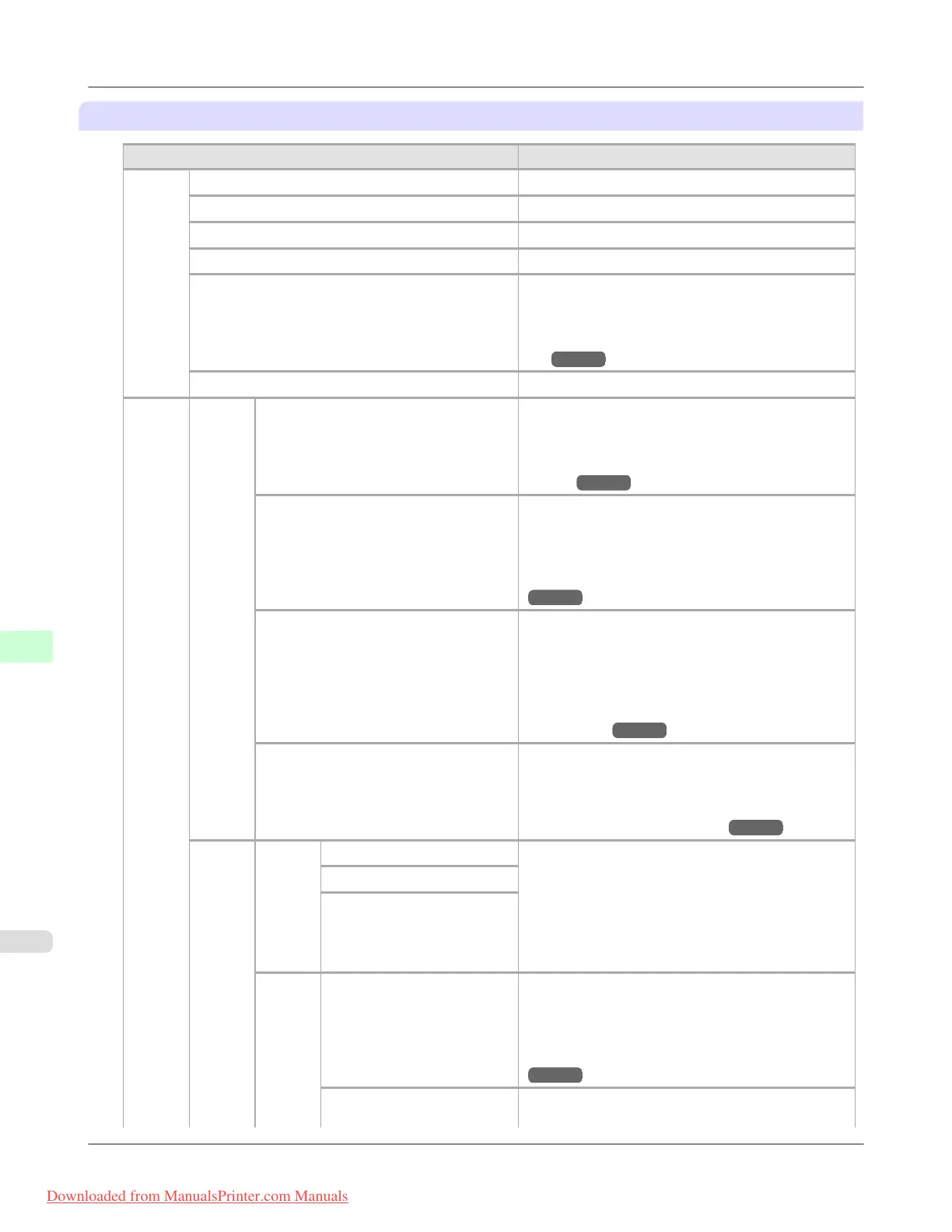
Set./Adj. Menu
Setting Item Description, Instructions
Test
Print
Nozzle Check Print a test pattern to check the nozzles.
Status Print Print information about the printer.
Interface Print Print interface settings information.
Paper Details Print the paper settings as specified in Paper Details.
Print Job Log Print a record of print jobs, including the paper type
and size, amount of ink consumed, and so on. Ink
consumption indicates a rough estimate of the
amount of ink consumed per print job.
(*1
→P.923 )
Menu Map Print the menu structure.
Adjust
Printer
Head
Posi.
Adj.
Auto(Standard) The printer prints and reads a test pattern for auto-
matic adjustment of Printhead alignment relative to
the printing direction. (See "Automatic Adjustment
to Straighten Lines and Colors (Head Posi.
Adj.).")
→P.839
Auto(Advanced) The printer prints and reads a test pattern for auto-
matic adjustment of Printhead alignment relative to
the printing direction and spacing between nozzles
and colors. (See "Automatic Adjustment to
Straighten Lines and Colors (Head Posi. Adj.).")
→P.839
Auto(Expansion) The printer prints and reads a test pattern for auto-
matic adjustment of Printhead alignment relative to
the printing direction and spacing between nozzles
and colors. Adjustment is performed at a higher level
of precision than Auto(Advanced). (See "Automatic
Adjustment to Straighten Lines and Colors (Head
Posi. Adj.).") →P.839
Manual Print a test pattern for adjustment of Printhead align-
ment relative to the printing direction. Enter the ad-
justment value manually based on the resulting pat-
tern. (See "Manual Adjustment to Straighten Lines
and Colors (Head Posi. Adj.).")
→P.841
Feed
Priori-
ty
Adj.
Priori-
ty
Automatic Specify exact paper feeding, if desired. Normally, se-
lect Automatic. Choose Print Quality for attractive
printing. Choosing Print Quality also makes band-
ing less noticeable. Choose Print Length if you pre-
fer to feed the paper an exact amount. However, note
that slight banding may occur in the direction of car-
riage scanning when Print Length is selected.
Print Quality
Print Length
Adj.
Quali-
ty
Auto(GenuinePpr) Specify this mode with paper identified in the Paper
Reference Guide.
The printer prints and reads a test pattern for auto-
matic adjustment of the feed amount. (See "Auto-
matic Banding Adjustment (Adj. Quality).")
→P.846
Auto(OtherPaper) Specify this mode with paper not in the Paper Refer-
ence Guide.
Printer Parts
>
Control Panel
>
Menu Settings iPF8300
9
916
Downloaded from ManualsPrinter.com Manuals














 To Next Page