262Service Manual – CS7010™ 42 - Sweep System, Main
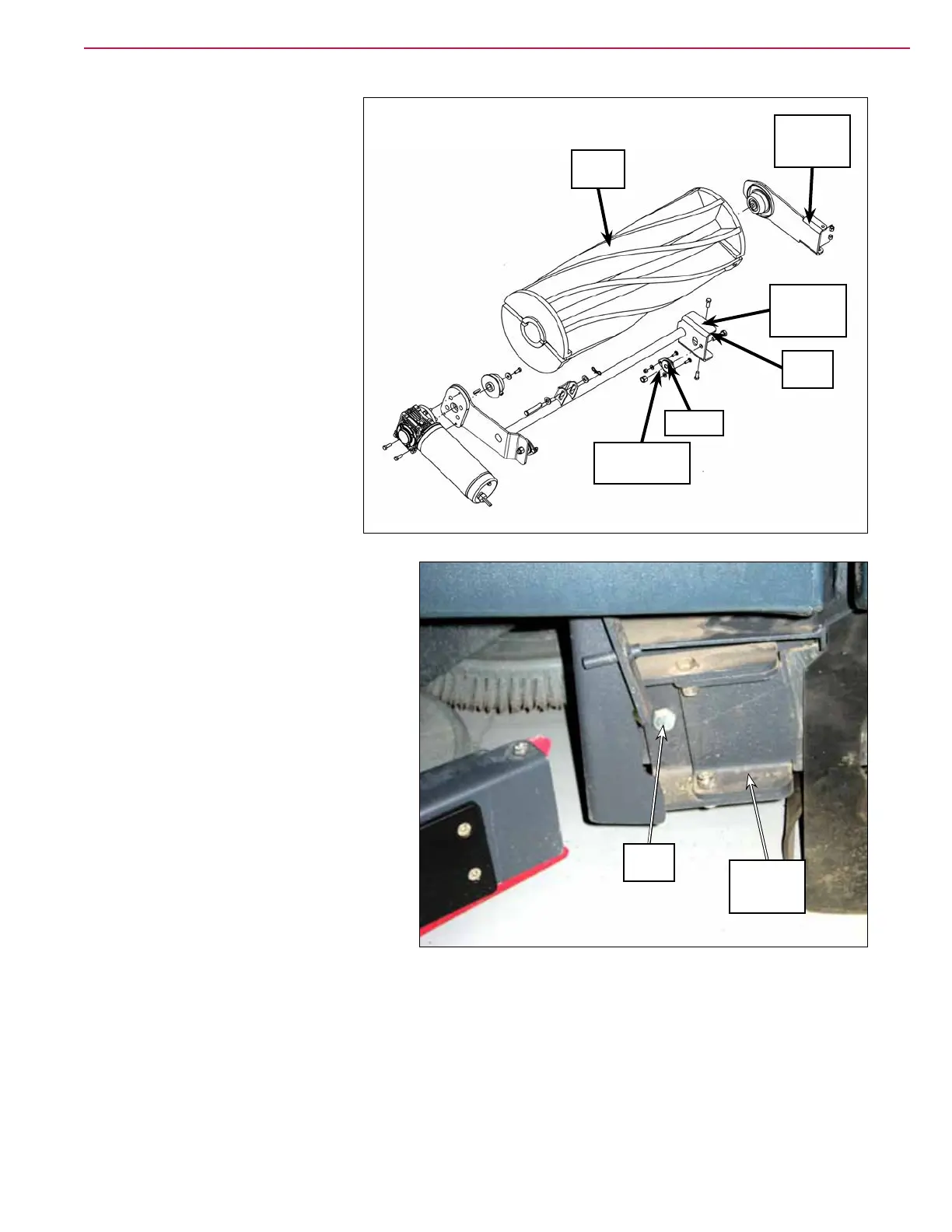
Adjust the Main Broom Tilt
1. Loosen the two 1/4”-20 Nyloc®
nuts holding the bearing on
which the broom support
weldment pivots on the right
side. Note that the 1/4”-20
nyloc® nuts and bearing are
accessed from the inside of the
main broom compartment and
are located behind the 1/2”-13
screw just to the rear of the
broom arm assembly. Also note
that the bearing and mounting
screws ride in slotted holes in the
supporting weldment to allow for
up/down adjustment.
2. Move the bearing and attached
broom support weldment up or
down as necessary so the width
of the main broom sweep pattern
is consistent along the entire
length of the main broom. Note
that:
Raising the right side of the main
broom will narrow the sweep
pattern on the right side.
Lowering the right side of the
main broom will widen the sweep
pattern on the right side.
3. Tighten the two 1/4”-20 nyloc®
nuts.
4. Check the main broom sweep
pattern.
5. Readjust the main broom tilt as
necessary.
Broom Arm
Assembly
1/2”-13
Screw
1/4”-20 Nyloc
®
Nut (2)
Bearing
Broom
Support
Weldment
1/2”-13
Screw
Broom Arm
Assembly
Main
Broom



 To Next Page