292Service Manual – CS7010™ 50 - Dust Control/DustGuard™ Systems
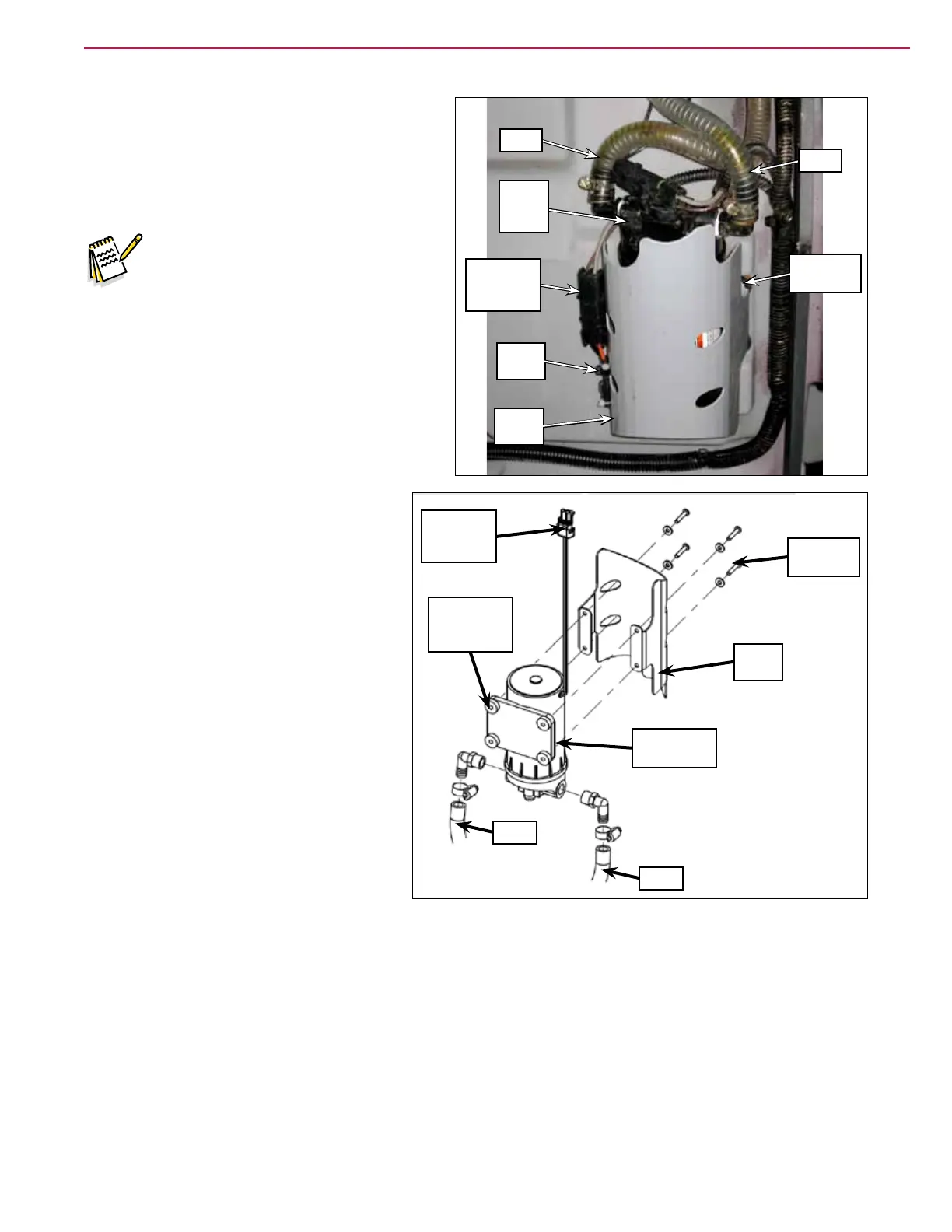
DustGuard Pump
1. Drain the water from the upper hopper. Note
that you can do this one of several ways. The
most convenient way is to remove the strainer
cover and screen and drain the upper hopper
through the DustGuard strainer.
Note: Place a suitable container
underneath the upper hopper to
catch the water from the hopper
reservoir.
2. Turn the key switch on, raise the hopper and
engage the prop rod, then turn off the key
switch.
3. Disconnect the Pump Electrical Connector.
4. Disconnect the two Hoses from the
DustGuard Pump.
5. Remove the four phillips screws and
washers holding the pump guard and
pump to the upper hopper and remove
the guard and pump.
• Note that the pump guard is
positioned below the 4 isolation
pads.
6. Reinstall the DustGuard Pump by
following the above steps in reverse
order.
Pump
Guard
Wire
Tie
Phillips
Screw (4)
Dust-
Guard
Pump
Hose
Pump
Electrical
Connector
Hose
Hose
Hose
Pump
Electrical
Connector
Phillips
Screw (4)
Pump
Guard
DustGuard
Pump
DustGuard
Pump
Isolator (4)



 To Next Page