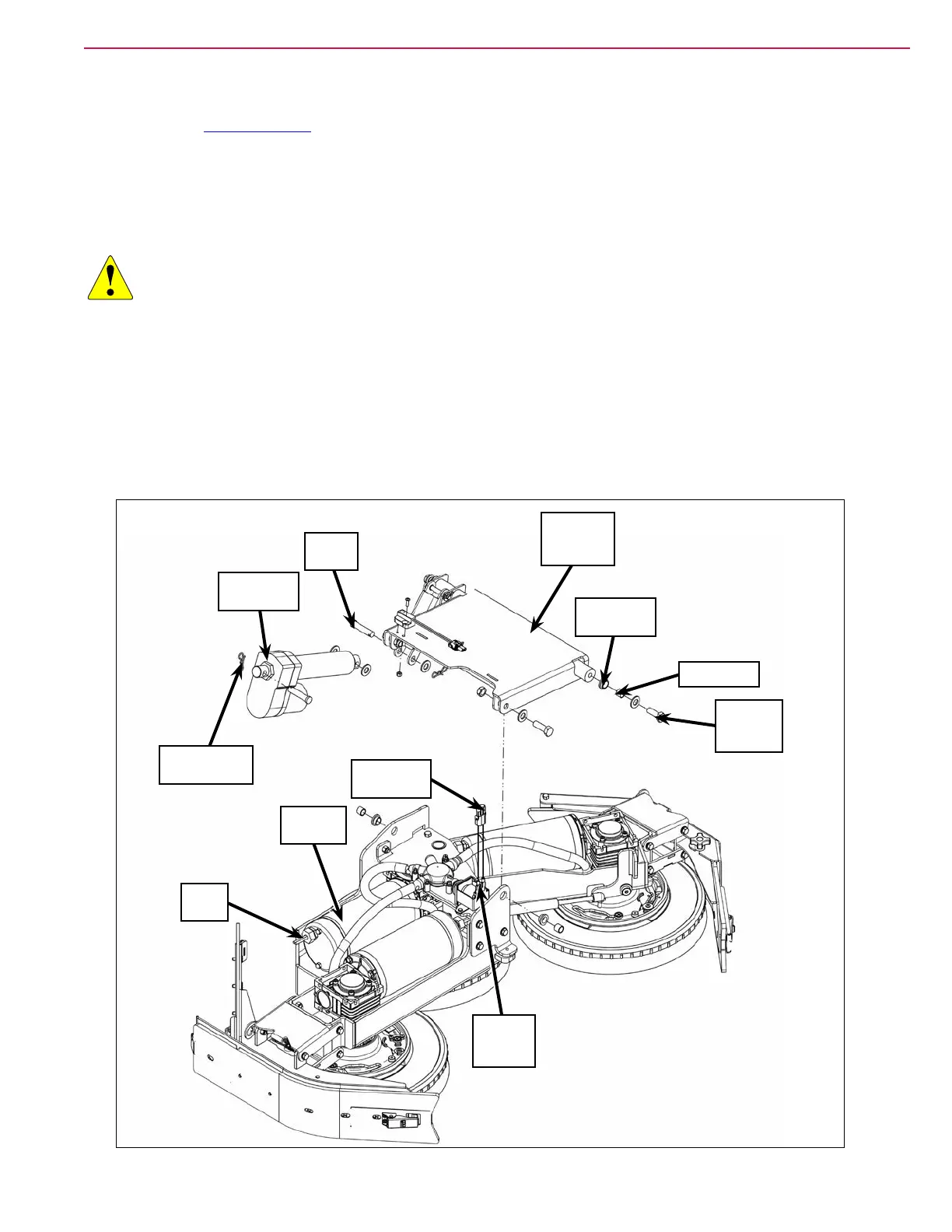
232Service Manual – CS7010™ 34 - Scrub System
Scrub Deck
1. Remove the Recovery Tank described on page 254.
2. Make sure the solution shutoff valve is closed, then disconnect the solution hose to the solution solenoid
valve.
3. Turn on the key switch and put the machine into the Service Mode to allow you to jog the scrub deck up
and down.
CAUTION: Disconnect the main battery connector before reaching between the scrub deck and the
machine frame. The scrub deck could cause serious injury if it raises unexpectedly.
4. Disconnect the Electrical Connectors:
• To the three Scrub Motors. Make note of which connector connects to each motor for later
replacement.
• To the Solution Solenoid Valve.
• It may be necessary to jog the scrub deck up or down to access the electrical connectors. Note that you
may need to cut wire ties to access the electrical connectors.
5. Extend the scrub deck downward in the Service Test mode to minimize the weight on the M12 screws
Flange
Bearing (2)
Bushing (2)
Scrub Deck
Actuator
M12-1.75
x 35mm
Screw (2)
Clevis
Pin (2)
Solution
Solenoid
Valve
Scrub
Deck
Electrical
Connector
Deck
Lift Arm
Assembly
Bow-tie Cotter
Pin (2)
Scrub
Motor (3)



 To Next Page