84Service Manual – CS7010™ 20 - Wheel System, Traction
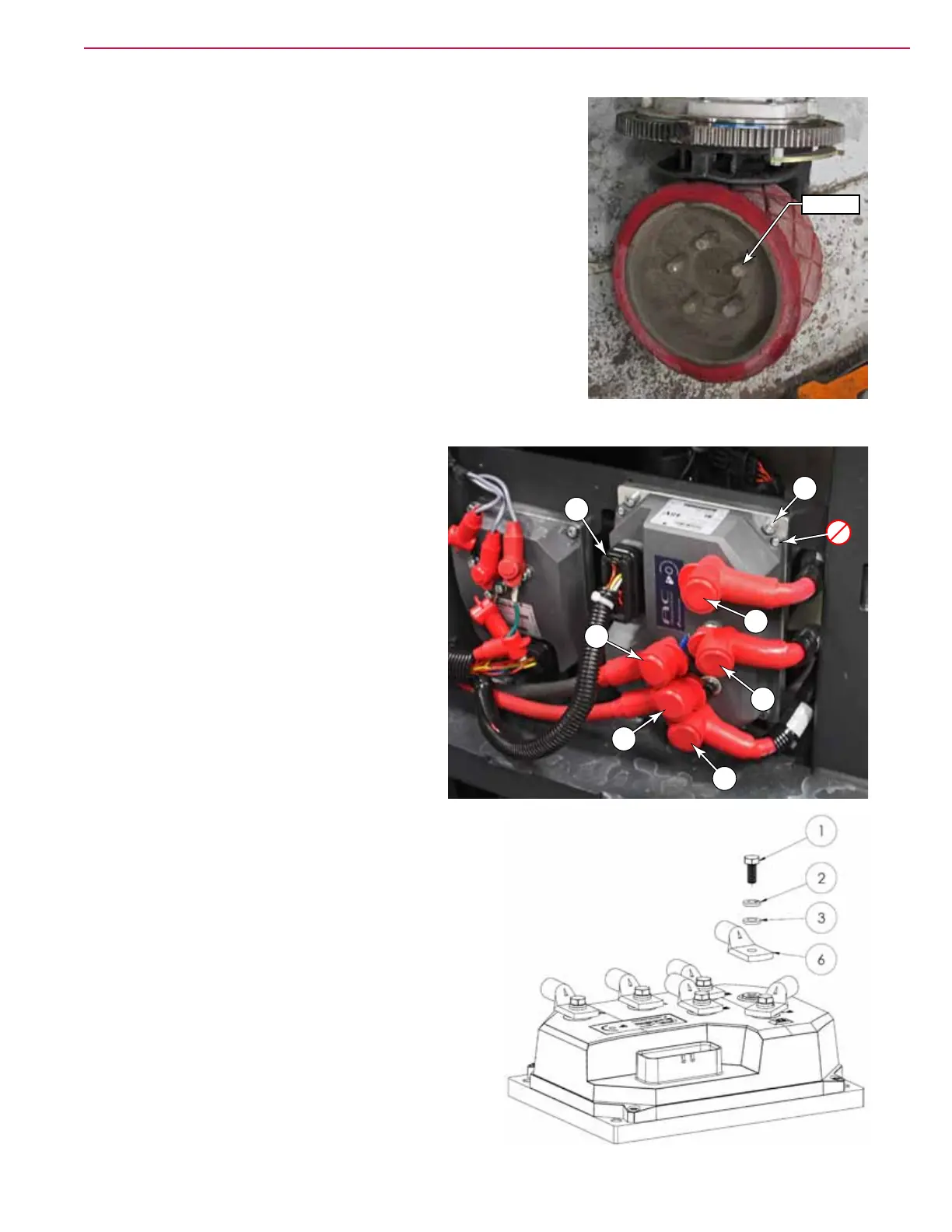
Drive Wheel
1. Chock front wheels and disconnect the main battery connector.
2. While the weight of the machine is still on the drive wheel,
slightly loosen the drive wheel lug nuts.
3. Jack the rear of the machine up to get the drive wheel off the
ground.
4. Remove the drive wheel lug nuts and remove the wheel.
5. Reassemble in reverse order.
Drive Controller
1. Disconnect the main battery connector.
2. Open the recovery tank.
3. Disconnect the low current connector (D).
4. Label the power and motor cables to aid in
correct reassembly. (B+,B-,U,V,W)
5. Remove the screw, spring washer, and at
washer that secures each cable lug, and
remove the cable.
6. Remove the four controller mounting screws
(E) and remove the controller. (Do not
remove the controller from its baseplate.)
7. Reassemble in reverse order. When
attaching cables use the correct hardware
in the correct order to avoid damage caused
from a loose connection. Torque to 90 In-Lbs (10.17
Nm).
• Screw (1), Lock Washer (2), Flat Washer (3),
Cable Lug (6).
Lug Nuts
D
B-
B+
U
V
W
E



 To Next Page