28Service Manual – CS7010™ 03 - General Information
Machine Controls
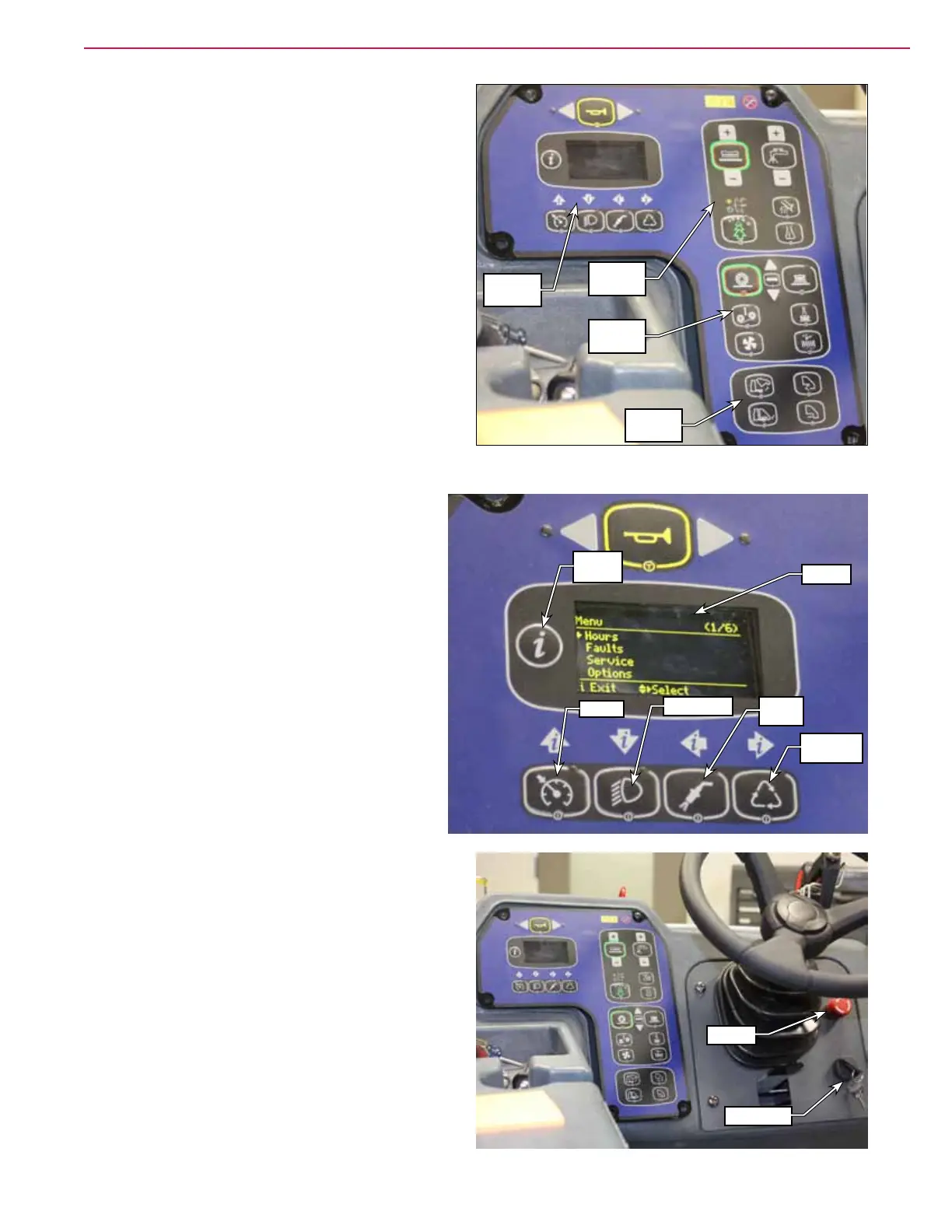
Control Panel - General Layout
The CS7010 control panel is organized by machine
function with the scrub, sweep and hopper functions
conveniently grouped together. Miscellaneous
controls such as the key switch, emergency-stop
switch, speed control, light switch, high-pressure
wand switch, extended scrub system switch and horn
button are located in front of the Operator.
Miscellaneous Controls
• E-Stop – maintained palm switch; removes
all functions of the machine when pressed. To
reset the Emergency Stop switch, rotate the
red knob clockwise.
• Left and Right Turn Signal – switch on the
corresponding turn signal.
• Horn Button – sounds the horn when pressed.
• Key Switch – main power/ignition switch.
• OLED Display – displays the various machine
status icons and informational displays.
• Speed Switch – functions as follows:
– Engine machines – increments the engine
speed up and down through the three speed
ranges. Note that the engine speed will
increase automatically when certain machine
functions are engaged.
– Battery machines – increases the machine
scrub speed to the full transport speed.
• Headlight Switch – switches on the headlights.
• High-pressure Wash Switch – engages the high-
pressure spray wand solution pump (LPG and
diesel only).
• Extended Scrub Switch – enables the optional
extended scrub (recycle) function.
Machine
Controls
Scrub
Controls
Sweep
Controls
Hopper
Controls
E-Stop
Keyswitch
Info
Button
Display
Speed
Headlights
Spray
Wand
Extended
Scrub



 To Next Page