288Service Manual – CS7010™ 50 - Dust Control/DustGuard™ Systems
Maintenance and Adjustments
CAUTION: Before performing any machine maintenance or adjustments, make sure the key switch
is off, the key is removed from the machine and the parking brake is engaged.
Clean the Dust Control Filter
1. Lift the hopper cover.
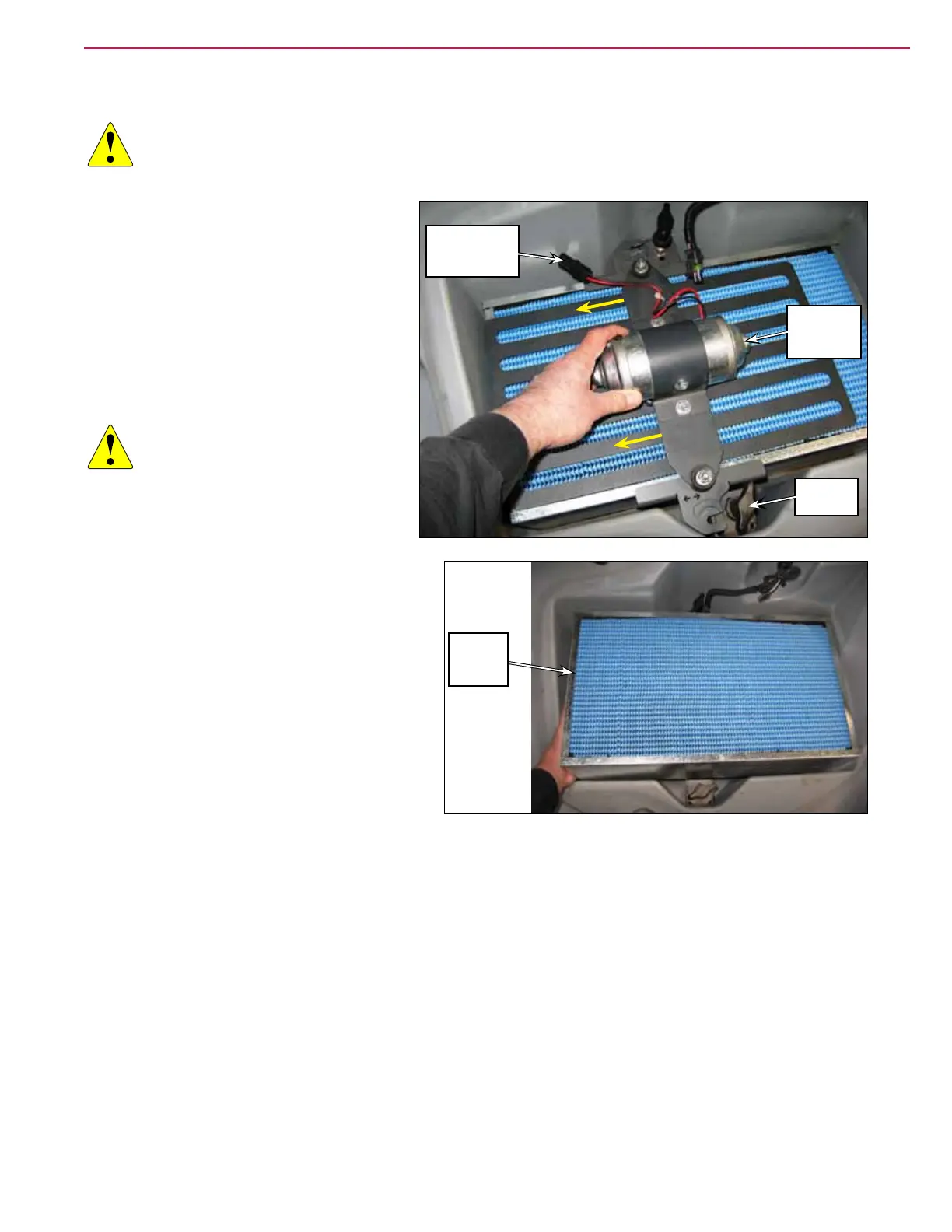
2. Disconnect the Shaker Motor Electrical
Connector.
3. Loosen the two Thumb Nuts, then slide
the Filter Shaker Assembly toward the
left and remove it from the machine.
4. Lift the Filter out of the machine.
CAUTION: Wear safety glasses
when cleaning the lter.
Clean the lter in a well-
ventilated area. Be careful
not to puncture the lter
element.
5. Inspect the lter and urethane gasket for
damage.
• A large amount of dust on top of the
Filter may be a sign of a punctured lter
or damaged seal.
• If the lter surfaces or gasket are
damaged, replace the lter.
6. Clean the lter:
a. Tap the lter on a hard surface to knock
off heavy debris.
b. Vacuum the surface to remove remaining debris.
c. Blow compressed air (maximum pressure 100 psi) into the clean side of the lter to remove ne dust.
7. During replacement, make sure the arrow on the side of the lter is pointing upward.
Shaker Motor
Electrical
Connector
Filter
Shaker
Assembly
Thumb
Nut (2)
Dust
Control
Filter



 To Next Page