29Service Manual – CS7010™ 03 - General Information
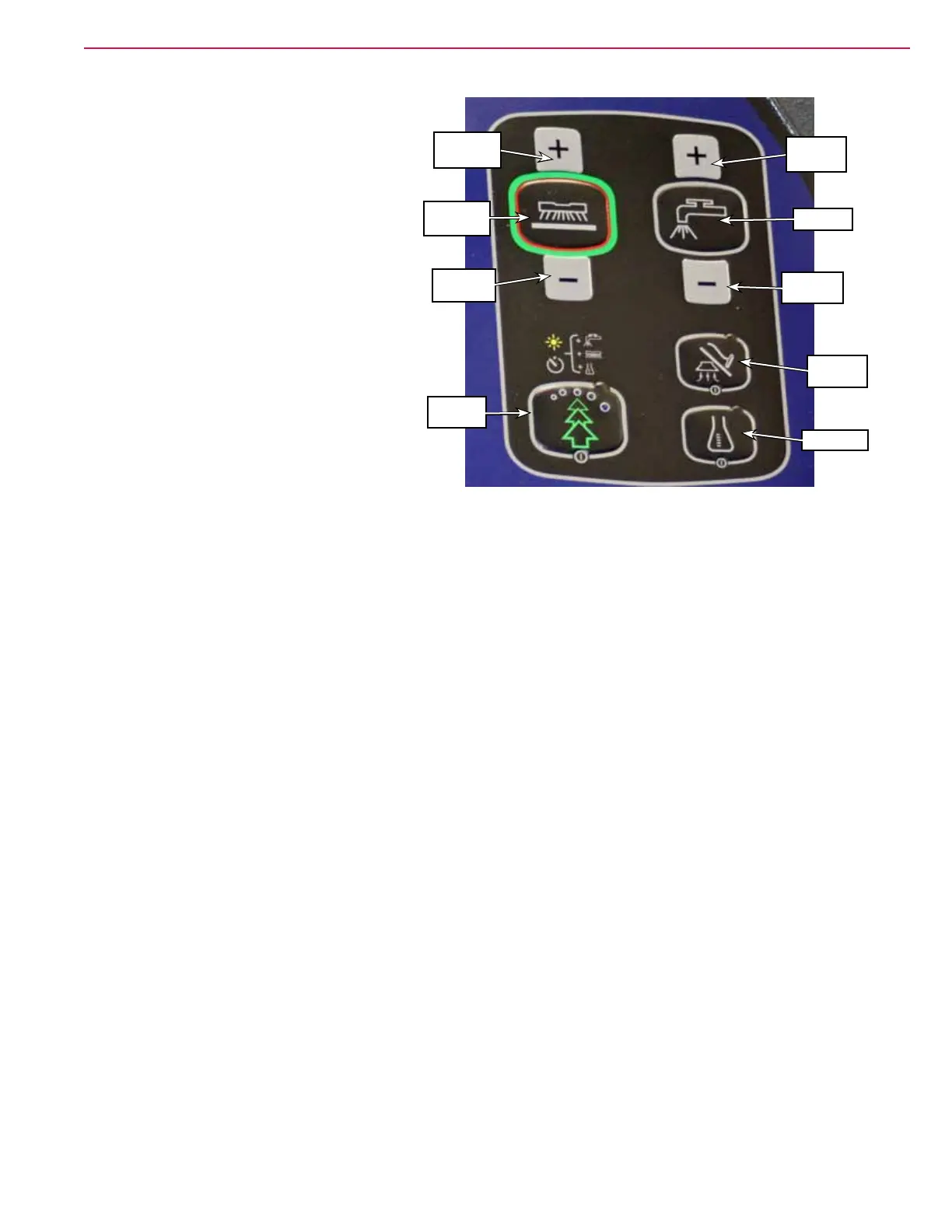
Scrub Controls
• Scrub Pressure Increase Button –
increases the scrub pressure one level
when pressed.
• One Touch Scrub Button – enables the
scrub, solution, and recovery systems,
and the EcoFlex™ system if the machine
is so equipped. Note that the scrub brush
pressure and solution ow will be at their
lowest levels. The scrub brushes will run,
the solution will ow and the squeegee
vacuum will turn on when the machine
begins moving forward.
• Scrub Pressure Decrease Button –
decreases the scrub pressure one level
when pressed.
• Burst Of Power Button – increases both
the scrub brush pressure and solution ow
one step higher for 60 to 300 seconds.
• Solution Flow Increase Button – increases the solution ow rate one level when pressed.
• Solution Button – enables and disables the solution system.
• Solution Flow Decrease Button – decreases the solution ow rate one level when pressed.
• Vacuum/Wand Button – enables and disables on the vacuum system.
• Detergent Button – enables and disables the detergent system (on models so equipped).
One-touch
Scrub
Pressure
Increase
Pressure
Decrease
Burst of
Power
Flow
Increase
Flow
Decrease
Solution
Vacuum/
Wand
Detergent



 To Next Page