45Service Manual – CS7010™ 04 - Control System
Maintenance and Adjustment
Firmware Update
1. Copy the rmware le to the root directory of a
USB ash drive. The le needs to be located in
the root directory or the Controller won’t know
where to nd it.
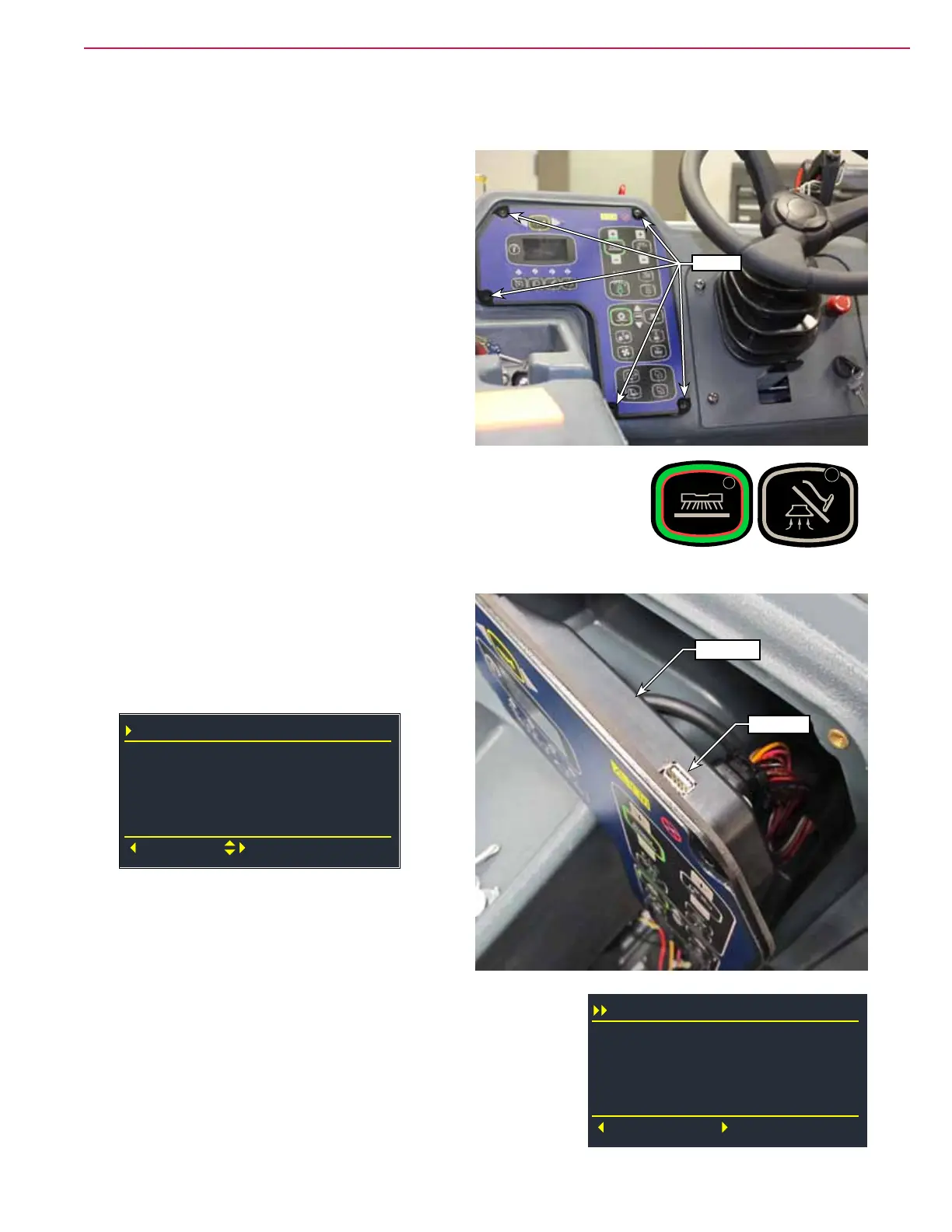
2. With the machine turned off, remove the 5
screws that secure the Main Controller to the
dash panel.
3. Place the machine in Service Mode. Press and hold the Scrub and
Vacuum buttons then turn the key to the on position.
4. Carefully tilt the Controller module out of the dash just enough to expose
the USB port on the top edge. Take care to not disconnect the electrical
connectors or the solution tank pressure hose.
5. Insert your USB ash drive into the USB port.
6. Press the Information button to enter the
machine menu, and scroll down to the System
menu, and then select “Install Firmware”.
System
Firmware
Back
Select
Serial Number
Install Firmware
99.99.99.9
15.14.0009
7. The display will show the revision level of the
new rmware. Press the Right navigation arrow
to install the rmware.
8. The display will show the progress, and when
complete, will display “Rest to Install”.
9. Press the Right navigation arrow to reset the controller using
the new rmware. To cancel the installation, press the Left
navigation arrow.
Screws
USB Port
Controller
Install Firmware
Cancel
Reset
Loading: 100%
Reset to Install



 To Next Page