30Service Manual – CS7010™ 03 - General Information
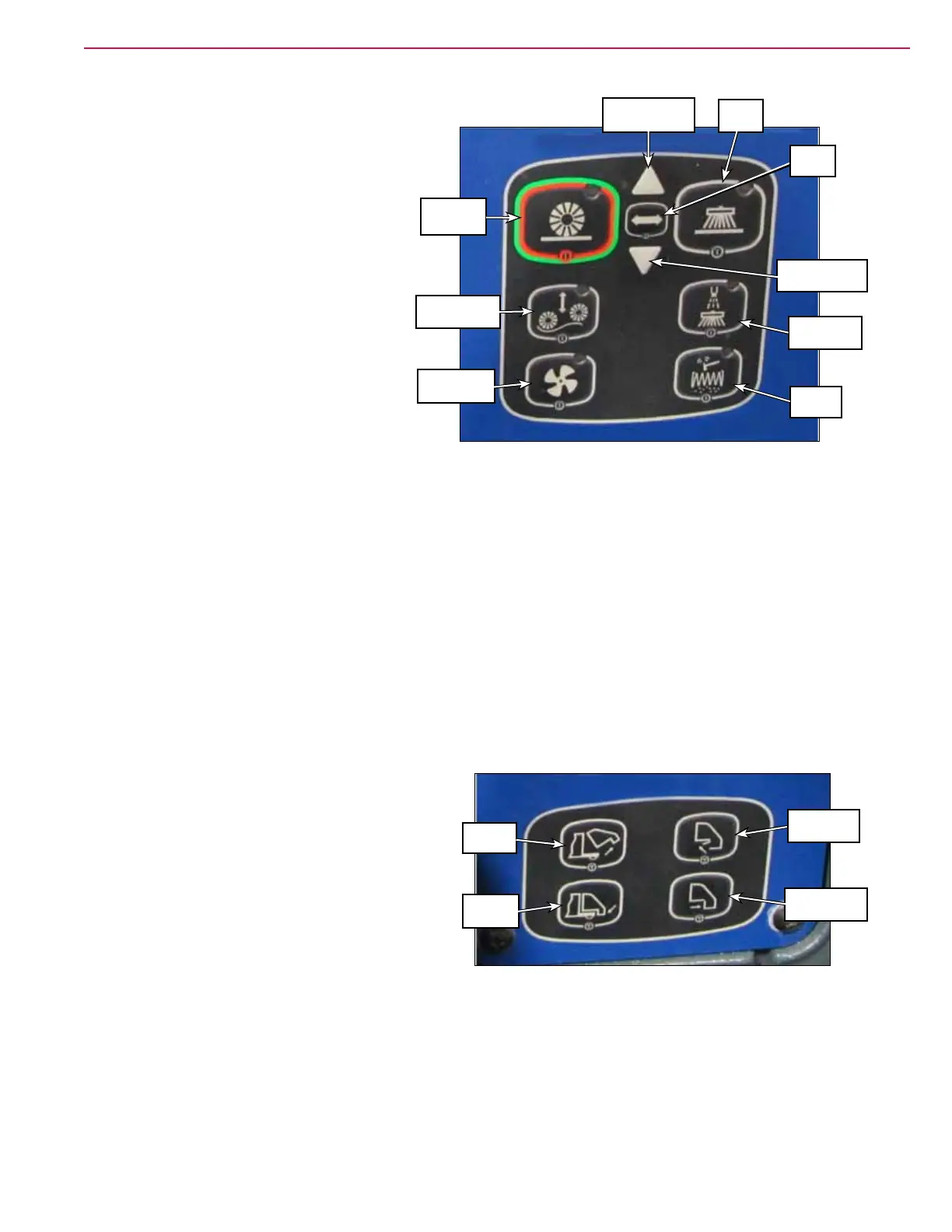
Sweep Controls
• One-touch Sweep Button – enables the
main broom, side brooms, dust control fan
and DustGuard™ spray nozzles.
• Broom Select Button –
– When the one-touch sweep is enabled,
the Broom Select button selects the
broom (main broom or side brooms)
that will be raised or lowered when the
Broom Height Raise Button and Broom
Height Lower Button are pressed.
– When the one-touch sweep is not
enabled, pressing the Broom Select
button once will lower the side brooms,
switch on the side broom motors for a
short time, then raise the side brooms.
Pressing the Broom Select Switch
twice will lower the main broom, switch on the main broom motor for a short time, then raise the main
broom.
• Broom Height Raise & Lower Buttons – raise and lower the selected broom from its current position.
• Side Broom Button – enables and disables the side brooms. Note that if you switch off the side brooms,
the DustGuard™ spray nozzles will also switch off.
• Main Broom Float Button – the main broom actuator moves all the way down so the weight of the main
broom is resting on the oor. The linkage is slotted to allow the broom to follow the contour of the oor.
• Dust Control Fan Button – enables and disables the dust control fan.
• DustGuard Spray Button – enables and disables the DustGuard spray nozzles.
• Filter Shaker Button – switches on the lter shaker. The shaker will cycle 16 times, then switch off.
Hopper Controls
• Hopper Raise Button – raises the hopper.
• Hopper Lower Button – lowers the hopper.
• Hopper Door Open Button – opens the hopper
door.
• Hopper Door Close Button – closes the hopper
door.
One-touch
Sweep
Broom Height
Lower
Broom
Select
Broom Height
Raise
Side
Broom
DustGuard
Spray
Filter
Shaker
Dust Control
Fan
Main Broom
Float
Hopper
Raise
Hopper
Lower
Hopper
Door Open
Hopper Door
Close



 To Next Page