293Service Manual – CS7010™ 50 - Dust Control/DustGuard™ Systems
Impeller Assembly
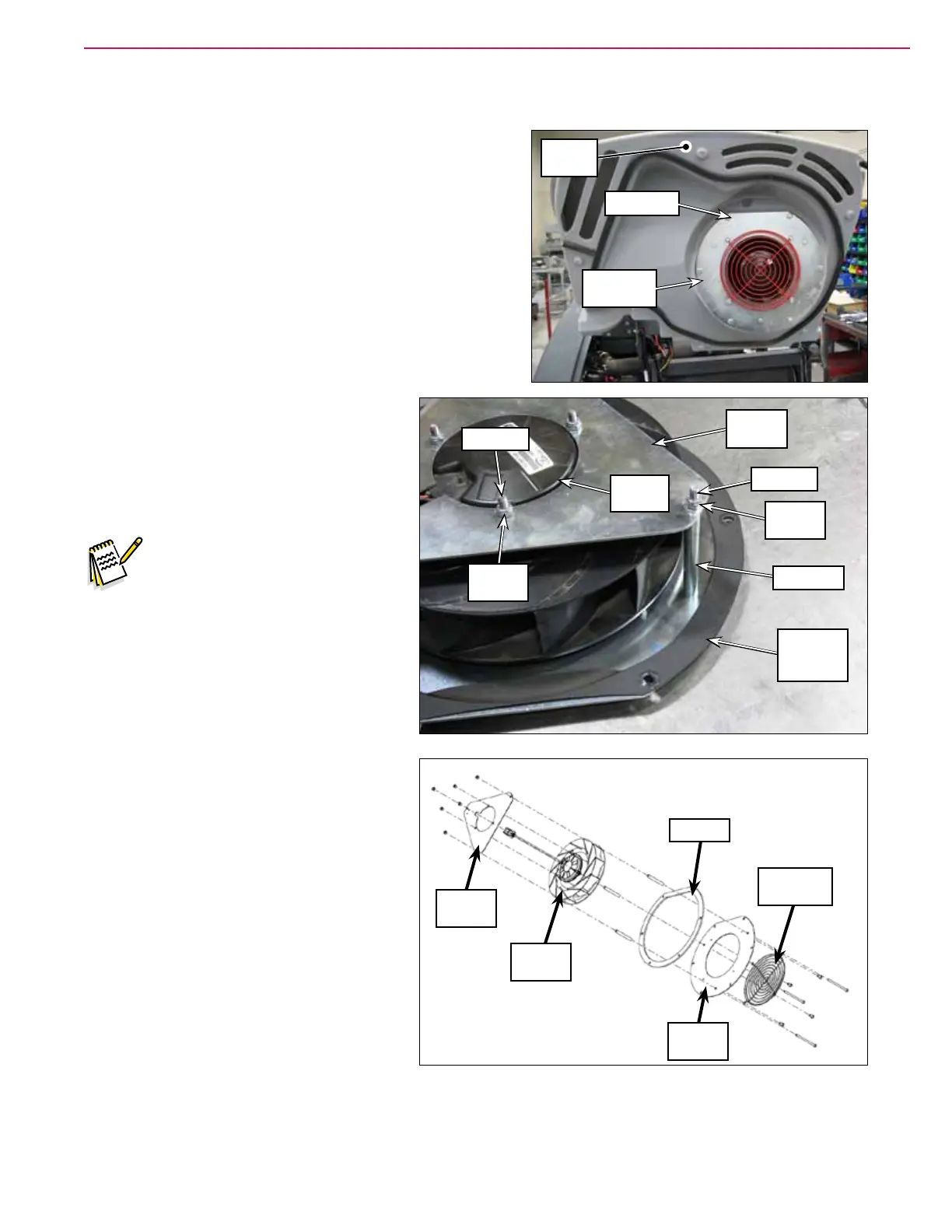
1. Lift the Hopper Cover.
2. Remove the six Screws and washers holding the
Impeller Assembly to the Hopper Cover.
3. Carefully pull the Impeller Assembly partway off of the
Hopper Cover.
4. Disconnect the Vacuum Motor electrical connector, then
remove the Impeller Assembly from the machine.
5. Remove the three nyloc nuts, screws and spacers holding
the vacuum plate and gasket to the
vacuum support and attached vacuum
motor.
6. Remove the three nyloc nuts holding the
vacuum motor to the vacuum support
and remove the vacuum motor.
Note: To prevent the three screws
from spinning when
removing the nyloc™ nuts to
remove the vacuum motor,
place a wrench on the screw
heads under the vacuum
motor tabs.
7. Reassemble the impeller assembly
following the above steps in reverse order.
Screw (6)
Impeller
Assembly
Hopper
Cover
Vacuum
Plate and
Gasket
Vacuum
Support
Screw (3)
Nyloc™
Nut (3)
Spacer (3)
Vacuum
Motor
Screw (3)
Nyloc™
Nut (3)
Vacuum
Support
Vacuum
Motor
Gasket
Vacuum
Plate
Protection
Grate



 To Next Page