95Service Manual – CS7010™ 22 - Steering System
Steering Controller
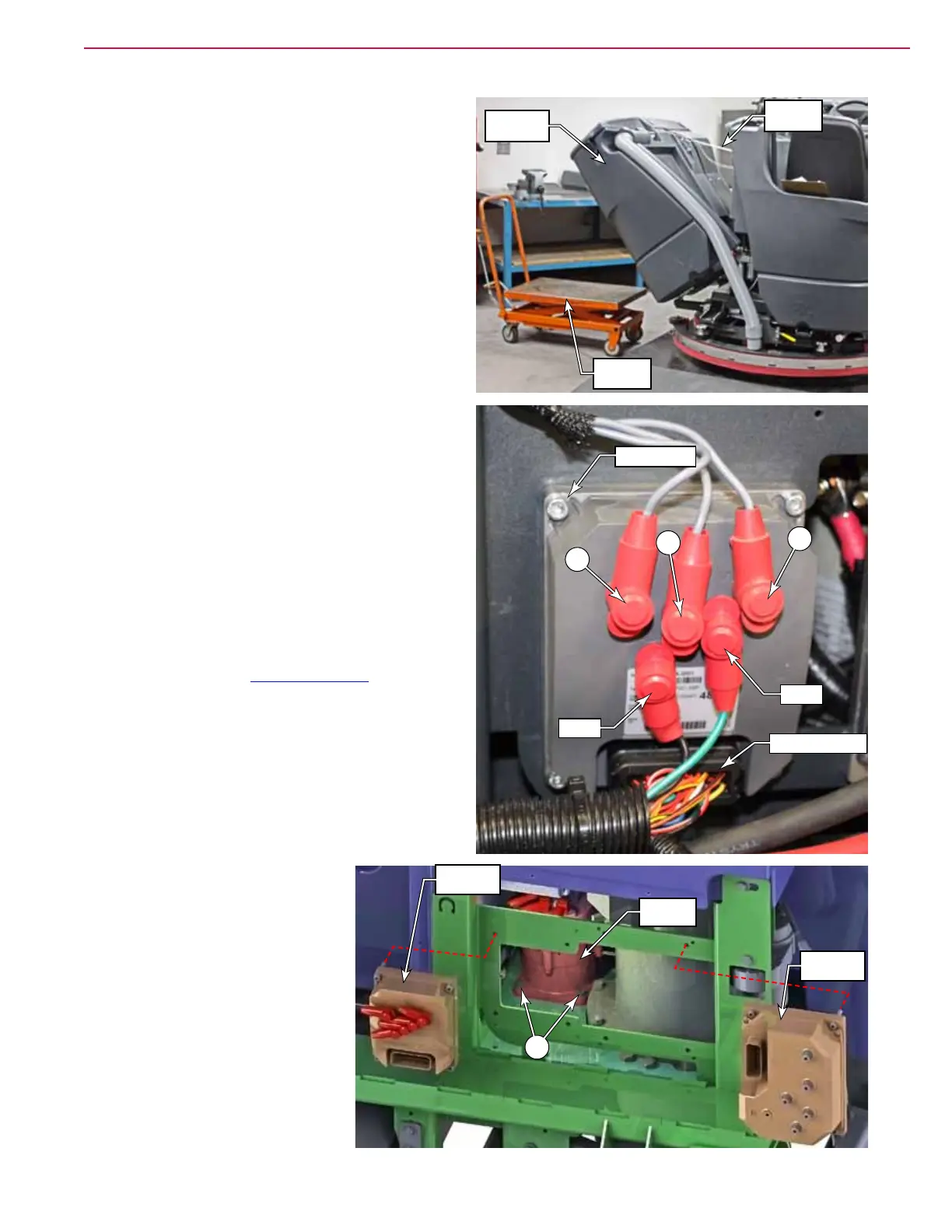
1. Drain recovery tank.
2. Turn machine off, set the parking brake and
disconnect the main power plug.
3. Tip the recovery tank out and let it rest on the
support cable.
4. Disconnect any electrical or vacuum connections
to the recovery tank so that it can be lowered
horizontal.
5. With a helper, remove the support cable clip, and
tip tank down onto an elevated support. Remove
the tank if desired.
6. Label the steering controller wiring to make
correct reassembly easier, then disconnect all
wiring.
7. Remove 4 controller mounting screws, and
remove the controller.
Steering Actuator Motor
1. Perform all of the steps listed above to remove
the steering controller.
2. For additional room to work, you may choose
to also remove the Drive Controller described
on page 84. Access to the actuator motor is
through the frame where the two controllers are
mounted.
3. Disconnect the data connector from the actuator
motor.
4. Remove the four steering actuator mounting
screws (A).
5. Tilt the actuator sideways to
remove it through the opening
in the frame. It is a tight t and
may require skewing the motor
back and forth to get through
the opening.
Elevated
Support
Recovery
Tank
Support
Cable
Batt+
U
V
W
Batt-
J6 Connector
Screws (4)
A
Actuator
Motor
Steering
Controller
Drive
Controller



 To Next Page