280Service Manual – CS7010™ 48 - Sweep System, Side Broom
Note: If you’re installing a new Side Broom Actuator, or if the Drive Nut Cylinder on the existing
Side Broom Actuator has been rotated on the Acme threaded shaft, check the actuator
extended and retracted dimensions and set as follows:
1. Reconnect the side broom actuator electrical
connector.
2. Install the Drive Nut Cylinder onto the drive
screw threads just a few turns.
3. Hold on to the drive nut cylinder to keep it from
rotating, then retract the side broom actuator
using the Service Mode until the motor stops.
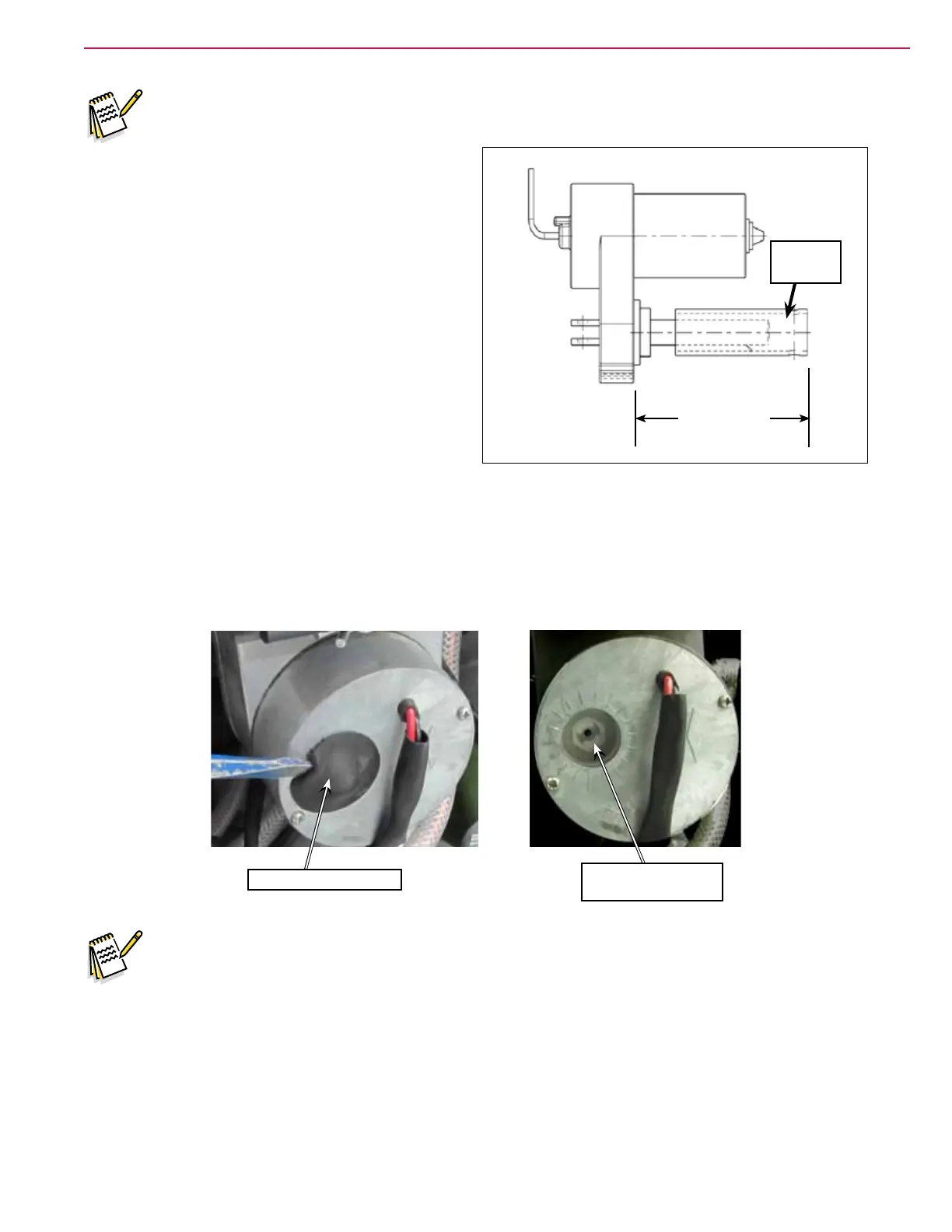
4. Check the retracted position dimension as shown
in the adjacent drawing.
5. Adjust the retracted position by rotating the
Drive Nut Cylinder on the threaded shaft as
necessary.
6. Hold on to the drive nut cylinder to keep it from
rotating, then extend the side broom actuator using the Service Mode until the motor stops.
7. Check the extended position dimension.
8. If the distance is not correct, remove the rubber adjuster cover from the end of the motor. Then rotate
the nylon nut found under the cover with a 1/2” (13 mm) SOCKET (Not a screwdriver!). Turning the
nut one click will change the distance approximately on tenth of an inch (2.5 mm). After changing the
adjustment, run the motor in and out and recheck the “extended” position dimension.
Remove Adjuster Cover
Rotate Nylon Nut to
Adjust
Note: Use a 1/2” (13mm) socket to turn the adjuster.
9. After each adjustment, hold the drive nut cylinder, run the actuator IN & OUT and recheck the
dimensions. Reinstall the adjuster cover.
Drive Nut
Cylinder
Retracted: 6 1/2” (165 mm)
Extended: 7 1/2 (191 mm)



 To Next Page