112
9. Installing Windows GUI Software
9-1. System Requirements
To use the Windows GUI, your computer must meet the following requirements.
Windows® 7 Professional SP1 (32/64bit)
Windows® 8.1,10 Pro (32/64bit)
(Mac OS is not supported.)
Intel® Core™ 2 Duo processor 2 GHz or higher
Resolution: 1280×1024 pixels or better recommended
Full color (24-bit) or more
Ethernet: 100BASE-TX/1000BASE-T More than 1 port
100BASE-TX: Category 5 or higher
1000BASE-T: Category 5e or 6
Microsoft® .NET Framework 4.7.1
Windows® Installer 3.1
9-2. Installing Windows GUI Software
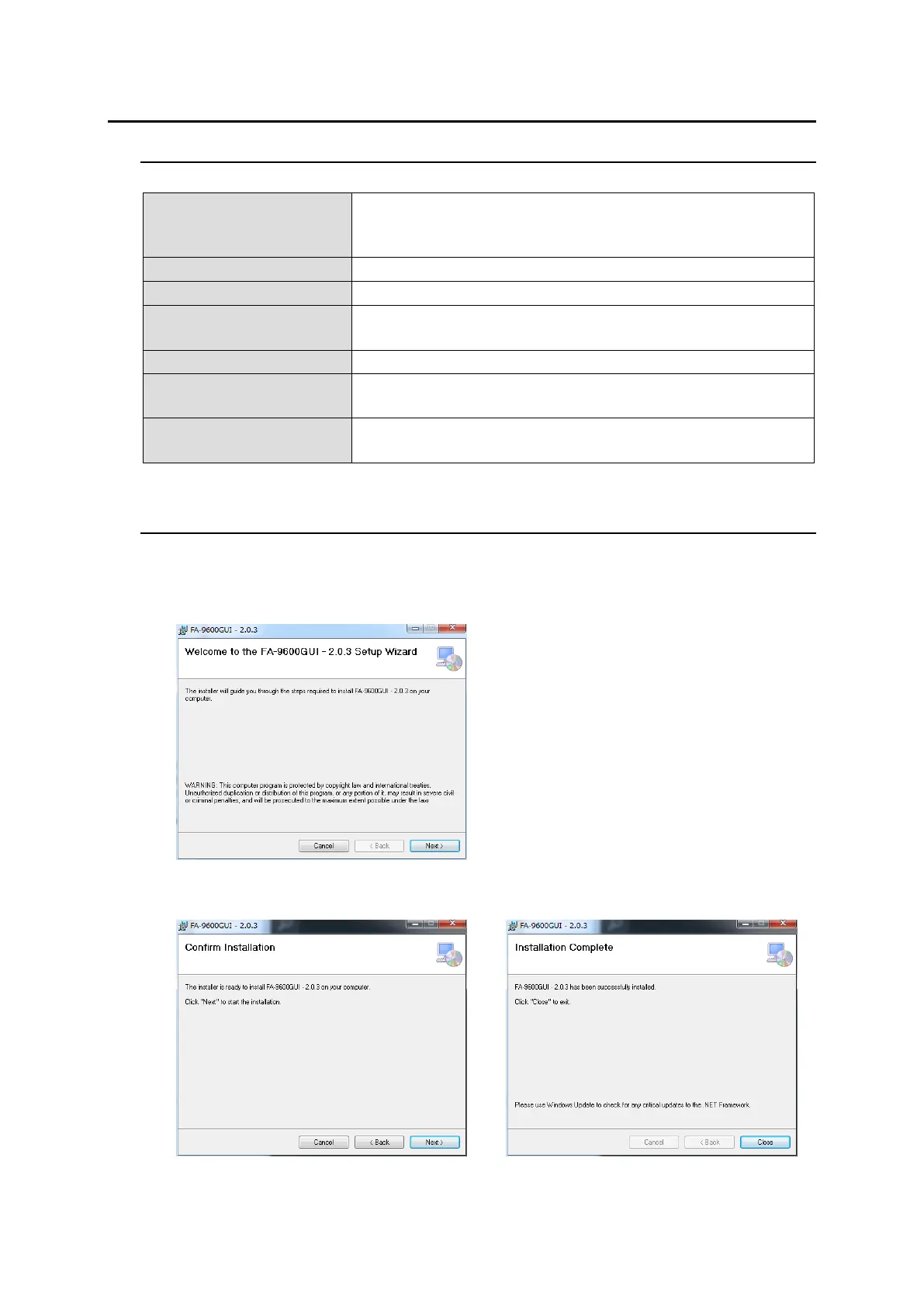
1. Open the CD-ROM, and the FA-9600GUI folder. Double-click the Setup icon to start the setup
wizard.
2. The following window will appear. Click Next.
3. Select the installation directory, then click Next.
4. After the installation is completed, click Close to quit the setup wizard.


 To Next Page
 Loading...