40
5-7. IN/OUT GAMMA/COLOR
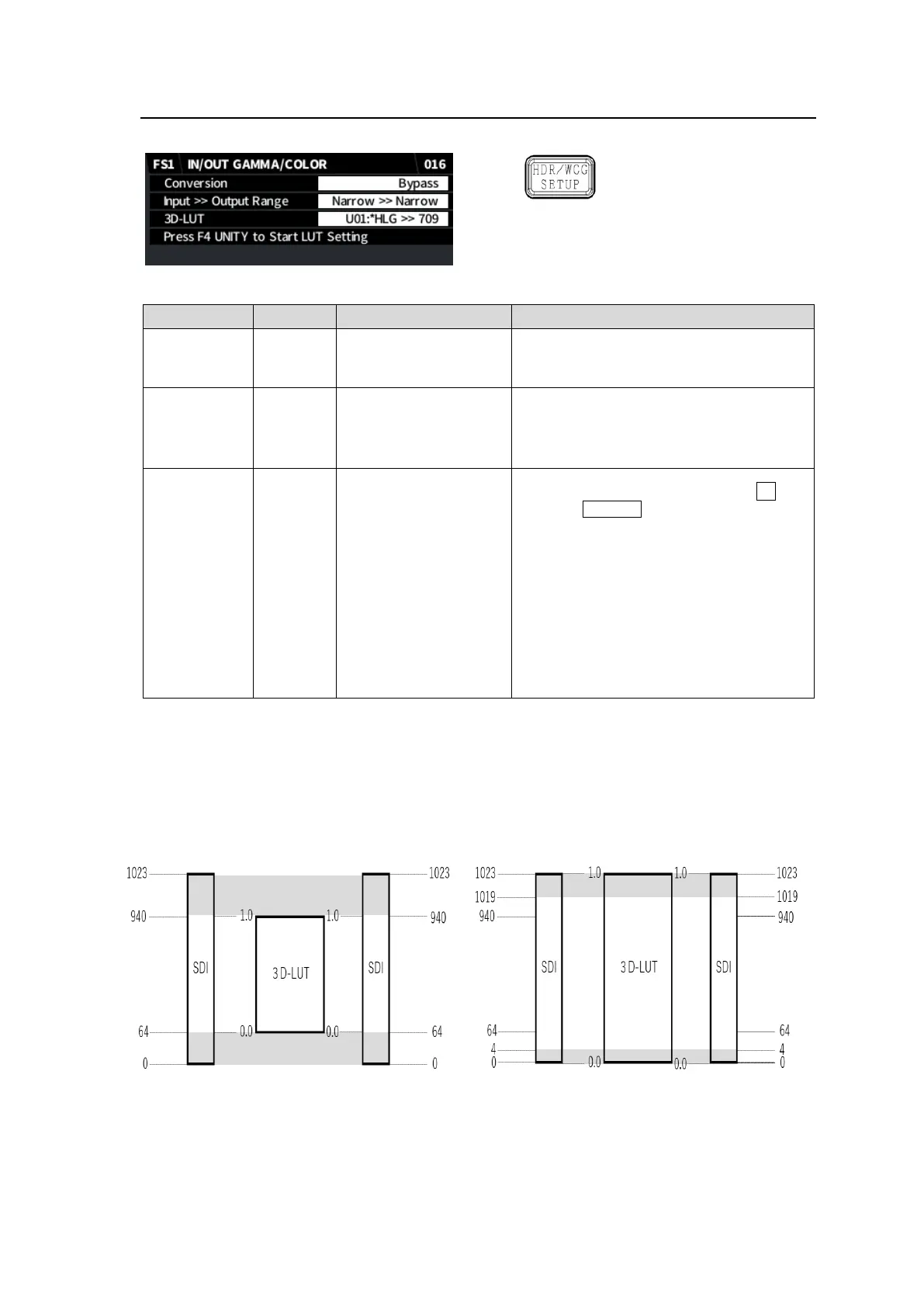
Allows you to change dynamic range and color space, add gain and correct colors using a 3D-LUT.
Simultaneous 4K/HD
Dual HD
3D-LUT (FS1)
◆ Dynamic Range Color Space Conversion
Setting to Operate enables conversions
using 3D-LUT. In this case, select a table
under 3D-LUT below.
Narrow >> Narrow
SDI >> SDI
Narrow >> SDI
SDI >> Narrow
Selects an "Input >> Output" range pair for
normalizing video data between 0 and 1.
Narrow: 0x040 (64) - 0x3AC (940)
SDI: 0x004 (4) - 0x3FB (1019)
U01 HLG >> 709
U02 709 >> HLG
U03 HLG >> 1886
U04 1886 >> HLG
U05 FOR-A (1)
U06 FOR-A (2)
U07 FOR-A (3)
U08 Linear
U09 Linear
U10 Linear
HLGLive >> 709
(*1)
709 >> HLGLive
(*1)
SL3Live >> HLG
(*1)
Selects a 3D-LUT table by turning F3 and
pressing F4 Unity.
While the table is in use, an asterisk “*” is
displayed in front of the table name.
U01 to U10 3D-LUT data as shown at left
are stored in the supplied CD-ROM as
files. These file names and content can be
changed in the FA-9600 Web GUI. (See
FA-9600 Operation Manual for details.)
(*1) FA-96AHDR2 option required
<3D-LUT Data Ranges>
3D-LUT data (.cube files) ranges, described above as "Narrow" and "SDI," are assumed to be
nominalized as follows.
Narrow >> Narrow SDI >> SDI


 To Next Page
 Loading...