Order sorter section
1/2
2. Replacement and adjustment of parts
27430-5
27430-5
Replacing the paper tray [Print sorter unit (10-inch type)]
!
!!
! Procedure
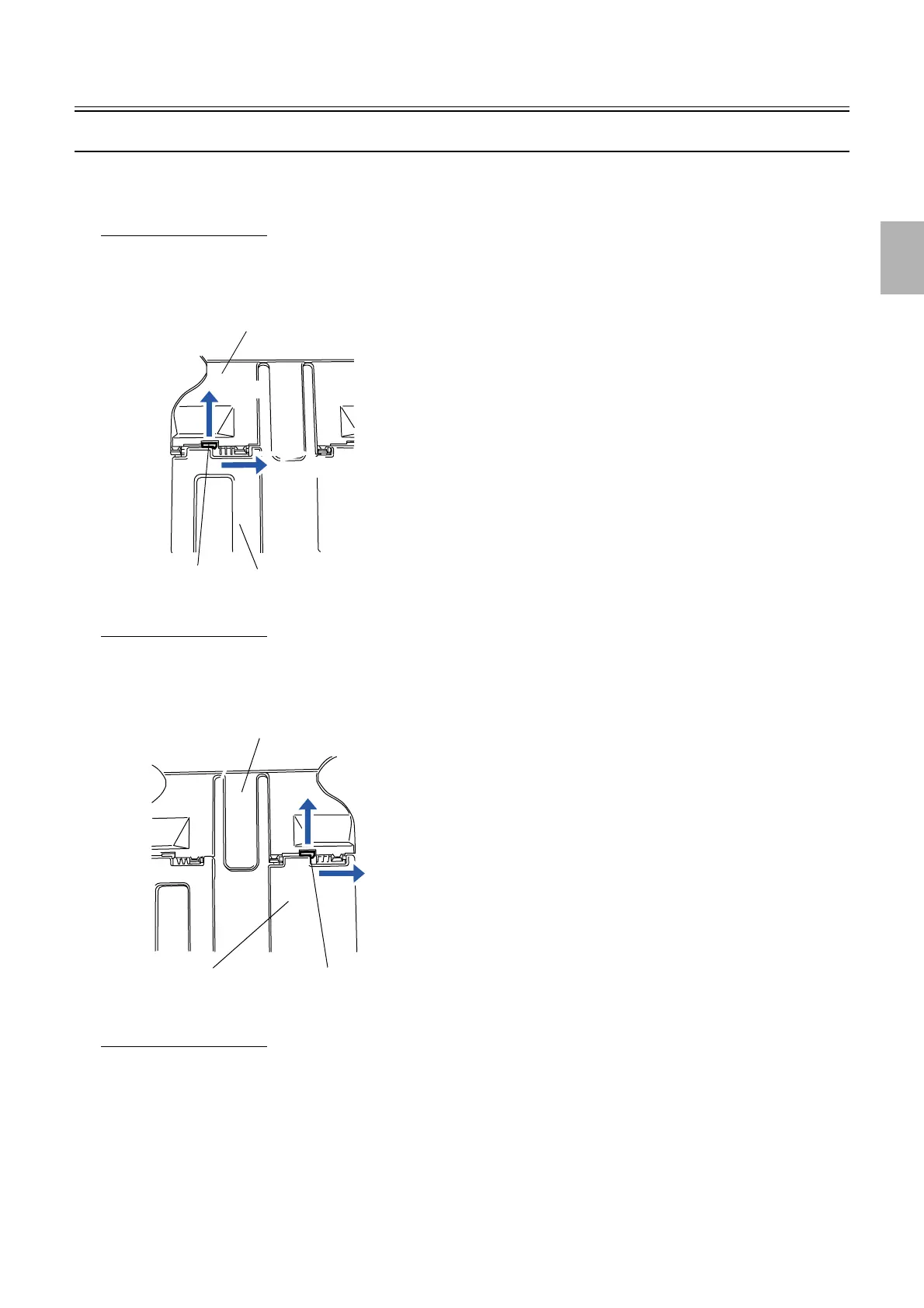
Replacing paper tray (1)
1. Stop the paper tray to be replaced below the print receiving position.
2. Push the pawl of the paper tray (3) in the direction indicated by arrow A, then remove the paper tray (1)
in the direction indicated by arrow B.
Replacing paper tray (2)
1. Stop the paper tray to be replaced below the print receiving position.
2. Push the pawl of the paper tray (3) in the direction indicated by arrow A, then remove the paper tray (2)
in the direction indicated by arrow B.
Replacing paper tray (3)
1. Stop the paper tray to be replaced below the print receiving position.
B
A
Paper tray (1)
Pawl
Paper tray (3)
G074243
A
B
Paper tray (2) Pawl
Paper tray (3)
G074244
Distributed by: minilablaser.com



 To Next Page