Colorimeter Section
1/5
2. Replacement and adjustment of parts
27460
27460
Colori meter Sec tion
Replacing the colorimeter and the calibration plate
The following procedures for the colorimeter are explained here.
$ ☞ Replacing the colorimeter unit
$
☞ Replacing the colorimeter
$
☞ Replacing the calibration plate
IMPORTANT
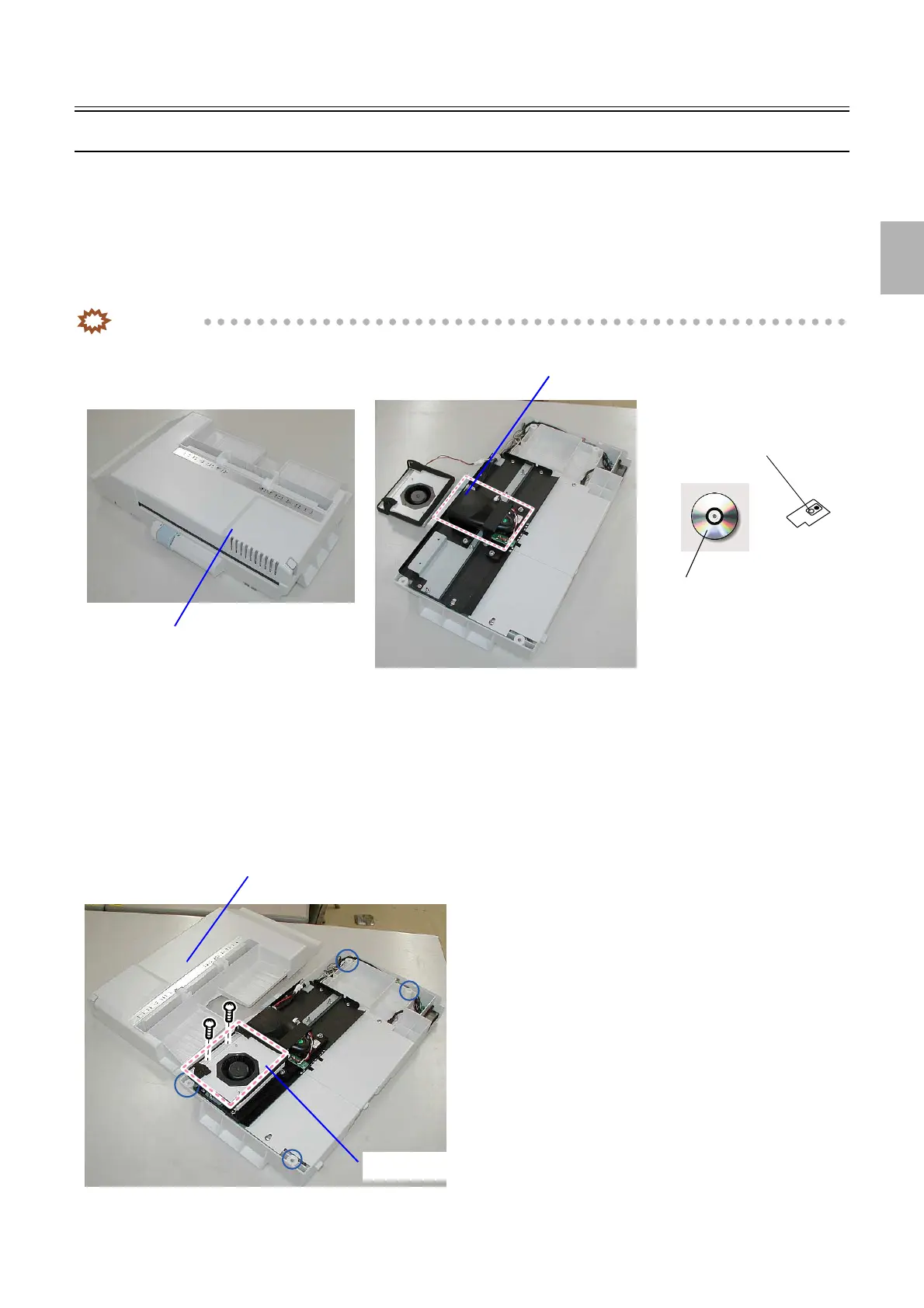
• The colorimeter unit consists of the following items.
• When replacing the colorimeter, replacing the calibration plate and calibration data CD is also necessary. Replace them
as one set.
• When replacing the calibration plate, replacing the calibration data CD is also necessary. Replace them as one set.
!
!!
! Replacing the colorimeter unit
1. Remove the colorimeter unit cover. (four screws)
2. Remove the Colorimeter Cooling Fan. (two screws)
Calibration data CD
Calibration plate
Colorimeter unit
Colorimeter
G085246
Colorimeter unit cover
Colorimeter Cooling Fan
G085247
Distributed by: minilablaser.com



 To Next Page