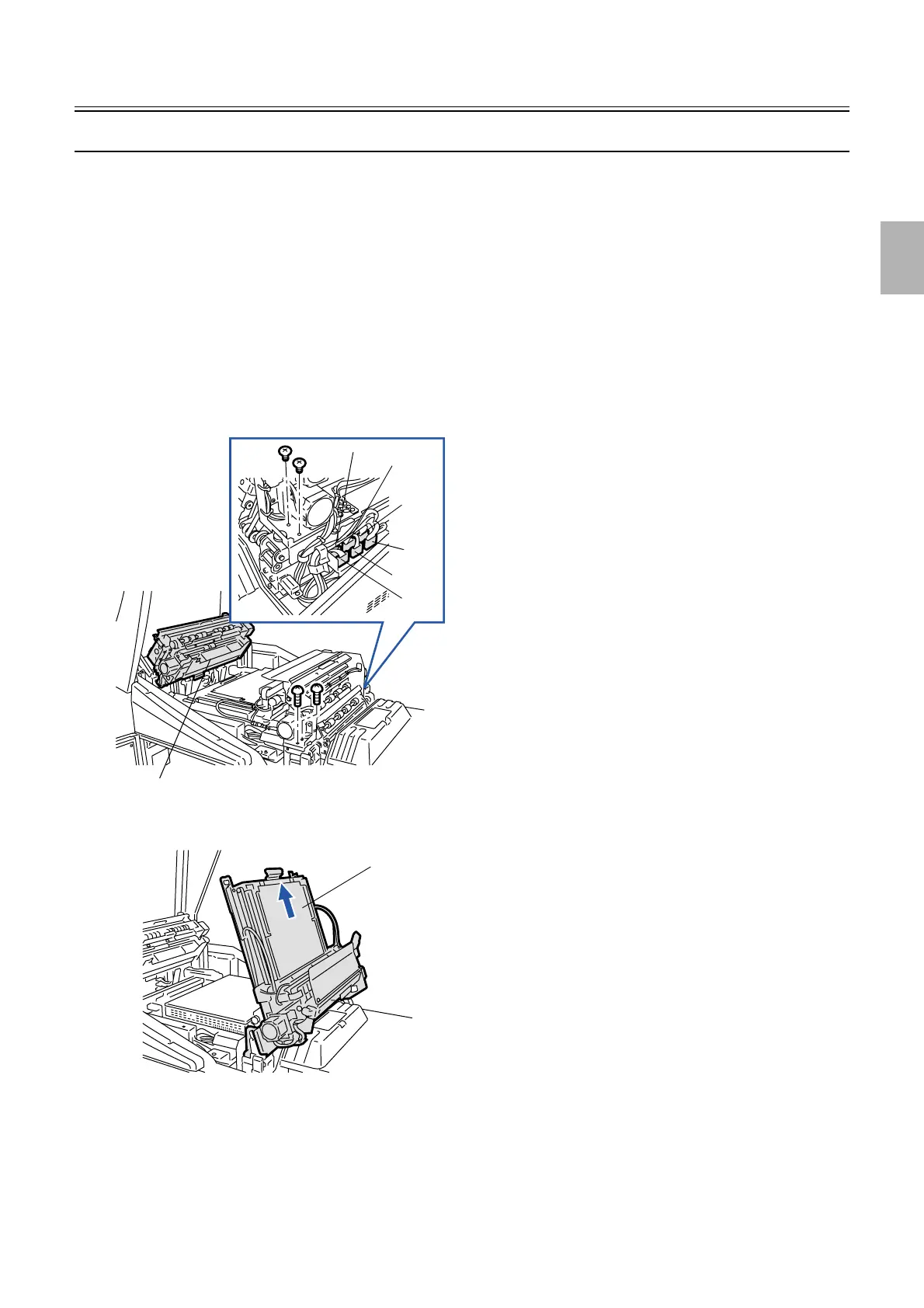
Paper advance unit 2
1/3
2. Replacement and adjustment of parts
26550
26550
Paper ad vance unit 2
Removing paper advance unit 2
!
!!
! Removing
1. Open the printer top cover.
2. Open paper advance unit 1.
3. Disconnect the connector(s).
J/P322 (Relay connector)
J/P323 (Relay connector)
J/P410 (Relay connector)
J/P411 (Relay connector)
J/P412 (Relay connector)
J/P413 (Relay connector)
4. Remove screw(s) from paper advance unit 2. (four screws)
5. Open paper advance unit 2 and remove it in the arrow direction.
!
!!
! Adjusting the attaching position
1. Attach paper advance unit 2.
Paper advance unit 1
J/P322
J/P411
J/P410
J/P413
J/P412
J/P323
G068503
Paper advance unit 2
G068504
Distributed by: minilablaser.com



 To Next Page