Setup
1/2
3. Mode
32515
32515
Exposure Adjustment
Bringing up the display
Maintenance: 2260 → Extension → Setup → Laser Setup → Paper Specification Registration/Setup → Functions → Exposure Adjustment
!
!!
! Explanation
!
!!
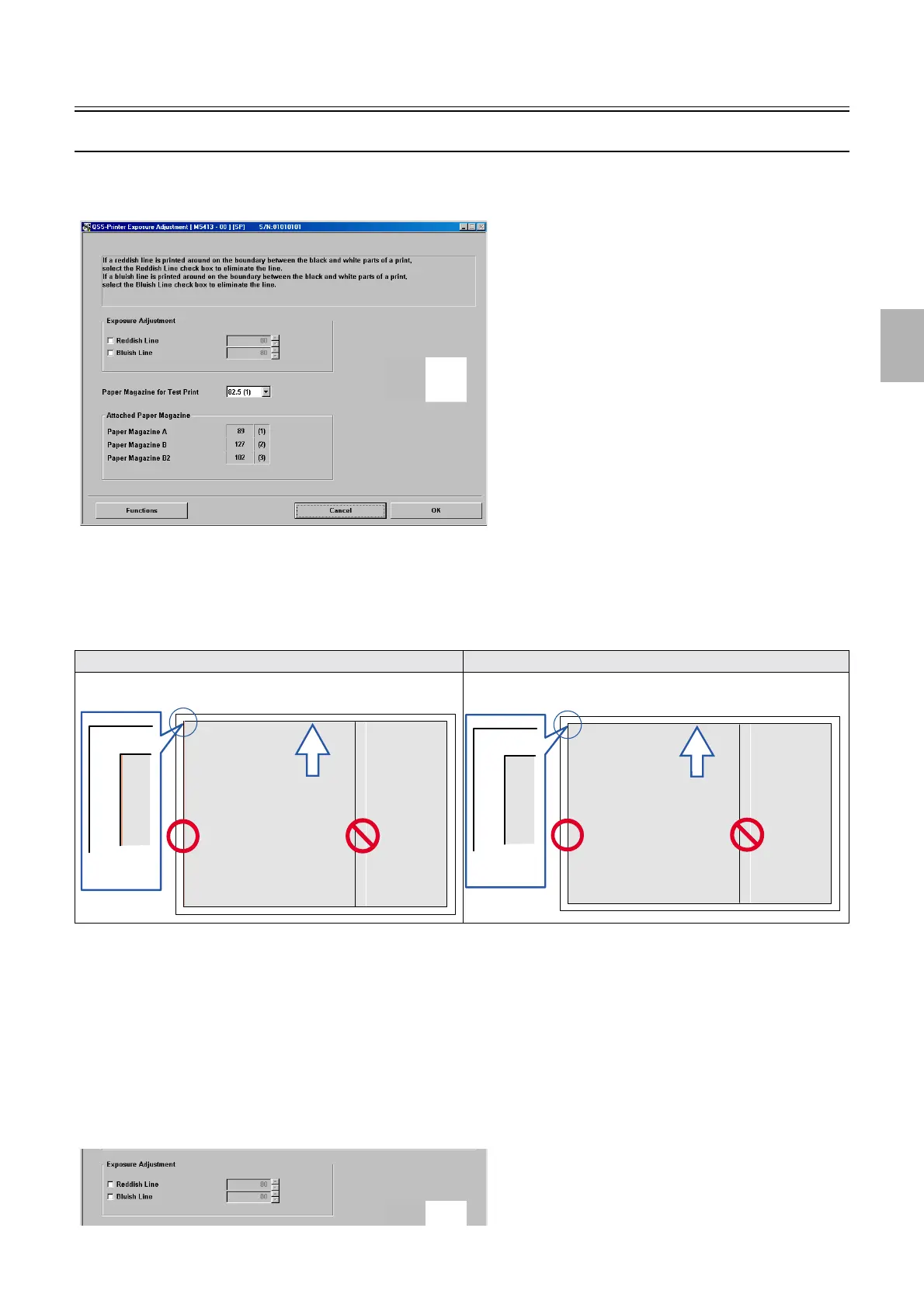
! Exposure Adjustment (Initial setting: both Reddish Line and Bluish Line unselected)
• If uneven prints as shown in the illustration below are output after the laser unit is replaced, it can be corrected.
!
!!
! Adjusting procedure
1. Confirm that Paper Specification Registration/Setup and Magazine Registration/Setup have been
completed.
2. If either or both Reddish Line or/and Bluish Line in Exposure Adjustment is/are selected, clear both,
then click OK.
3. Select the paper magazine to use for Exposure Adjustment.
4. Click Functions→Test Print.
Example: Before performing Exposure Adjustment Example: After performing Exposure Adjustment
M5413-00
Exposure Adjustment is effective.
Exposure Adjustment is ineffective.
Exposure Adjustment is effective.
Exposure Adjustment is ineffective.
M5413-00
Distributed by: minilablaser.com



 To Next Page