Order sorter section
1/3
2. Replacement and adjustment of parts
27420
27420
Removing the print conveyor unit
!
!!
! Procedure
1. Remove the processor drive cover.
☞20020
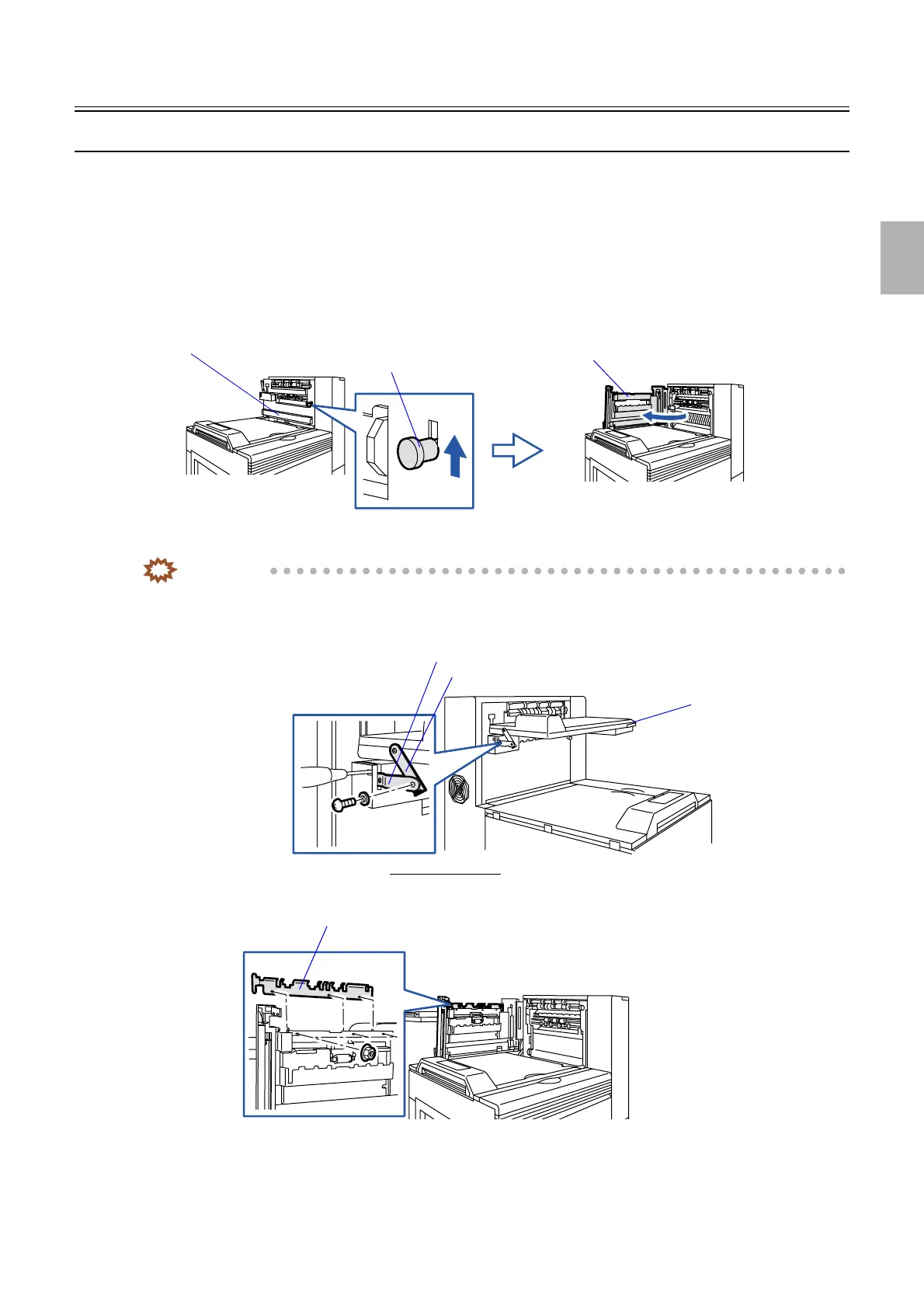
2. Open the squeegee unit top cover.
3. Lift up the lever and open the dryer door.
4. Lower conveyor stay 2 and insert the philips blade screwdriver (small) to the square hole.
IMPORTANT
• Do this not to get your hands pinched with stay 2 or the print conveyor unit after you remove the screw from
stay 2.
5. Remove the screw from stay 2 of the print conveyor unit.
6. Remove the conveyor guide. (three nuts)
Squeegee unit top cover
Dryer door
Lever
G085451
Conveyor stay 1
Print conveyor unit
Viewed from the back
Conveyor stay 2
G070290
Conveyor guide
G090231
Distributed by: minilablaser.com



 To Next Page