4. Troubleshooting
45530
5/14
45530
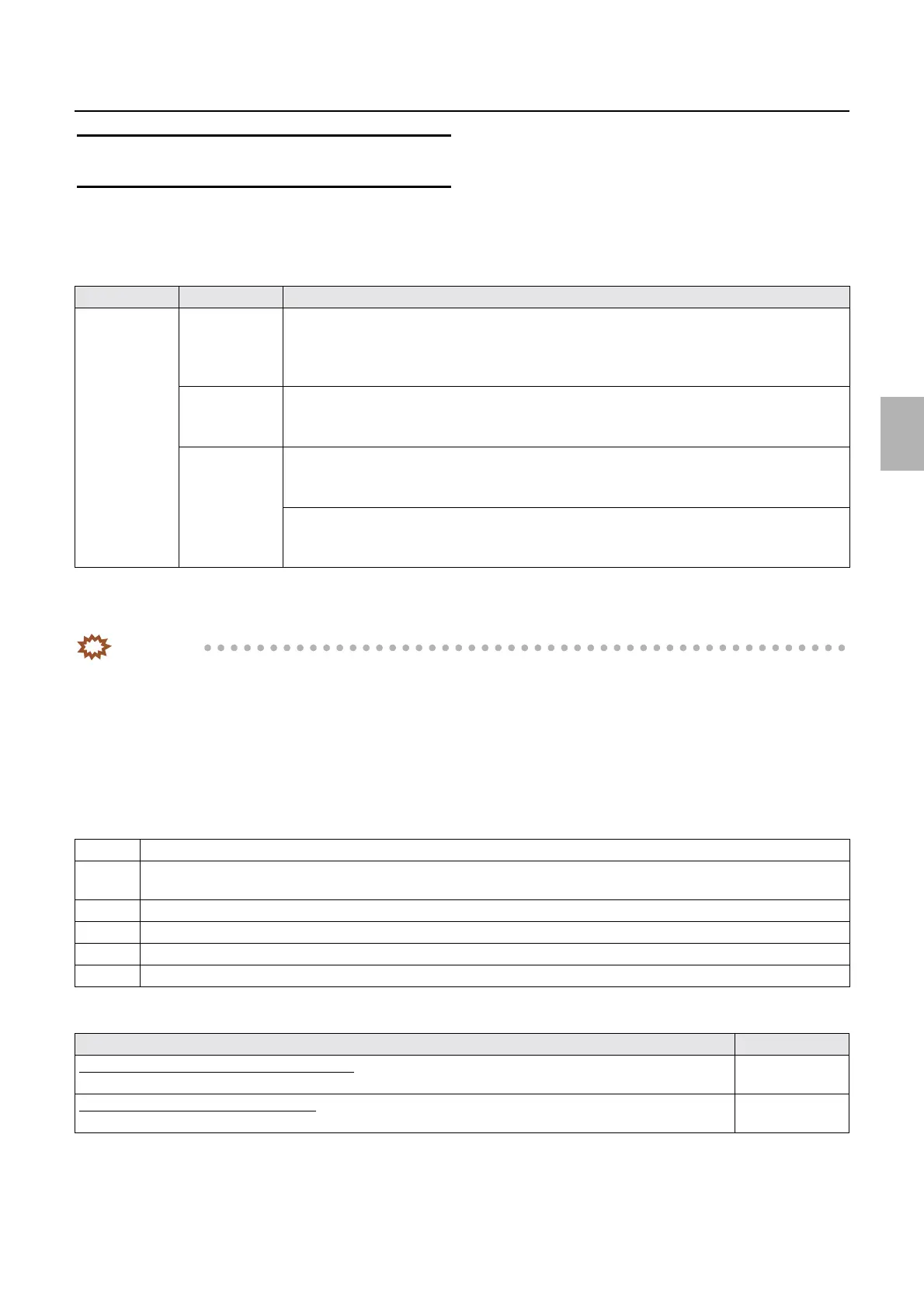
Error: Processor 2
No. 05535
Paper has jammed in the processor section.
Error message release
YES
Condition
*1. If prints are output to the print conveyor unit
*2. If prints are output to the print receiving tray (large)
*3. If prints are fed to the colorimeter unit
IMPORTANT
• The error above may occur when the ARCNET communication status is not normal.
If the error occurs, check the following items.
• Check the ARCNET communication status on the Version Check display.
☞35500
• Check the ARCNET communication path.
☞50520
• For details about the diagnosis of ARCNET communication error, see
☞35940.
Check Point
Diagnosis
Suffix number Status Condition
00000 Normal
process
*1
• After the printer feeds out the paper to the processor, Print Sensor (Left), Print Sensor
(Center) or Print Sensor (Right) in the dryer section do not turn DARK within a specified
time.
• For details, see ☞56100 Paper advance operation of the processor (normal prints).
Normal
process
*2
• After the printer feeds out the paper to the processor, Dryer Lane Select Sensor in the dryer
section do not turn DARK within a specified time.
• For details, see
☞56100 Paper advance operation of the processor (normal prints).
Automatic color
measurement
*3
• When the colorimeter unit paper sensor 1 does not turn DARK within a specified time in
performing the automated color measurement of setup print
• For details, see
☞56110 Paper advance operation of the processor (setup prints).
• After a setup print is fed to the processor, the Dryer Lane Select Sensor does not detect
DARK within a specified time.
• For details, see
☞56610Automatic color measurement operation for setup prints.
1 Confirm that the upper guides and the squeegee unit are securely attached.
2 Confirm that the gears and the rollers rotate smoothly after removing the paper processing rack from the processing solution
tank.
3 Confirm that the lower turn belt of the paper processing rack is damaged.
4 Confirm that paper remains on each sensor.☞35220
5 Confirm that the paper guide of the dryer rack is correctly attached.
6 Confirm that the print sensor is soiled.
Adjustment failure Manual No.
If paper jam occurs during automatic colorimetry
Check the setting of Dryer Section Setting (Auto Setup).
☞33505
If paper jam occurs during normal process
Perform paper sensor adjustment.
☞33001
Distributed by: minilablaser.com



 To Next Page