Maintenance
1/2
3. Mode
35600
35600
System upgrade for each control PCB (CPU)
Bringing up the display
Maintenance: 2260 → Extension → Maintenance → Software Upgrade
IMPORTANT
• This section explains the procedure for updating the system of each control PCBs.
• When the external PC compatible with the CT-1 or printer driver has been connected, do not receive the order or make
prints before or during software upgrading. Upgrading may not be performed normally.
!
!!
! Explanation
!
!!
! Software Upgrade
• Upgrade each control PCB (CPU) using system program data saved in the directory for software upgrade.
• The software upgrade is carried out separately for each control PCB (CPU).
*1. The whole name of system version may not be shown here.
Confirm the system version on the System Version Check.
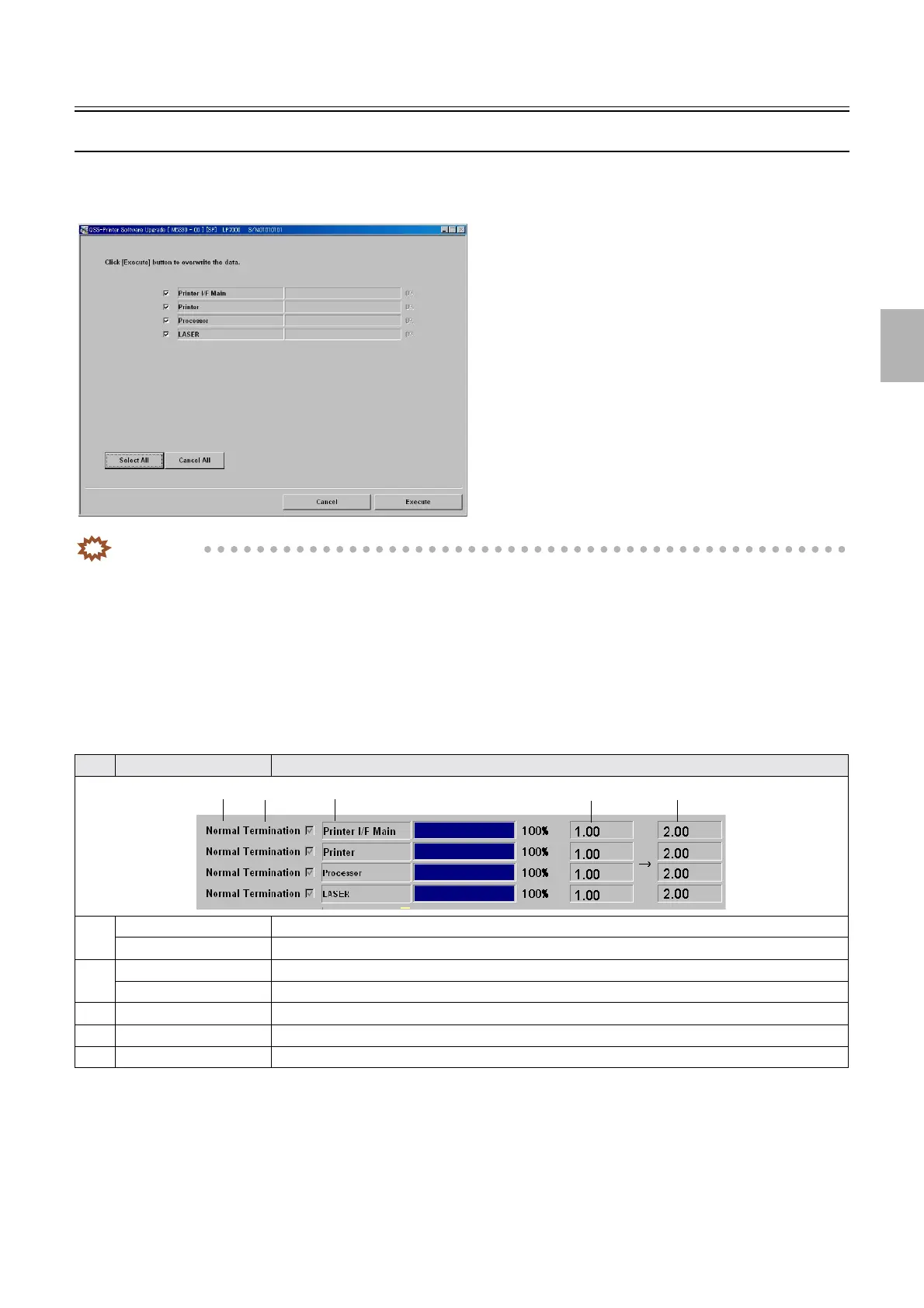
No. Display Explanation
1 Normal Termination Shows this when the upgrading is completed correctly.
Abnormal Termination Shows this when the upgrading is not completed correctly.
2 & Select this to upgrade.
% Deselect this not to upgrade.
3 Printer I/F Main Shows each control PCB (CPU) separately.
41.00
*1
Shows the system program version saved in each control PCB.
52.00
*1
Shows the system program version saved in HDD.
M5330-00
1
2
3
4
5
Distributed by: minilablaser.com



 To Next Page