Self-diagnostic
1/2
3. Mode
35942
35942
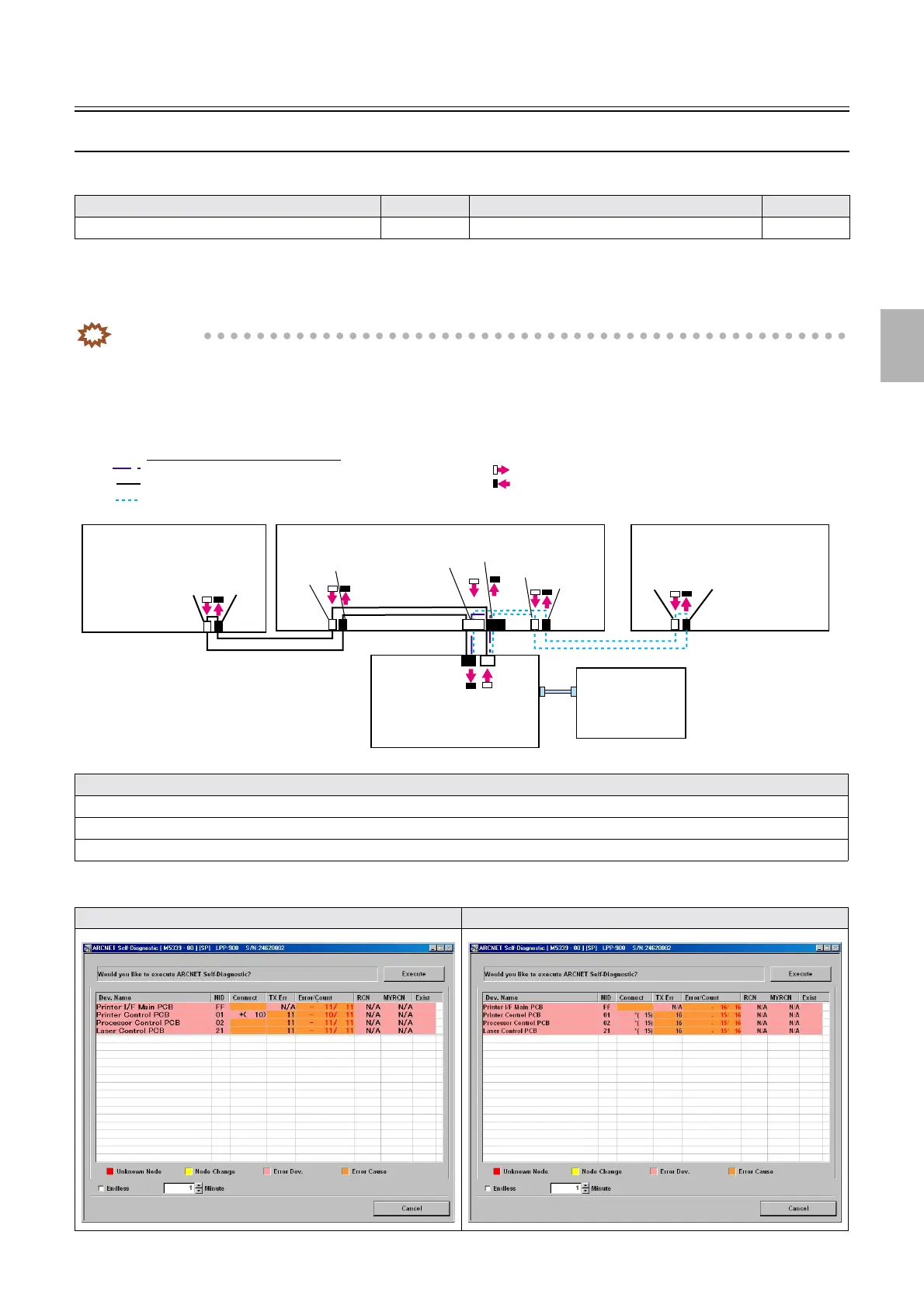
ARCNET Self-Diagnostic (results)
Also see the following references to utilize for diagnosis.
Diagnosis list shows results of ARCNET Self-Diagnostic that was performed on each ARCNET cable by each time disconnecting a target
cable to perform it for 1 minute.
After ARCNET Self-Diagnostic is performed, find a ARCNET Self-Diagnostic display of the same pattern then determine a diagnosis
part.
IMPORTANT
• The state of the ARCNET Self-Diagnostic display shown in the manual may vary depending on the system's
communication state.
!
!!
! ARCNET cable connection
!
!!
! Printer control PCB - Printer I/F main PCB
Model Reference Model Reference
ARCNET Self-Diagnostic (diagnosis)
☞35941 ARCNET Self-Diagnostic (details of modes) ☞ 35940
ARCNET Self-Diagnostic result list
• ☞Printer control PCB - Printer I/F main PCB
•
☞Printer control PCB - Processor control PCB
•
☞Printer control PCB - Laser control PCB
Printer control PCB (black) ⇔ Printer I/F main PCB (white) Printer control PCB (white) ⇔ Printer I/F main PCB (black)
J/P224
J/P223
ARCNET
ARCNET
J/P518
J/P517
J/P1517
J/P1516
J/P219
J/P220
J/P222
J/P221
ATX MOTHER
BORD
LAN
J/P1208
J/P1207
Printer I/F main PCB
Order of the ARCNET communication
1 Processor control PCB
2 Printer control PCB
3 Laser control PCB
Printer control PCB
Processor control PCB
Laser control PCB
ARCNET (Connector emission side)
ARCNET (Connector detection side)
G085411
Distributed by: minilablaser.com



 To Next Page