3. Mode
35310
3/3
35310
Maintenance
!
!!
! Paper Advance Section 1
!
!!
! Paper Advance Section 2
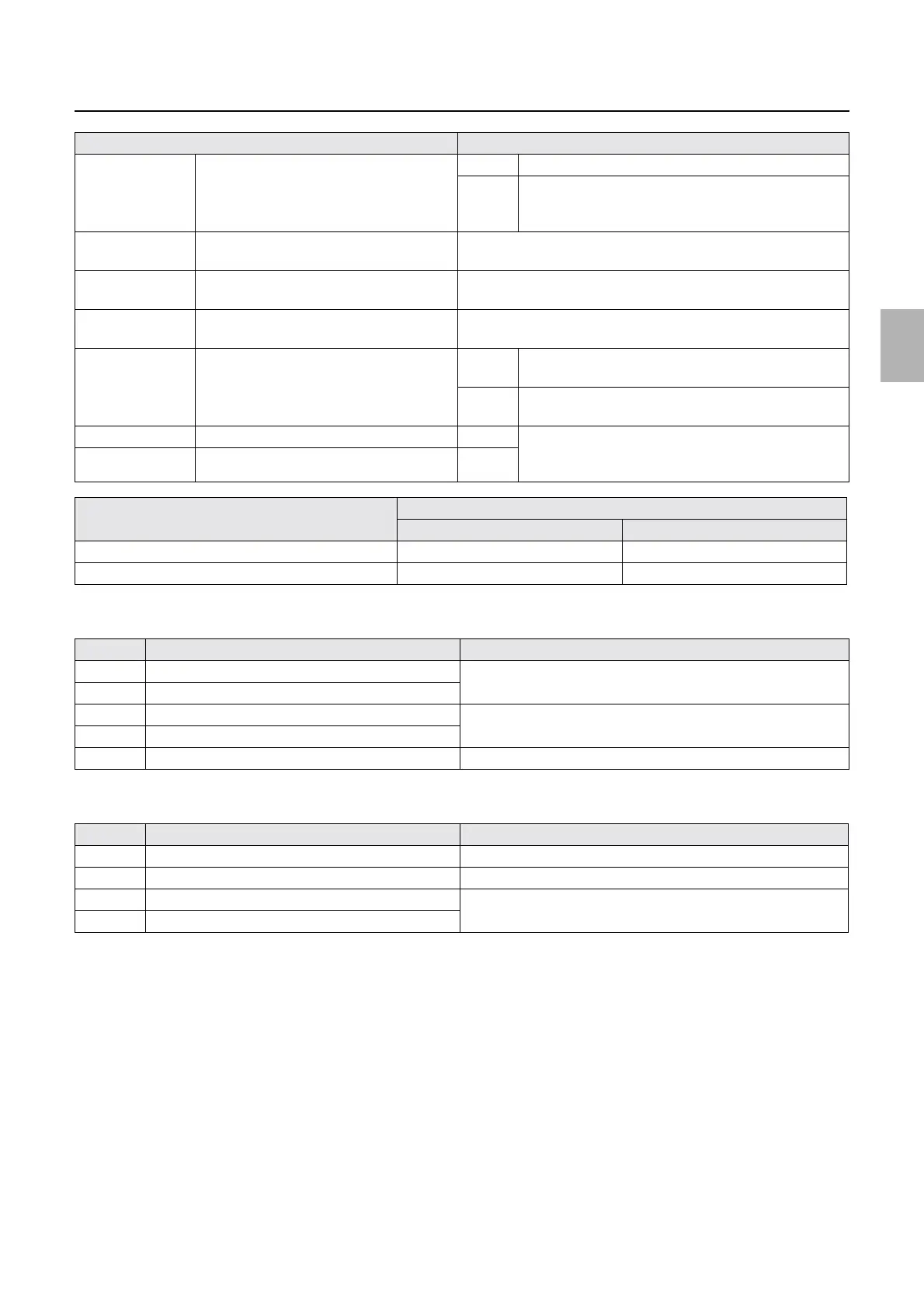
OK/No Good G Laser Light Source Status OK The laser and G laser driver are normal.
No
Good
The laser unit is deteriorated.
The G laser driver is not connected correctly, or is
damaged.
##.#C Laser Unit Thermosensor Displays the temperature of the laser unit.
For the controlled temperature of the laser unit, see
☞No. 06177.
##.#C R Laser Thermosensor Displays the R laser temperature.
For the controlled temperature of R laser, see
☞No. 06107.
##.#C B laser temperature sensor The temperature of the B laser is shown.
For the controlled temperature of B laser, see
☞No. 06220.
##### Polygon Mirror Frequency 2043±7When Laser Synchronous Sensor of Output Check is
Synchronous
-When Laser Synchronous Sensor of Output Check is
Synchronous
ON/OFF G Laser Judgment Signal 1 OFF The combination of ON/OFF identifies the laser unit
type.
See the list below for details.
ON/OFF G Laser Judgment Signal 2 OFF
Laser unit (Type # # #) G laser differentiation signal
1 2
HhB type OFF OFF
Type IiB ON OFF
No. Display Status
1 Paper Advance Arm Motor (Left) Clicking Execute repeats moving forward and backward.
2 Paper Advance Arm Motor (Right)
3 Lane Select Motor (Left) Clicking Execute repeats moving to the left and right.
4 Lane Select Motor (Right)
5 Paper Advance Motor 3 Press Execute to operate for specified time.
No. Display Status
1 Paper Advance Motor 2 Press Execute to operate for specified time.
2 Pressure Guide Motor Press Execute to repeat pressure/release.
3 Paper Advance Pressure Change Motor (Left) Press Execute to repeat pressure/release.
4 Paper Advance Pressure Change Motor (Right)
Display Status
Distributed by: minilablaser.com



 To Next Page