3/9
4. Troubleshooting
4202
4202
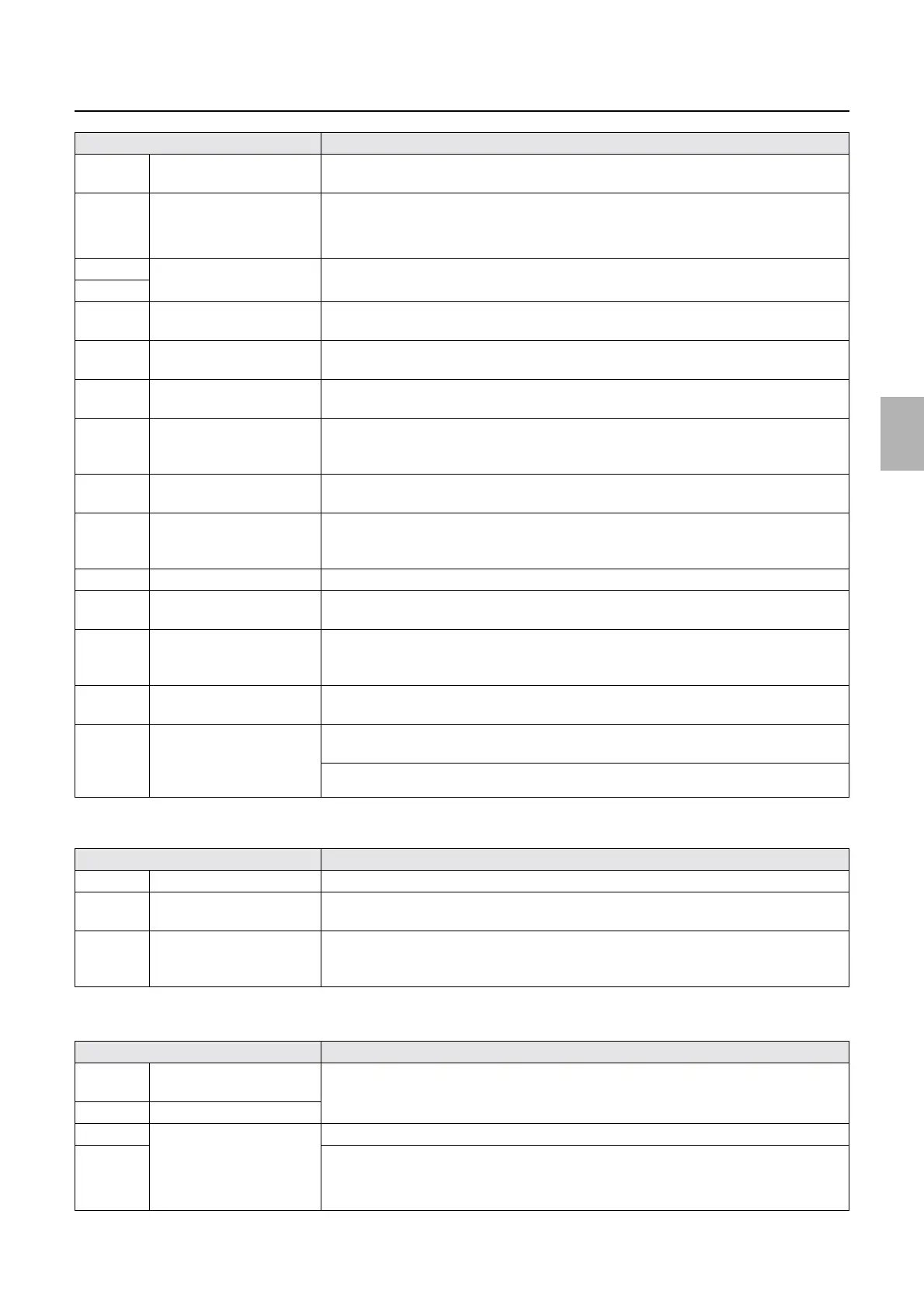
Diagnosis appendix for the failures: Symptom due to the connection failure of wiring
!
!!
! G laser driver
!
!!
! G-AOM driver
J/P1513 Connects to the printer I/F
main PCB (LVPECL)
No.06194-00008 Laser Control PCB control error. occurs.
J/P1515 Connects to the laser unit. The following symptom appears when printing is started.
• No.06076-00001 Polygon Mirror control error. occurs.
• Unexposured prints are output.
J/P1516 Connects the printer control
PCB (ARCNET).
No.06901-00521 ARCNET communication error. Printer ProcessorLASER occurs.
J/P1517
J/P1519 Connects to the G laser
driver.
No.06075-00007 G Laser control error. occurs.
J/P1520 Connects to the printer
control PCB.
No.06087-00022 Laser Control PCB system error. occurs when printing is started.
J/P1521 Connects to the printer
control PCB.
Printing is not started.
J/P1522 Connects to the laser unit
and connects the inner
thermosensor.
The message Temperature control started is shown and the display does not change.
Via input check, Laser Unit Thermosensor and Inner Temperature is 0.0.
J/P1532 Connects to the laser unit. • In Printer Information on Status Display, Laser temperature control status does not
change from Temperature control started for five minutes or more.
J/P1533 Interlock switch (printer top
cover)
• When confirmed by input check, the interlock switch of the printer supply section turns
on (printer doors 1 and 2) but the interlock switch of the engine section turns off (printer
doors 1 and 2).
J/P1534 Unused −
J/P1535 Connects to printer I/O PCB
1 (24 V-3).
• When confirmed by input check, the interlock switch (for printer doors 1 and 2) and
interlock switch (printer top cover) turns off.
J/P1541 Inputs the power supply
(+24 V) from laser power
supply.
• In Printer Information on Status Display, Laser temperature control status does not
change from Temperature control started for five minutes or more.
J/P1543 Connects to the G-AOM
driver.
No.06073-00002 Synchronous Sensor error. occurs when printing is started.
J/P1551 Connects laser unit cooling
fans 1 and 2, laser control
box cooling fan 1 and the
laser unit heater.
Laser unit cooling fans 1 and 2, laser control box cooling fan, and the laser unit heater do not
operate.
No malfunctions in the operations will occur on this condition.
Connector No. Symptom
J/P1663 Connects to the laser unit. No.06073-00002 Synchronous Sensor error. occurs when printing is started.
J/P1664 Connects to the laser control
PCB.
No.06075-00007 G Laser control error. occurs.
J/P1665 Inputs the power supply (+5
V) from printer power
supply 5.
No.06106-00001 G Laser light source status error. occurs.
Connector No. Symptom
J/P1636 Connects to the laser control
PCB.
No.06073-00002 Synchronous Sensor error. occurs when printing is started.
J/P1637 Connects to the laser unit.
J/P1638 Connects to the laser control
PCB.
No.06073-00002 Synchronous Sensor error. occurs when printing is started.
J/P1639 The following symptom appears when printing is started.
• No.06073-00002 Synchronous Sensor error. occurs.
• Unexposured prints are output.
Connector No. Symptom
Distributed by: minilablaser.com



 To Next Page