Note
• By default, no passwords are set for personal boxes.
• A password cannot be set for the shared mailbox.
• Enter a four-digit number as the password, in the range 0001–9999.
• Even if you have set passwords, they are not required to access personal boxes in Administrator Mode in
RemoteUI.
Using RemoteUI
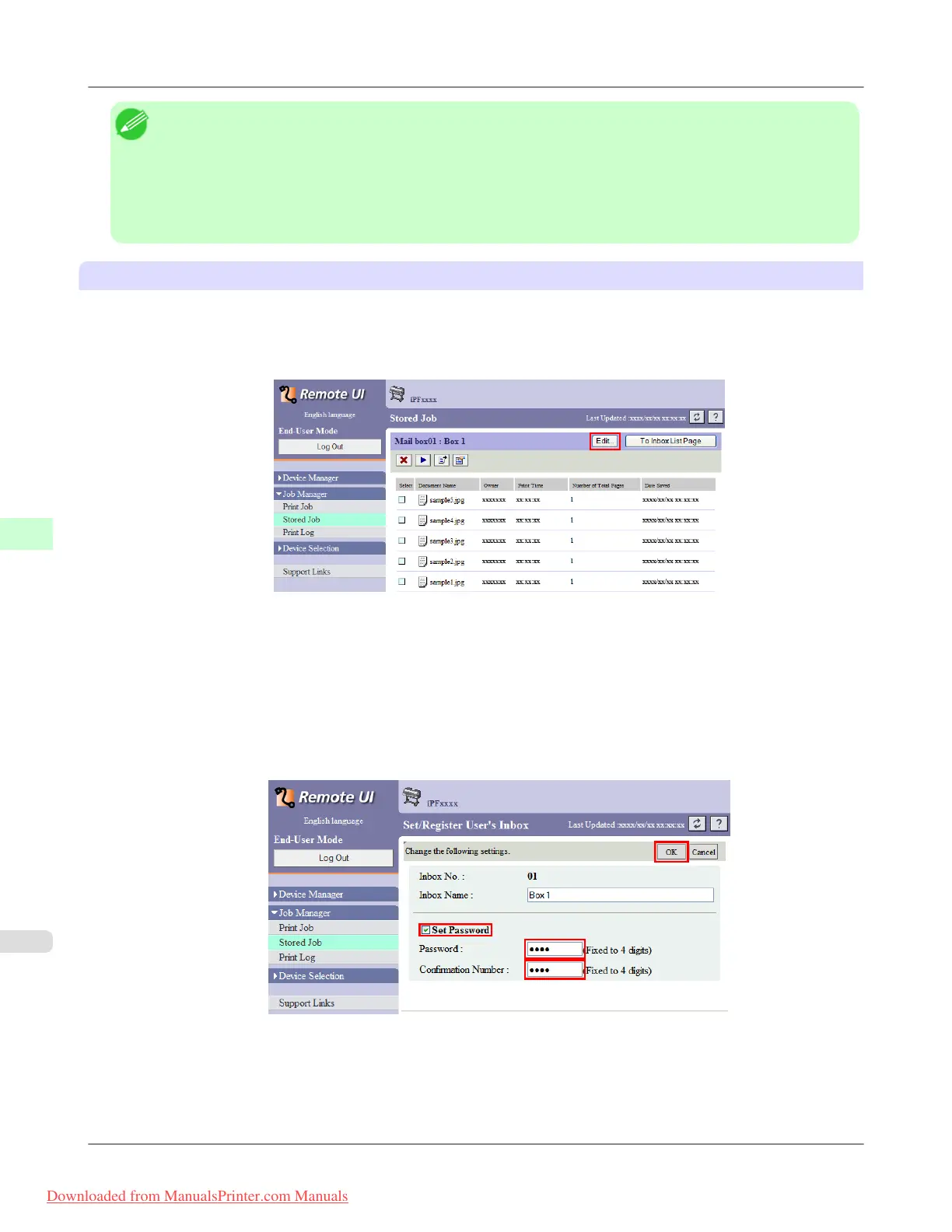
1. On the Stored Job page, choose the personal box.
2. Click Edit.
3. In the Set/Register User's Inbox dialog box, specify the password and click OK.
• Set Password
Select the check box.
• Password
Enter the password. (This field is limited to four digits in the range 0001–9999.)
• Confirmation Number
Re-enter the password to confirm it.
For details, refer to the RemoteUI help.
Print Jobs
>
Advanced Print Job Operations
>
Setting Passwords for Personal Boxes iPF8300
6
744
Downloaded from ManualsPrinter.com Manuals














 To Next Page