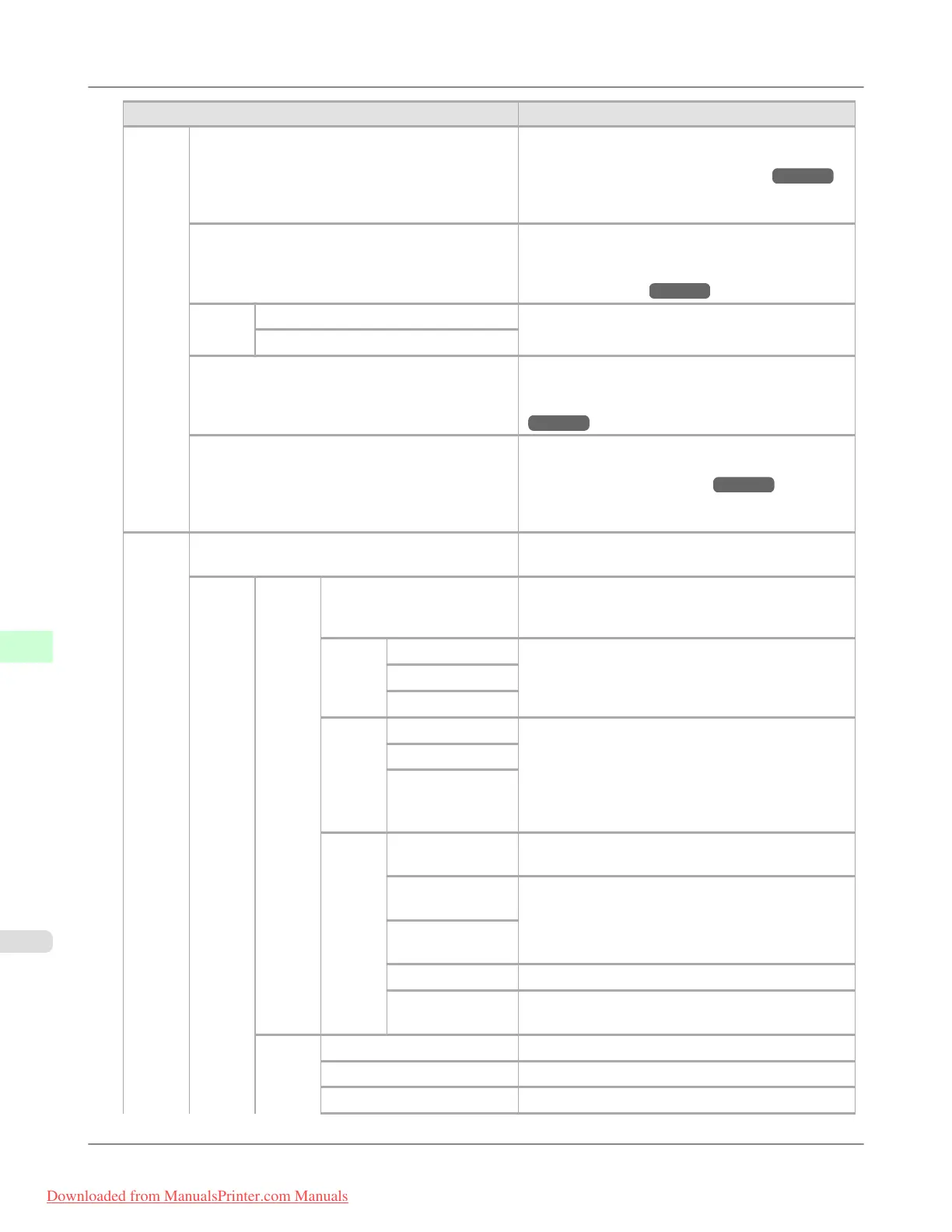
Setting Item Description, Instructions
Main-
te-
nance
Replace P.head Execute when replacing the Printhead. Follow the in-
structions displayed to complete the required proce-
dure. (See "Replacing the Printhead.") →P.1000
Not displayed during a warning message that the re-
maining Maintenance Cartridge capacity is low.
Repl. maint cart Execute when replacing the Maintenance Cartridge.
Follow the instructions displayed to complete the re-
quired procedure. (See "Replacing the Mainte-
nance Cartridge.") →P.1015
Head
Info
Printhead L Indicates information about the printhead.
Printhead R
Repl. S. Cleaner Replace the Shaft Cleaner. Follow the instructions
displayed to complete the required procedure. (See
"Replacing the Maintenance Cartridge.")
→P.1015
Change Cutter Replace the Cutter Unit. Follow the instructions dis-
played to complete the required procedure. (See
"Replacing the Cutter Unit.") →P.1011
Once you replace the Cutter Unit, you can also reset
the cut counter.
Inter-
face
Setup
EOP Timer Specify the timeout period before cancellation of
print jobs that cannot be received by the printer.
TCP/
IP
IPv4 IPv4 Mode Choose whether the printer IP address is configured
automatically or a static IP address is entered man-
ually.
Proto-
col
DHCP Specify the protocol used to configure the IP address
automatically.
BOOTP
RARP
IPv4
Set-
tings
IP Address Specify the printer network information when using
a static IP address.
Enter the IP address assigned to the printer, as well
as the network subnet mask and default gateway.
The value that was automatically configured is dis-
played if you have set IPv4 Mode to Automatic.
Subnet Mask
Default G/W
DNS
Set-
tings
DNS Dync up-
date
Specify whether DNS server registration is updated
automatically.
Pri. DNS
SrvAddr
Specify the DNS server address.
Sec. DNS
SrvAddr
DNS Host Name Specify the DNS host name.
DNS Domain
Name
Specify the DNS domain name.
IPv6 IPv6 Support Specify whether to connect via IPv6.
IPv6 StlessAddrs Specify whether a IPv6 stateless address is used.
DHCPv6 Specify whether DHCPv6 settings are used.
Printer Parts
>
Control Panel
>
Menu Settings iPF8300
9
918
Downloaded from ManualsPrinter.com Manuals














 To Next Page