3. Mode
35320
2/7
35320
Maintenance
Replenisher Cartridge Open Motor operation
*1. Replenisher Cartridge Open Motor rotates to right.
*2. Replenisher Cartridge Open Motor rotates to left.
!
!!
! 3 (for each specification)
*6
*1. If one of the waste solution float switches is ON, each automated flushing valve does not work.
However, auto cleaning pump works regardless of the waste solution float switch. If the operation continues when either of waste solution float
switches is ON, the auto cleaning pump may be damaged.
*2. When Execute is clicked, the message Confirm whether to complete the air pulling out of the Cleaning Pump system piping. Operate the
Replenisher Cartridge Open Motor, prepare the cleaning water does not run into the replenishment tank from the nozzle to check. For
details, see the manual. Would you like to operate the Replenisher Cartridge Cleaning Pump? is shown.
*3. When pressing Execute, Confirm whether to complete the air pulling out of the Cleaning Pump system piping. Cleaning water will be run
into the replenishing tank. Please refrain from draining for a long time. For details, refer to the manual. Would you like to operate the
Replenisher Cartridge Cleaning Pump? is shown.
Count Replenisher Cartridge Open Motor operation
First Press Execute to move the motor from the upper position to the lower position.
*1
Second Press Execute to move the motor from the lower position to the upper position.
*2
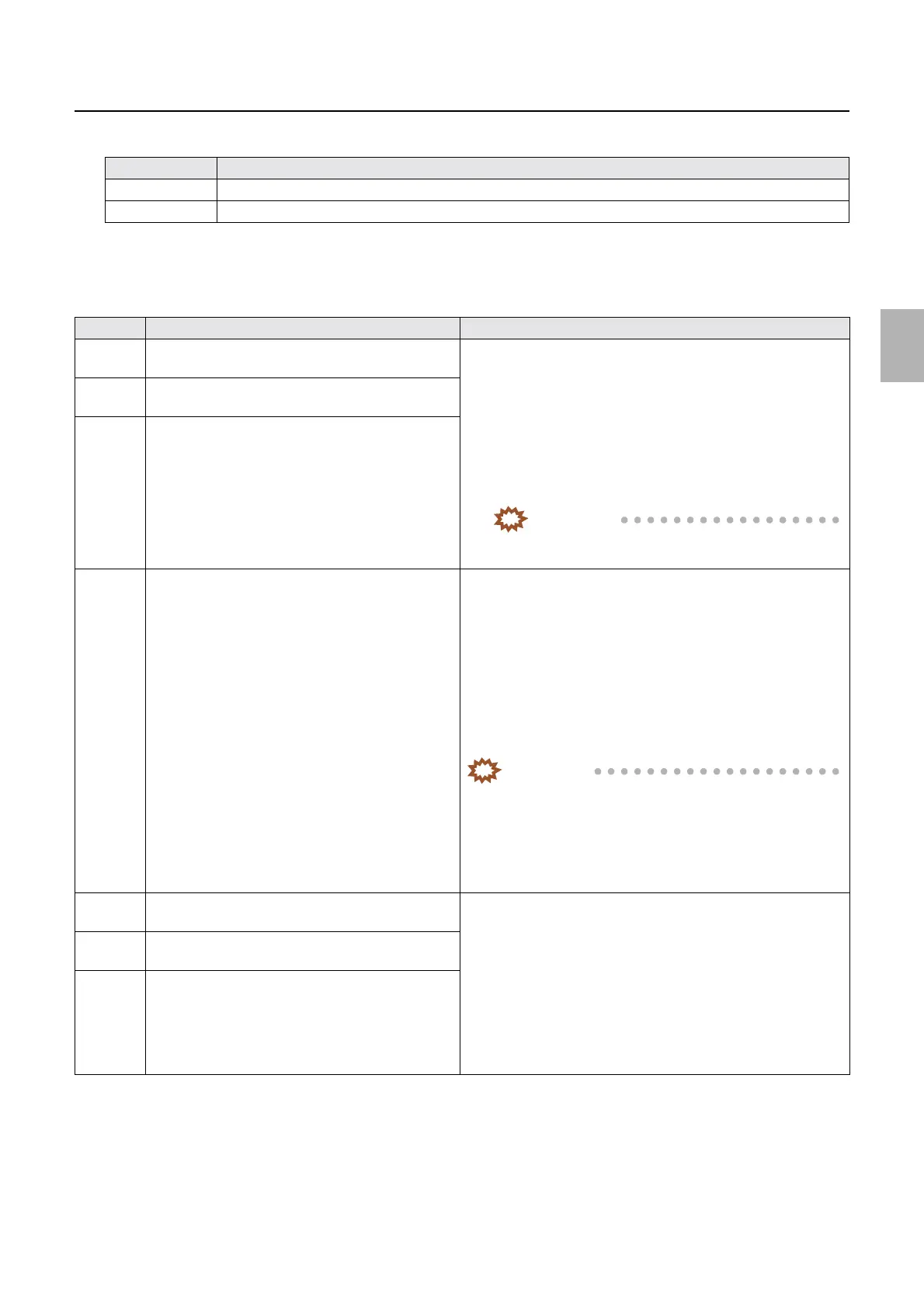
No. Display Status
1 P1R Cartridge Cleaning Valve + Replenisher
Cartridge Cleaning Pump
Press Execute to operate each cartridge flushing valve and auto
cleaning pump.
*1*2*5
• Follow the steps 1-4 below.
• 1. Turn ON the auto cleaning pump.
• 2. Wait for water pressure to be adjusted for one second.
• 3. Open each cartridge flushing valve (maximum 10 seconds).
• 4. Close each cartridge cleaning valve. → Turn OFF the
cleaning pump.
IMPORTANT
• The output amount of the replenisher cartridge
cleaning pump is about 194 ml per 10 seconds.
2 P2RA Cartridge Cleaning Valve + Replenisher
Cartridge Cleaning Pump
3 P2RB Cartridge Cleaning Valve + Replenisher
Cartridge Cleaning Pump
4 P1R agitation solenoid valve + Replenisher Cartridge
Cleaning Pump
Press Execute to operate P1R agitation solenoid valve +
Replenisher Cartridge Cleaning Pump.
*1*3
• Follow the steps 1-4 below.
• 1. Turn ON the auto cleaning pump.
• 2. Wait for water pressure to be adjusted for one second.
• 3. Open P1R agitation solenoid valve (maximum three
seconds).
• 4. Close P1R agitation solenoid valve. → Turn OFF the
cleaning pump.
IMPORTANT
• If P1R agitation solenoid valve + Replenisher Cartridge
Cleaning Pump is operated, the initial value is used for
the next opening.
• The output amount of P1R agitation solenoid valve +
Replenisher Cartridge Cleaning Pump is about 227 ml
per 3 seconds.
5 P1 Auto Cleaning Valve + Replenisher Cartridge
Cleaning Pump
Press Execute to operate each automated flushing valve and auto
cleaning pump.
*1*4
• Follow the steps 1-4 below.
• 1. Turn ON the auto cleaning pump.
• 2. Wait for water pressure to be adjusted for one second.
• 3. Open each automated flushing valve (maximum three
seconds).
• 4. Close each automated flushing valve. → Turn OFF the
cleaning pump.
6 P2 Auto Cleaning Valve + Replenisher Cartridge
Cleaning Pump
7 PS Auto Cleaning Valve + Replenisher Cartridge
Cleaning Pump
Distributed by: minilablaser.com



 To Next Page