4. Troubleshooting
4202
6/9
4202
Diagnosis appendix for the failures: Symptom due to the connection failure of wiring
!
!!
! Printer I/O PCB 3
!
!!
! Triple magazine PCB
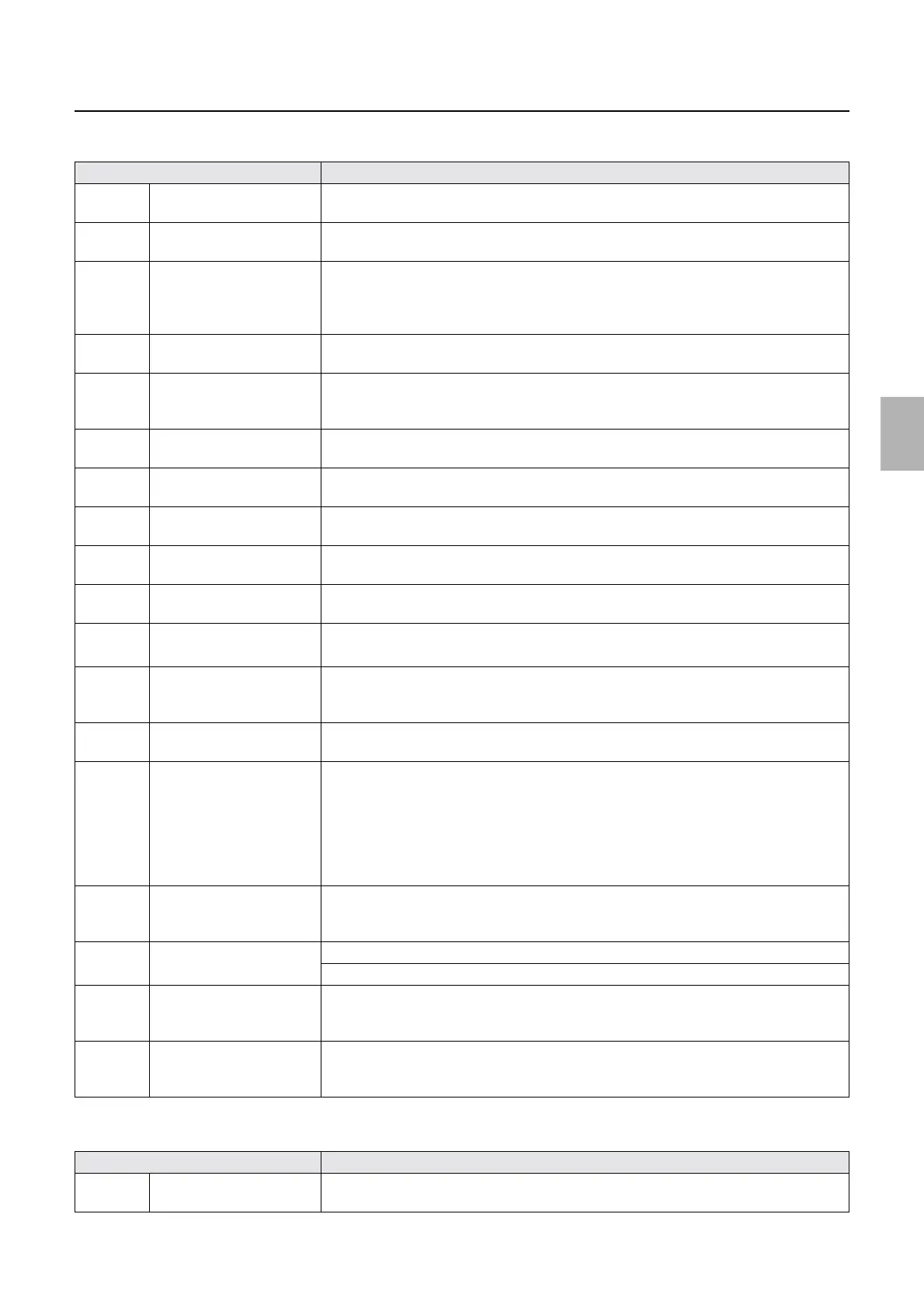
Connector No. Symptom
J/P271 Connects to the lane select
motor (left).
No.06140-00002 Lane Select Motor (Left) operation error. occurs.
J/P272 Connects to the lane select
motor (right).
No.06141-00002 Lane Select Motor (Right) operation error. occurs.
J/P273 Connects to the paper
advance arm motor (left) and
paper advance arm motor
(right).
The following error message is shown.?
• No.06138-00002 Paper Advance Arm Motor (Left) operation error. occurs.
• No.06139-00002 Paper Advance Arm Motor (Right) operation error. occurs.
J/P274 Connects the paper advance
motor 3.
No.06221-00003 Paper has jammed in the Paper Advance Unit. occurs.
J/P275 Input from printer power
supply 1 (LI24 V-3, LI24 V-
4)
No.06141-00002 Lane Select Motor (Right) operation error. occurs.
J/P276 Control box cooling fan 2,
inner cooling fan
Control box cooling fan 2 and inner cooling fan stop operations.
J/P277 Power supply (+24V) from
the printer I/O PCB 1
Control box cooling fan 2 does not rotate.
J/P278 Connects to the paper
magazine lamp B/C.
Paper magazine lamp B/C does not turn on.
J/P279 Connects to the printer
control PCB.
No.06224-00003 Paper remains in the Processor loading unit. occurs.
J/P280 Connects to the printer
control PCB.
No.06224-00003 Paper remains in the Processor loading unit. occurs.
J/P281 Connects to the paper end
sensors B and C.
• No.06015-00002 Paper did not rewind. Paper Magazine B occurs.
• No.06210-00003 Paper remains in the Paper Supply Unit. occurs.
J/P282 Connects to paper sensor 2
(left), paper sensor 2 (center)
and paper sensor 2 (right).
No.06224-00003 Paper remains in the Processor loading unit. occurs.
J/P283 Connects to the paper sensor
1 and pressure guide sensor.
No.06223-00001 Paper remains in the Paper Advance Unit. occurs.
J/P284 Connects to zigzagging
correction sensor (left),
zigzagging correction sensor
(right), and exposure start
sensor, and exposure
advance pressure change
sensor 1.
No.06211-00001 Paper remains in the Exposure Advance Unit. occurs.
J/P285 Inputs the power supply
from printer power supply 5
(Vcc5)
No.06224-00003 Paper remains in the Processor loading unit. occurs.
J/P286 Connects to arm sensor (left)
and arm sensor (right).
No.06138-00002 Paper Advance Arm Motor (Left) operation error. occurs.
No.06139-00002 Paper Advance Arm Motor (Right) operation error. occurs.
J/P287 Lane select sensor (left) and
paper advance pressure
change sensor (left)
No.06140-00002 Lane Select Motor (Left) operation error. occurs.
J/P288 Lane select sensor (right)
and paper advance pressure
change sensor (right)
No.06141-00002 Lane Select Motor (Right) operation error. occurs.
Connector No. Symptom
J/P295 Connects to the paper
magazine motor A.
No.06012-00001 Paper did not load. Paper Magazine A occurs while printing.
Distributed by: minilablaser.com



 To Next Page