4/7
6. Electrical parts
66006
66006
Description of PCB (printer section)
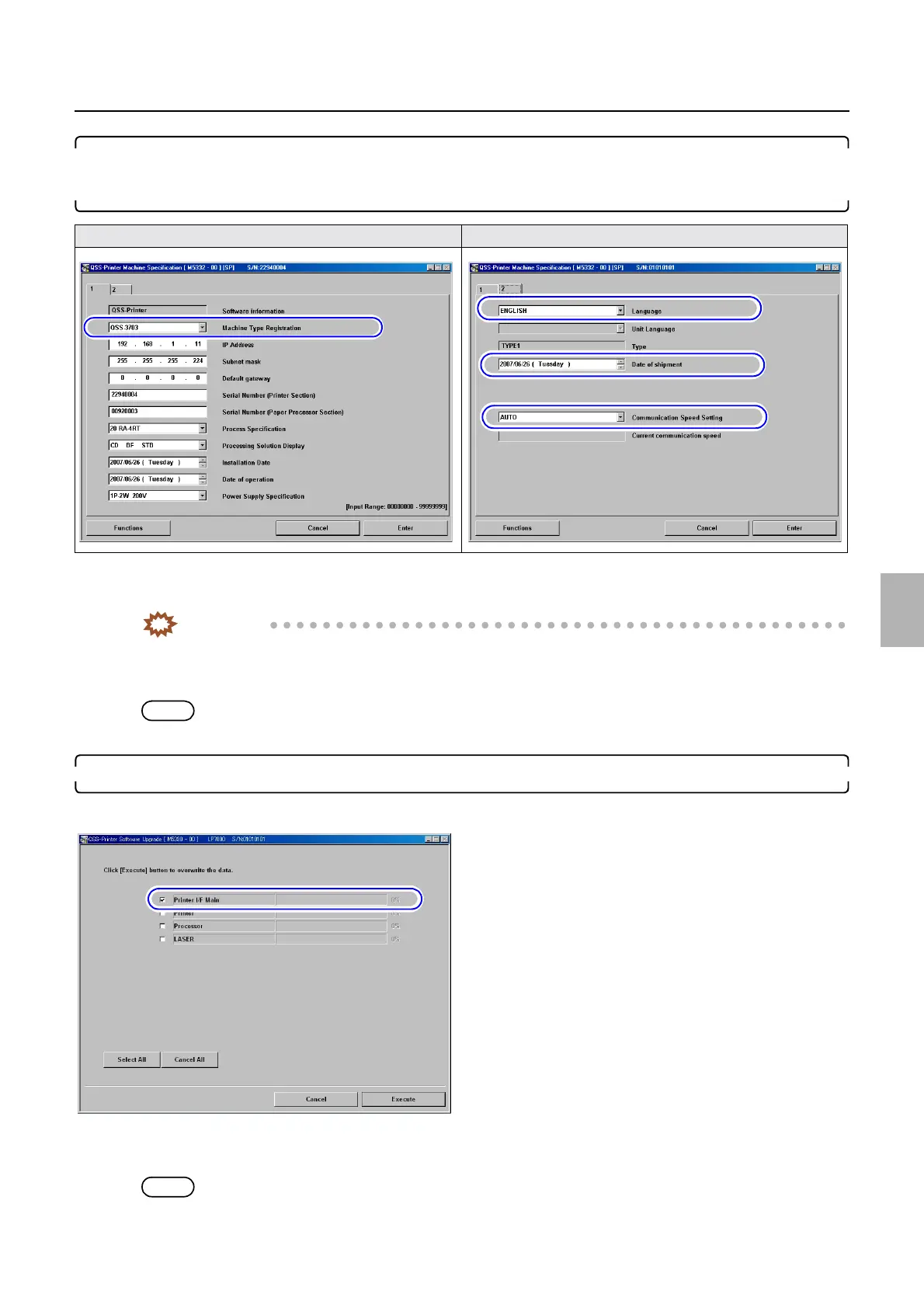
11. Configure the Machine Type Registration, Language, Date of shipment and Communication
Speed Setting settings on the Machine Specification display that were noted before replacing the
printer I/F main PCB in Step 1.
Bringing up the display
Maintenance: 2260 → Extension → Maintenance → Machine Specification
IMPORTANT
• Do not change the settings of IP Address, Subnet mask and Default gateway on the Machine Specification
display.
The Software Upgrade of the printer I/F main PCB may not complete normally.
NOTE
• It may take about several tens of seconds to complete the registration of Machine Specification.
12. Perform Software Upgrade of the printer I/F main PCB.
☞35600
Bringing up the display
Maintenance: 2260 → Extension → Maintenance → Software Upgrade
NOTE
• It may take about two minutes to complete the upgrade of the printer I/F main PCB.
Machine Specification (1) Machine Specification (2)
M5330-02
Distributed by: minilablaser.com



 To Next Page