6. Electrical parts
66006
3/7
66006
Description of PCB (printer section)
(4) Change IP Address, Subnet mask , and Default gateway of the operation PC to connect IP Address : 192 .
168 . 1 . 11, Subnet mask : 255 . 255 . 255 . 224 and Default gateway : No setting of the printer I/F main
PCB.
(5) Click OK.
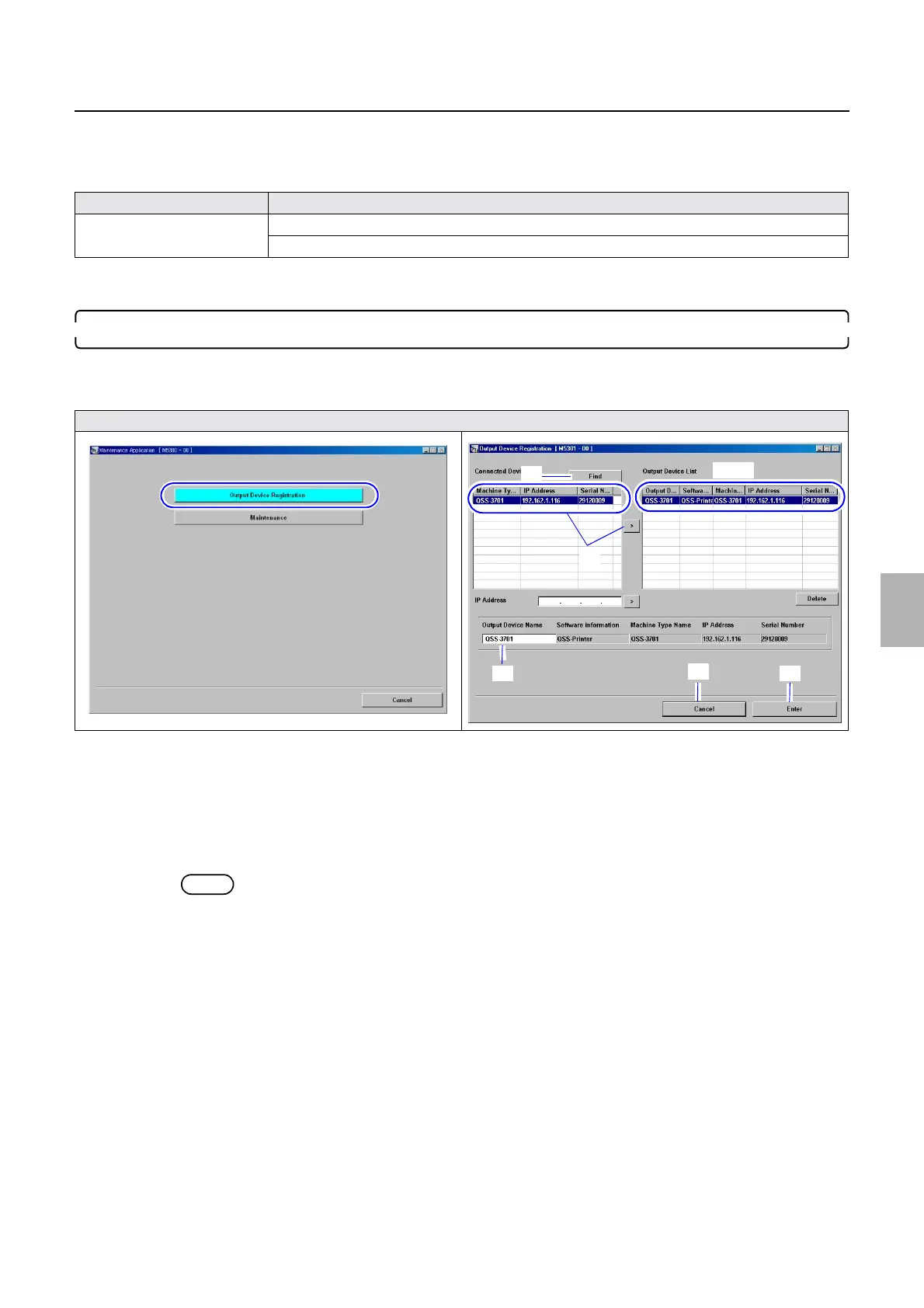
10. Perform Output Device Registration.
Bringing up the display
Start → All Programs → Select QSS-Printer. → Click Output Device Registration.
(1) Write down the Output Device Name shown in Output Device List.
(2) Delete the Output Device shown in Output Device List.
Select Output Device and click Delete.
(3) Click the Find button.
(4) Select this printer from the Connected device list then click >.
NOTE
• Any of the printers is shown at Machine Type Registration. However, you do not have to change the setting
because this will be changed in Step 11.
(5) Select this printer from the Output Device List, and register the name noted in Step (1).
(6) Click Enter.
(7) Click Cancel.
Example
Operation PC IP Address : 192 . 168 . 1 . 12, Subnet mask : 255 . 255 . 255 . 224
Default gateway : No setting
Output Device Registration
1, 2
3
5
7
6
4
Distributed by: minilablaser.com



 To Next Page