2/7
6. Electrical parts
66006
66006
Description of PCB (printer section)
5. Turn on the power supply of the PC while the power supply of the printer is off.
IMPORTANT
• This prevents the following error from being occurred when the printer power supply is turned on after the
printer I/F main PCB is replaced.
•
☞No. 06909 CPU was reset. Abort the process.
•
☞No. 06901 ARCNET communication error.
6. Start the PC, and quit the EZ Controller or the Noritsu Quick Access if it is installed.
This prevents automatic upgrade of the printer maintenance application if the EZ Controller is installed.
7. If several printers are connected, temporarily prepare the environment so that the operation PC can
connect the printer I/F main PCB one on one.
• See ☞How to change settings if several printers are connected in 66006.
8. Turn on the power supply of the printer.
NOTE
• Do not start the EZ Controller or the Noritsu Quick Access.
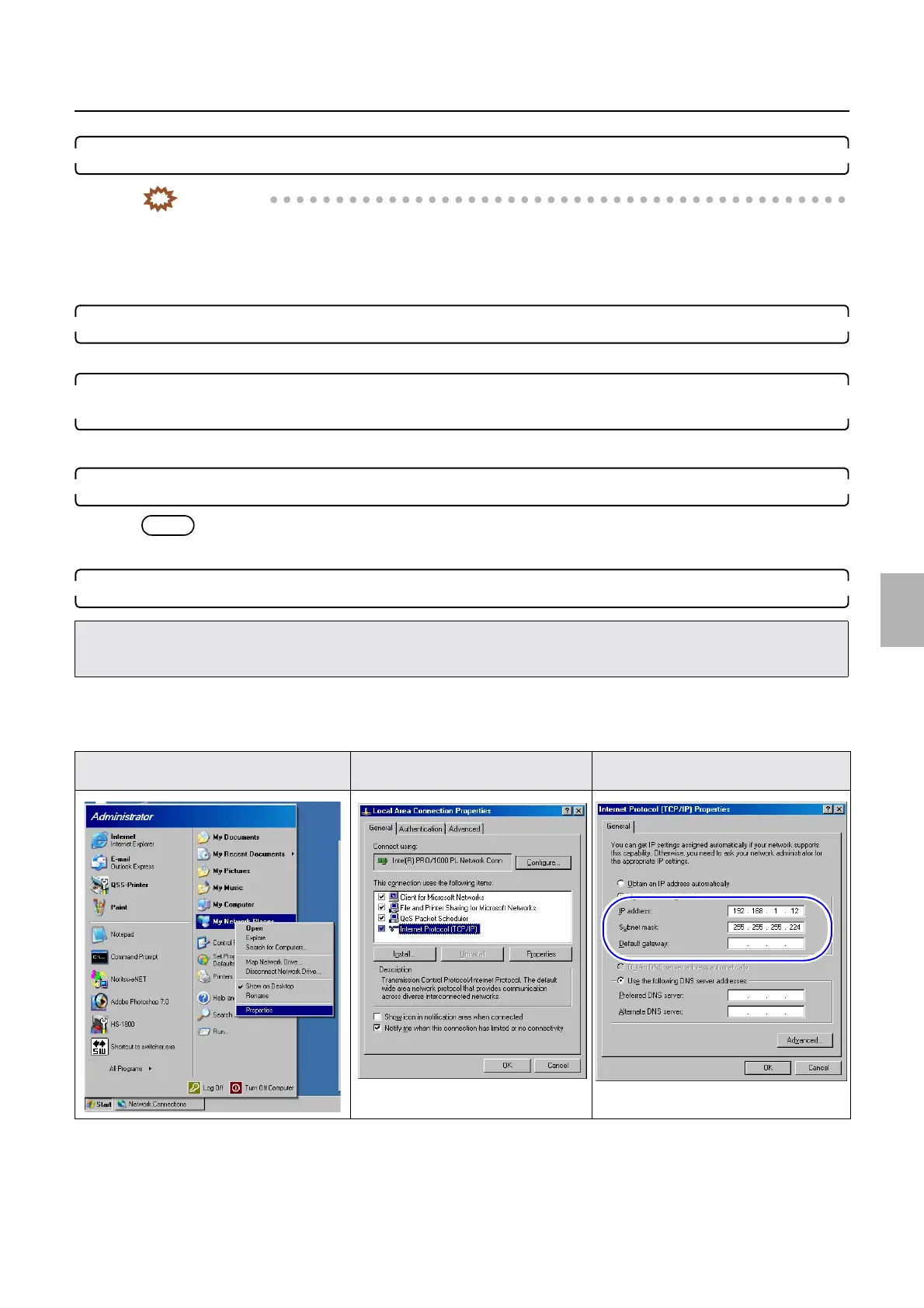
9. Confirm the network setting of the operation PC.
Bringing up the display
Start → Right-click My Network Place. → Click Properties. → Right-click Local Area Connection. → Click Properties.
→ Local Area Connection Properties
(1) Select Internet Protocol (TCP/IP).
(2) Click Properties.
(3) Write down IP Address, Subnet mask and Default gateway.
• If the settings of IP Address: 192 . 168 . 1 . 11, Subnet mask: 255 . 255 . 255 . 224 and Default gateway: 0 . 0 . 0 . 0 (default settings
of the printer I/F main PCB when shipping) of Machine Specification noted in Step 1 before replacing the printer I/R main PCB are
not changed, go to Step 11.
Start→My Network Place Protocol of the Local Area
Connection
Protocol of the Internet Protocol
(TCP/IP)
Distributed by: minilablaser.com



 To Next Page