CHAPTER 5: SETPOINTS 5.9 RELAY CONFIGURATION
GEK-106310-AF F650 DIGITAL BAY CONTROLLER 5-169
5.9.9 HMI (human-machine interface)
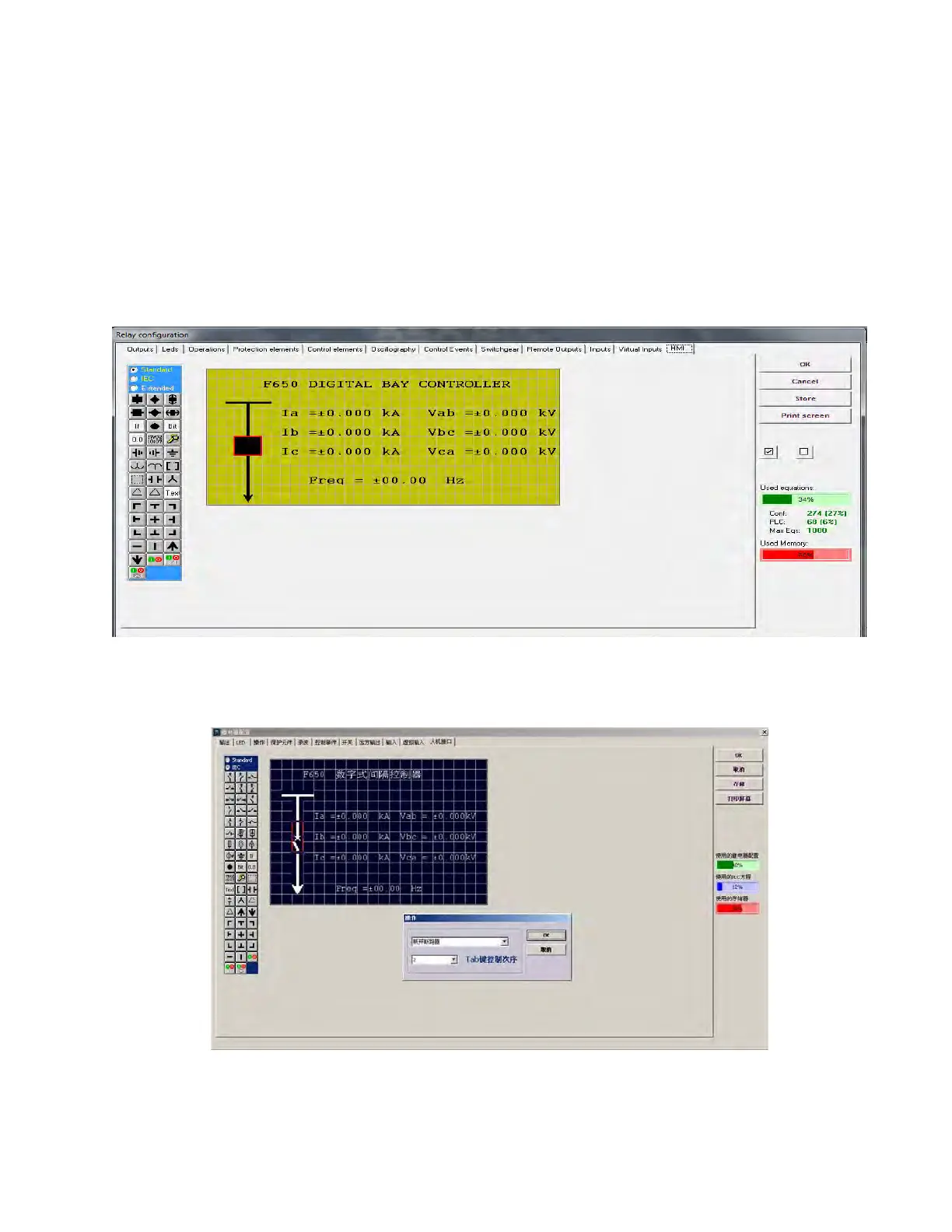
This menu shows a scenario to draw a simplified one-line diagram of a bay in a feeder, line, transformer, etc. The menu
includes a library for power elements, metering elements, text and drawings.
To use the drawing toolbar elements, select the desired element and then click the yellow area. The selected element is
moved to the screen on the selected spot (see Figure 5-54: HMI configuration).
The graphic display can be used to configured switchgear elements, operations, metering values, date and time, etc. The
configured values is always updated with the real status of the relay.
This functionality is only applicable to F650 elements with graphical display, and not for elements with alphanumerical
display . Depending on the relay model, the graphical display can show IEC 1082-1 symbols (N option in order code).
Figure 5-54: HMI configuration
For chinese graphical displays (only available N option in order code) the configuration screen has the following
appearance with full configuration capabilities:
On the left side of the window all the available elements to be programmed on the HMI are displayed. Their meaning is
detailed on the right.



 To Next Page