APPENDIX C: DNP 3.0 PROTOCOL FOR F650 C.5 DNP CONFIGURATION EXAMPLES
GEK-106310-AF F650 DIGITAL BAY CONTROLLER c-13
C.5 DNP configuration examples
C.5.1 Configuring DNP user map
For example, consider configuring DNP Binary Inputs Map with 8 Contact Inputs, 8 Protection states, 8 Contact Outputs
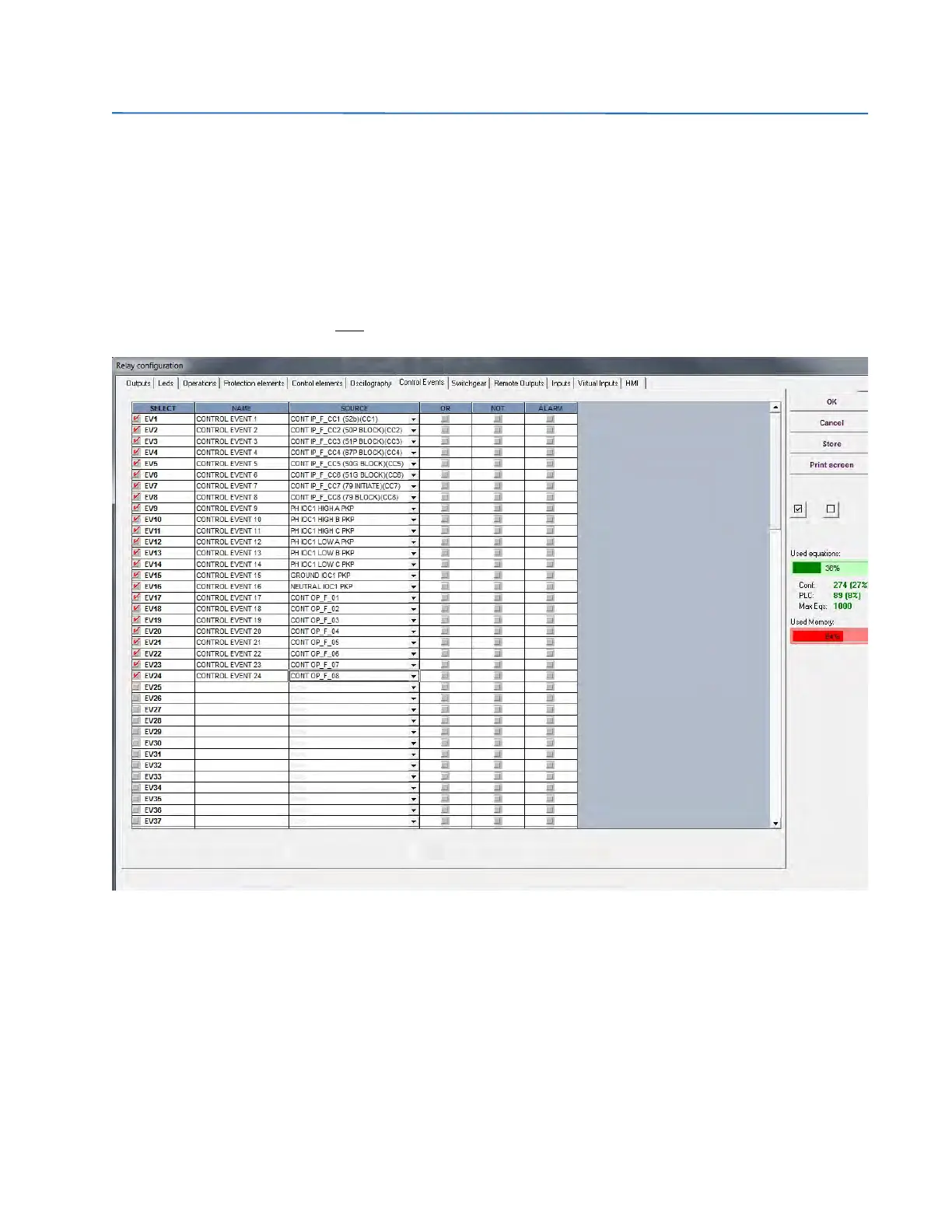
and 2 Switchgears. This configuration can be done in two steps. In first step, select Setpoint > Relay Configuration from
the EnerVista 650 Setup program and then configure the Control Events bits and Switchgear bits. This is shown in figures
9.1 and 9.2. In the second step, select Setpoint > System Setup > Communication settings > DNP in order to change the
DNP Binary Input Block settings. Set the values of the first three Binary Input blocks, Binary Input Block1 = CTL EVENTS 1-
16, Binary Input Block2 = CTL EVENTS 17-32, Binary Input Block3 = SWITCHGEAR 1-8. This is shown in Figure C-1:
Configuration of Control Events bits 13-1
Figure C-1: Configuration of Control Events bits



 To Next Page