6-46 F650 DIGITAL BAY CONTROLLER GEK-106310-AF
6.4 INPUTS / OUTPUTS CHAPTER 6: ACTUAL VALUES
6.4.3 Contact output operates
Actual > Inputs/Outputs > Contact Output Operates > Board X (being X the corresponding board in each case).
These screens are available for all boards incorporated in the relay model, which can be F, G, H, and/or J.
This screen shows the activated or deactivated status of those variables used internally to operate a contact output.
Signals shown on this screen are configured in the Outputs screen inside the Setpoint > Relay Configuration menu, either
directly by selecting the signals provided by the relay, or selecting a signal provided by the logic configured at Setpoint >
Logic Configuration.
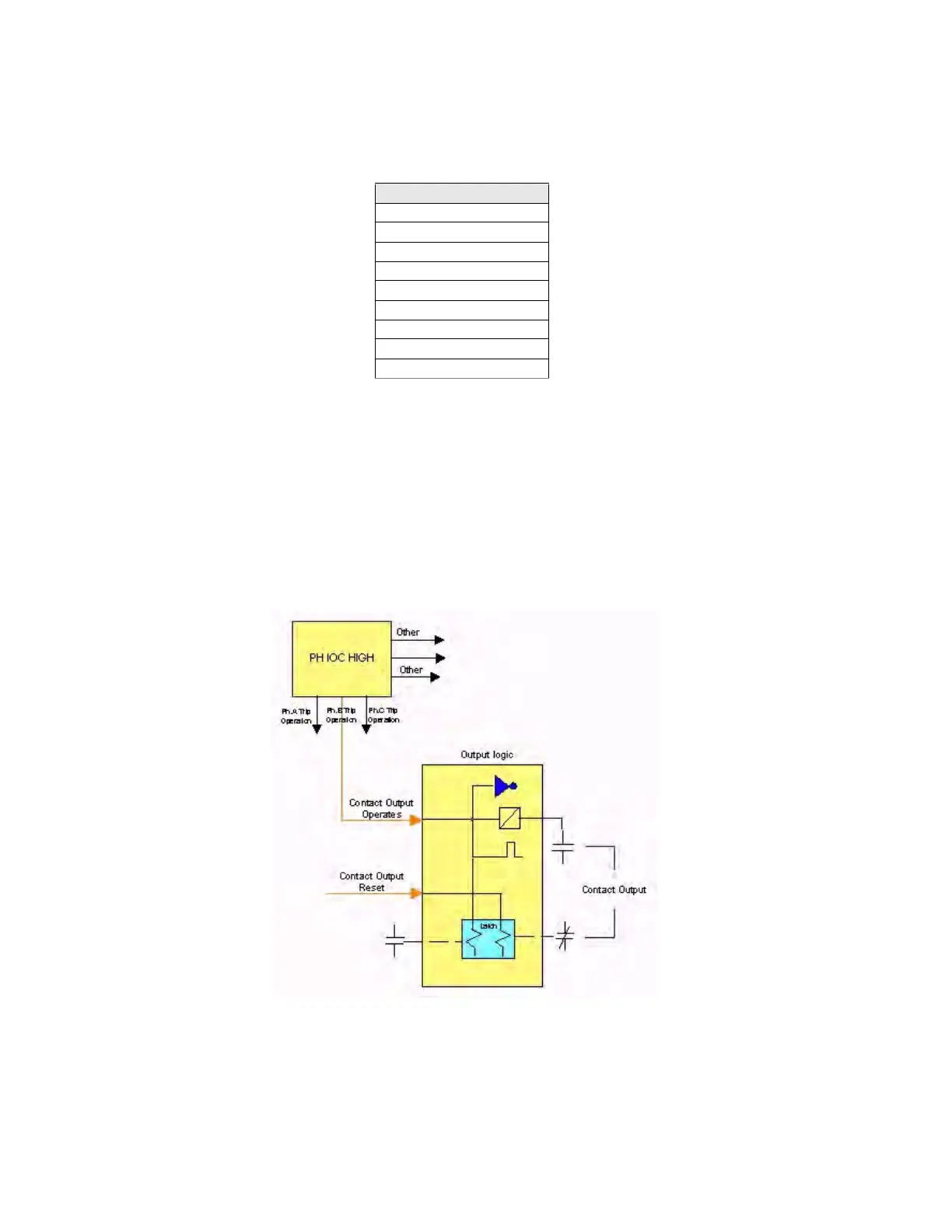
These logic signals (Contact Output Operates), when being transformed by the outputs logic configured at Setpoint >
Inputs/Outputs >Contact I/O > Board X become Contact Output signals. This output logic can be POSITIVE, NEGATIVE,
pulse, latched, etc.
Operation example of output contacts:
Figure 6-2: Output contact operation
CONTACT OUTPUT OPERATES
CONT OP OPER_X_01
CONT OP OPER_X_02
CONT OP OPER_X_03
CONT OP OPER_X_04
CONT OP OPER_X_05
CONT OP OPER_X_06
CONT OP OPER_X_07
CONT OP OPER_X_08
BOARD X STATUS



 To Next Page