CHAPTER 4: INTERFACES, SETTINGS & ACTUAL VALUES 4.1 ENERVISTA 650 SETUP SOFTWARE
GEK-106310-AF F650 DIGITAL BAY CONTROLLER 4-9
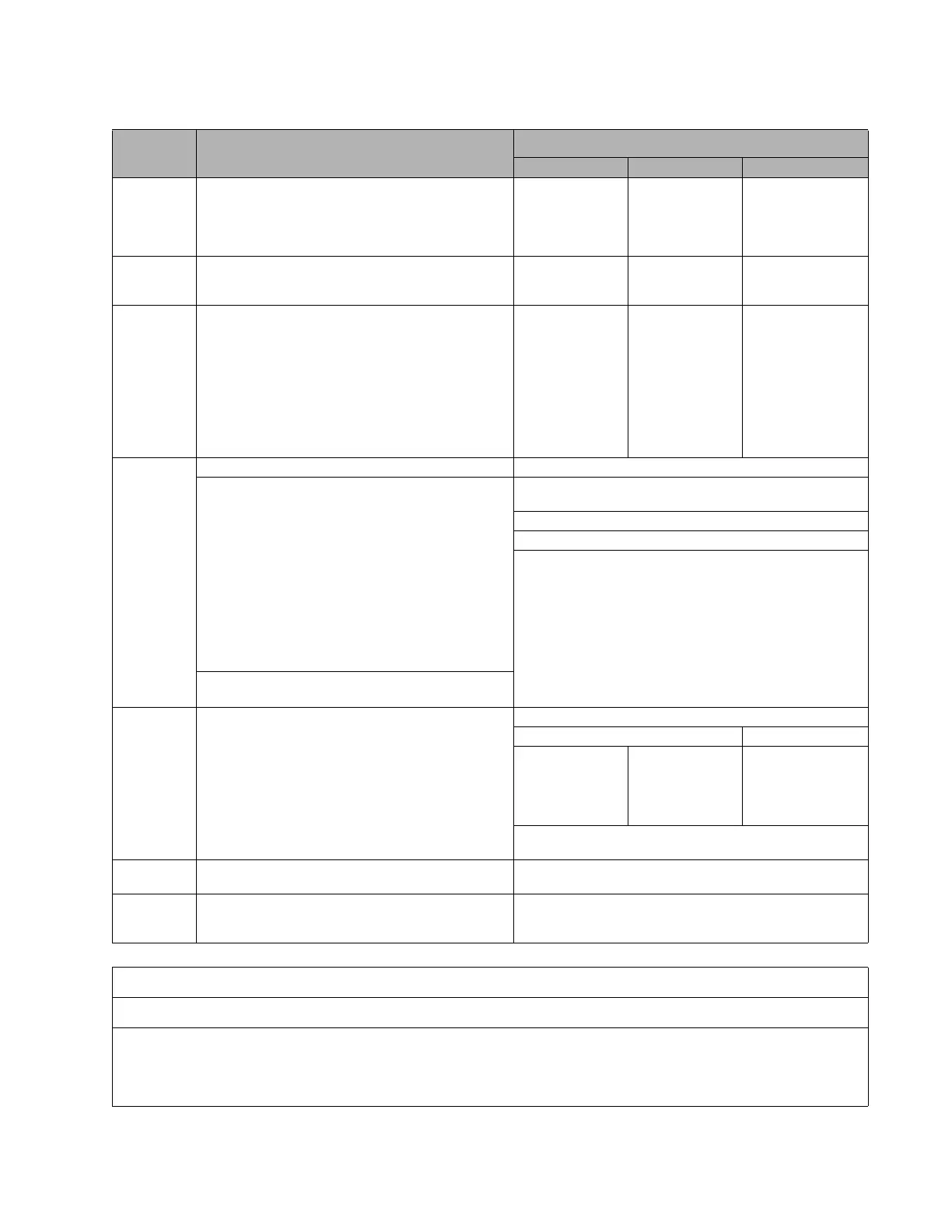
Table 4-2: Types of files generated by EnerVista 650 Setup software, online
Settings & Configuration File *.650
Logic Configuration Files (*.pep, *.aut, *.lib)
*.pep *.aut *.lib
Description Settings and Configuration Section Header for Logic
pr
oject
Graphical edition
container. Logic
equations (Virtual
Outputs) in FDB
format.
User programmable
lo
gic objects
Created by EnerVista 650 Setup Logic configuration
grap
hic editor (PLC
Editor)
Logic configuration
graph
ic editor (PLC
Editor)
Logic configuration
graph
ic editor (PLC
Editor)
Contents Relay configuration file containing all elements,
settings, input/output and LE
Ds configuration, graphic
display configuration, etc.
Equations corresponding to the logic created and
compiled in the PL
C Editor
PLC project file
cont
aining the
necessary
information
relative to the relay
model, logic
libraries included in
the project (*.lib),
graphic file name
(*.aut), etc.
PLC Project file
cont
aining all the
drawings used by
the logic, required
by 650 relay based
on IEC 61131-3
standard.
Functional block
diagram (FDB).
Library file to be
i
ncluded as an object
in a PLC project.
Logic packages that
can be stored into
libraries and be
distributed in
different PLC
projects.
How to
tra
nsfer to
relay
Connect with the relay (Comm
unications > Computer) Connect with the relay (Communications > Computer)
Send settings and configuration from file Launch 650 Logic equations editor (Se
tpoint > Logic
Configuration)
Open the created PLC project (F
ile > Open Project)
Compile the project (Run > Compile)
Now the logic (virtual outputs) can be sent directly to relay
(Run > Send
Equations to Relay). Texts of virtual outputs are
not stored in the relay, only in the logic configuration files to be
edited.
Modify settings and configuration directly in the relay:
How to save EnerVista 650 Setup:
File > Get info from relay. User de
finable texts retrieved
are operations, events, and LEDs.
PLC Editor:
File > Save Project File > Save Library
The relay does not
pr
ovide this
information unless
the *.pep file is
stored in the relay
The relay does not
pr
ovide this
information unless
the *.pep file is
stored in the relay.
The relay does not
pr
ovide this
information unless
the *.pep file is
stored in the relay.
To store the logic configuration files in the relay use the
Communication > Upload info files to relay op
tion
How to store
in the r
elay
Communication > Upload info files to relay through
Ethernet
Communication > Upload info files to relay through Ethernet
How to
re
trieve from
the relay
Communication > Download info files fr
om relay
through Ethernet
Communication > Download info files from relay through
Ethernet
REMINDER:
Logic programming support files (*.pep, *.aut, *.lib) CANNOT be retrieved directly from the relay.
It is necessary to do one of the following to store support files:
* Store in the PC
* Upload to the relay (Communication > Upload info files to relay), after which they can be retrieved from the relay



 To Next Page