Rev. 1
Card Gr6-
5
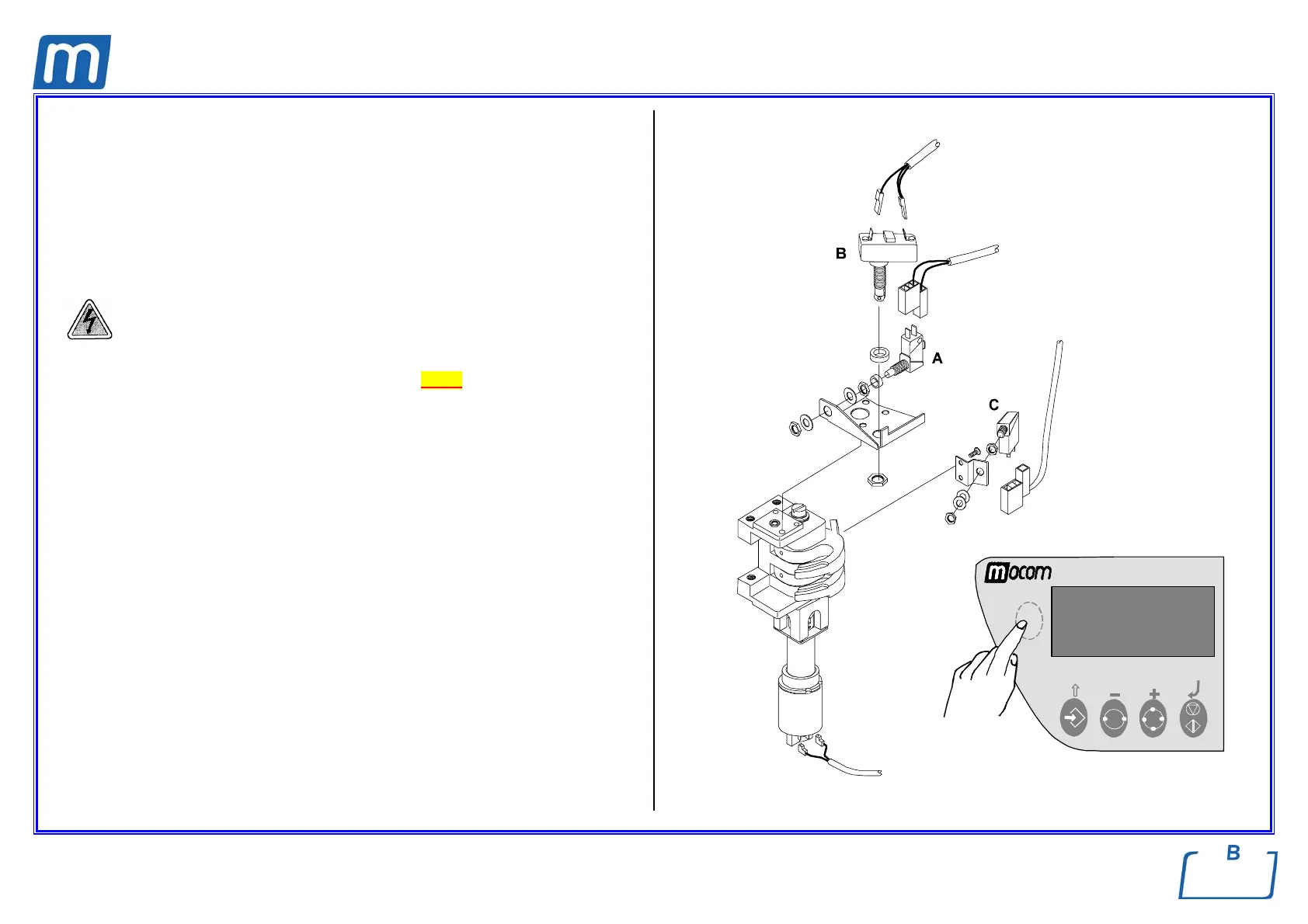
DOOR-CLOSED SWITCH
433#00010000
DOOR-UNLOCKED SWITCH
433#00010000
DOOR-LOCKED SWITCH
433#00040000
Before servicing, switch off the equipment and unplug the power
supply cable from the mains socket
1. Remove the left-side and top covers (see card Gr7-1 );
2. Remove the wiring of the switch involved;
A) Door-closed switch;
B) Door-unlocked switch;
C) Door-locked switch
3. Remove the screws of the bracket and switch involved;
4. Replace the switch, assembly all items proceeding in reverse order as above;
5. Perform a sterilization cycle.
Note: To release the door-unlocked switch proceed as follows:
- Enter the Setup; Service, digit the code “++--++--“, go to Device Test, Manual
and Locking Device, push key START to enable/disable.
- After the switch replacement, check its correct operation. Remove the jumper
X21 from the CPU board, push the hidden key on the keyboard and switch
on the sterilizer. As message “LOCKING DEVICE” appears on the display,
release the hidden key and push the Start key to enable the unlocking of the
closing mechanism; exit the Setup, switch off the sterilizer and restore the
jumper X21.



 To Next Page