Rev. 1
Attach.
6
ATTACHMENT E -
RESET PRINT QUEUE
Before servicing, switch off the equipment and unplug the power
supply cable from the mains socket
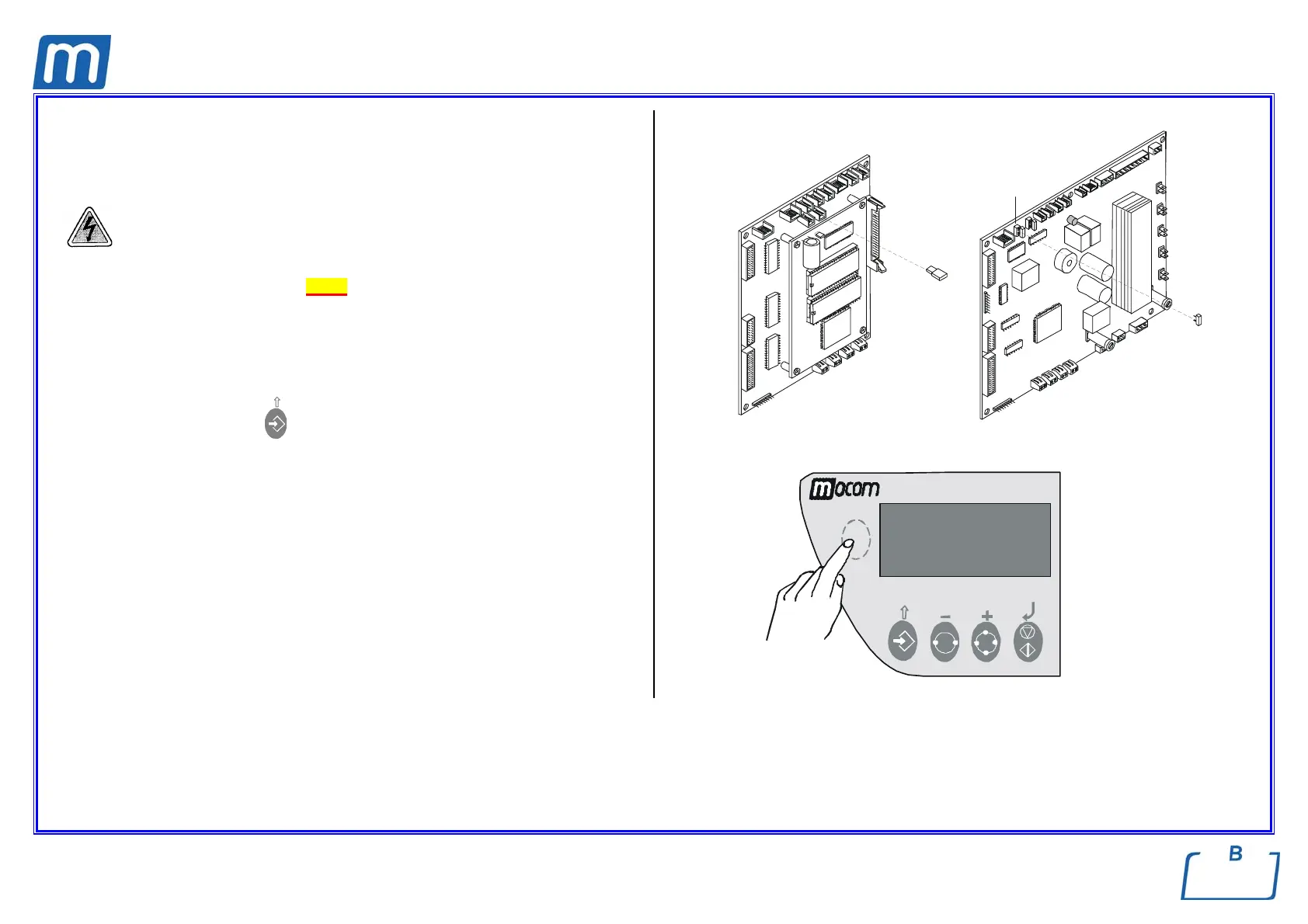
1. Remove the covers (see card Gr7-1 );
2. Remove the jumper X21 on the CPU board;
3. Press the hidden key on the control panel, switch-on the unit and release the
key only when the message “LOCKING DEVICE” appears on the LCD
display;
4. Press the arrow-up key
to exit this status and start the Self test;
5. Turn off the unit at the end of the Self test, restore the jumper X21 and switch
on the unit again;
6. Enter the SETUP mode, ADVANCED menu, PRINT OPTIONS, REPORT,
PRINT LAST and select the option NORMAL PRINT;
7. Exit the SETUP mode and check that the printer resumes to operate
correctly.
X21
GAM
TROLL
X21



 To Next Page