Rev. 1
Card Gr6-
6
GEAR-MOTOR
403#00010000
PIN
232#A03L25K0
Before servicing, switch off the equipment and unplug the power
supply cable from the mains socket
1. Remove the covers (see card Gr7-1 );
2. Empty both reservoirs;
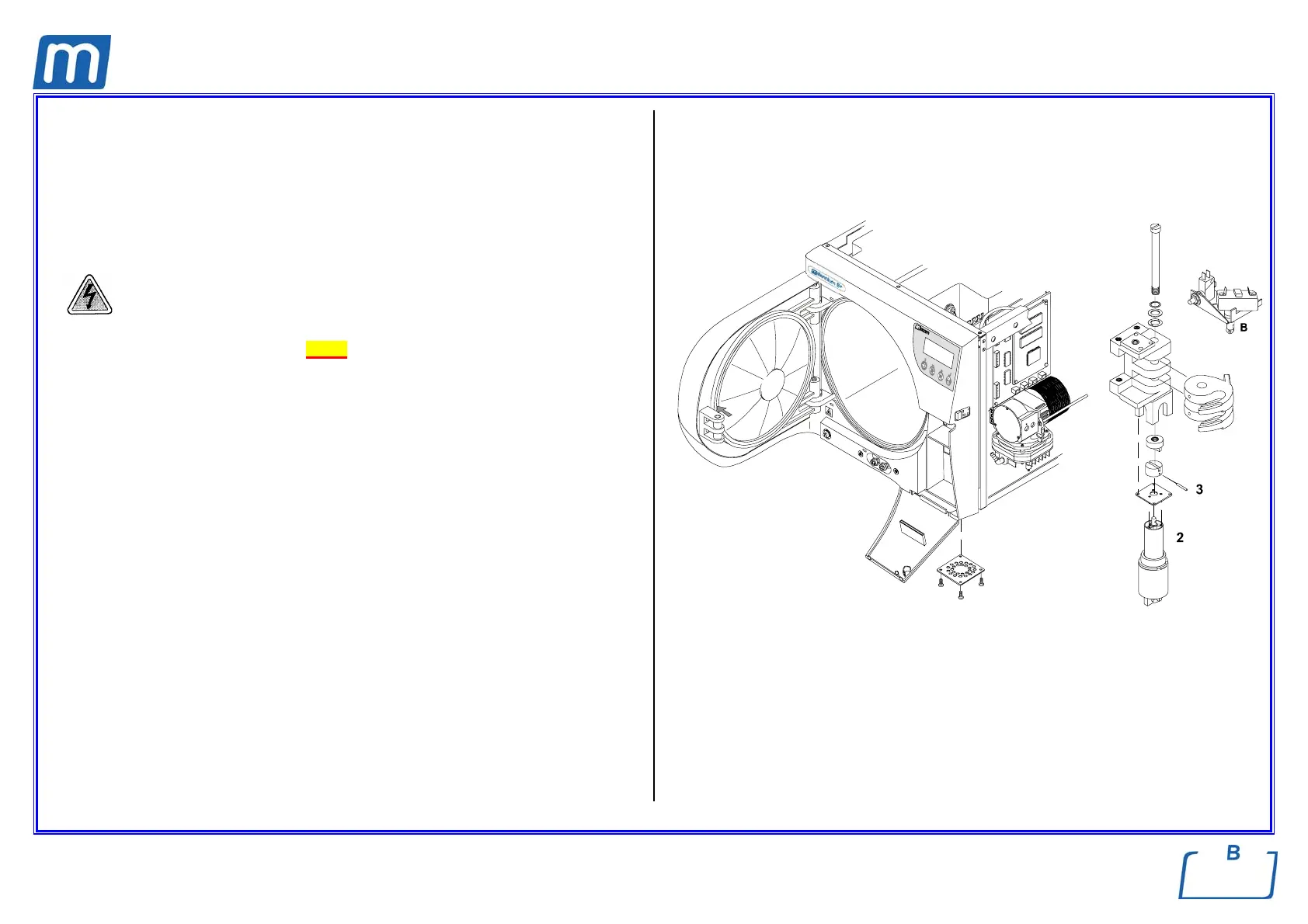
3. Turn on the left side the unit and remove the ratio-motor access plate (1)
from the bottom frame;
4. Remove the motor wiring and the motor itself (2);
5. Block the motor in a vise and remove the pin (3) by using proper tools;
6. Mount the new pin, the motor taking care to couple two bushes, connect the
wiring (white = + / black = -) and mount the small plate (1) proceeding in
reverse order as above;
7. By means of a large screwdriver, push on the pin (B) of the door-unlocked
switch (do not release it until explicitly indicated) and turn on the unit;
8. Wait for the end of the Self test, then enter the SETUP mode;
9. Go to SERVICE option, enter the code “++--++--“, then select DEVICE TEST,
MANUAL and LOCKING DEVICE option;
10. Push the Start key to enable the locking mechanism, then release the pin of
the door-unlocked switch;
11. Push again the Start key to release the locking mechanism;
12. Switch off/on the unit;
13. Perform a sterilization cycle.
1



 To Next Page