Rev.1
Page 1-
17
A
Clip
A
Draining tank
Vent-hole
Clip
Silicon pipe
Water level probe
Minimum
water level
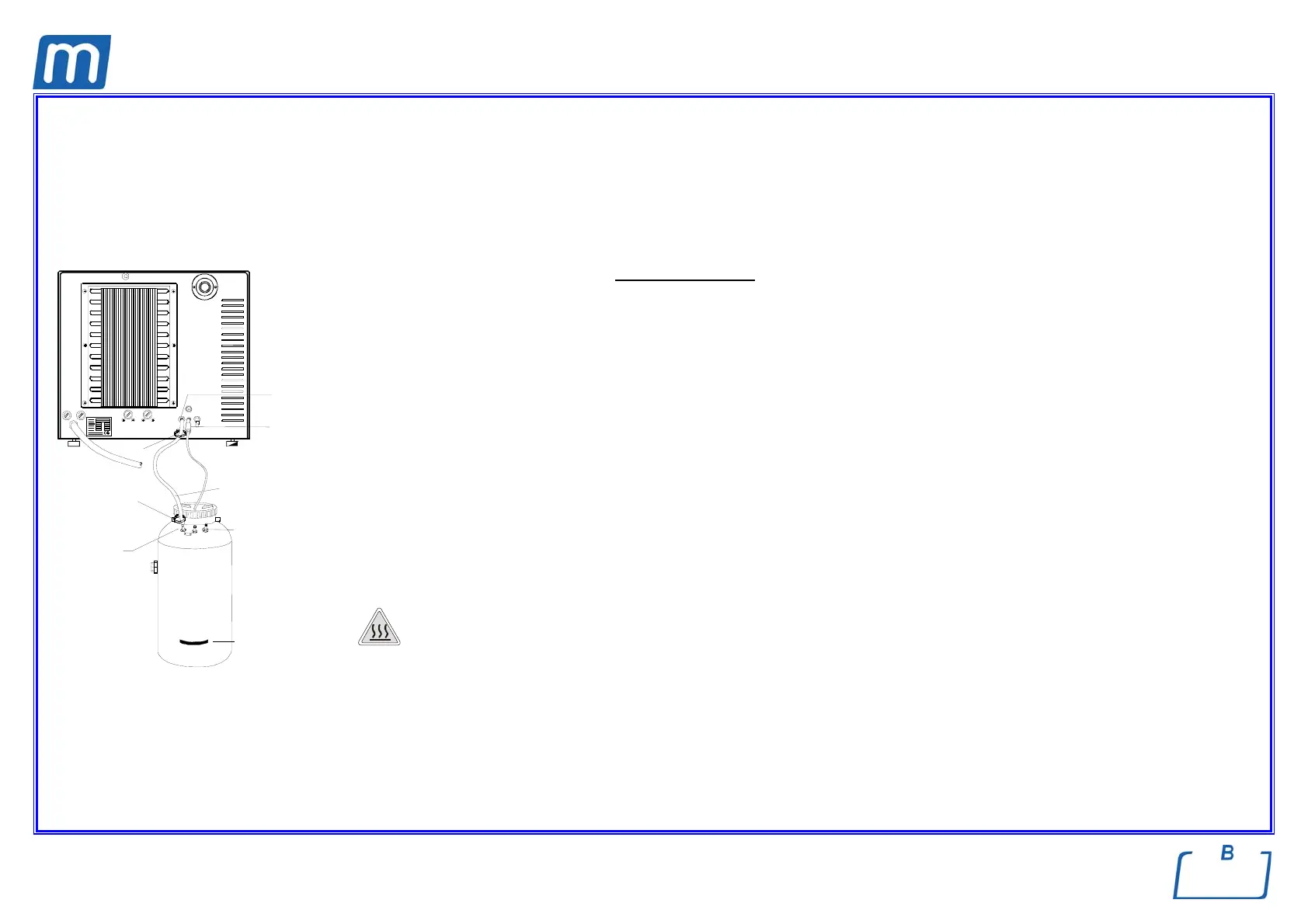
CONNECTING AN EXTERNAL DRAIN TANK
(OPTIONAL, external drain function)
An external drain tank (supplied as an option) can be used to avoid having to periodically empty the internal used water tank, which is then
manually emptied or connected to central drain system.
e Check that the drain silencer is correctly installed inside the tank, corresponding to connection “A”
Follow the instructions below for the correct connection
of the tank:
– Insert the silicone tube (provided with the option) on connector A on the machine; push the tube all the way on and lock it with the plastic tie;
– Cut the silicone tube to measure, push the free end on connector A on the drain tank and lock it with the plastic tie;
e Make sure the tube is not bent, crushed or obstructed in any way
– Connect the plug of the level sensor to the jack (optional) on the back of the device (see figure);
e Make sure the plug is correctly inserted. A poor connectin is interpreted as a MAX level signal, with a consequent alarm
whenever you insist on starting the cycle.
– Fill the tank with normal tap water up to the level marked on the container.
e For this option setting, refer to chapter “Configuring the Device – Setting the water draining mode”.
H
OT WATER AND STEAM UNDER PRESSURE COME OUT OF THE DRAIN CONNECTORS. CONNECT ALL THE ELEMENTS OF THE DRAIN
CIRCUIT CAREFULLY TO AVOID PROPERTY DAMAGE AND
/OR INJURY



 To Next Page