Rev. 1
Card Gr7-
3
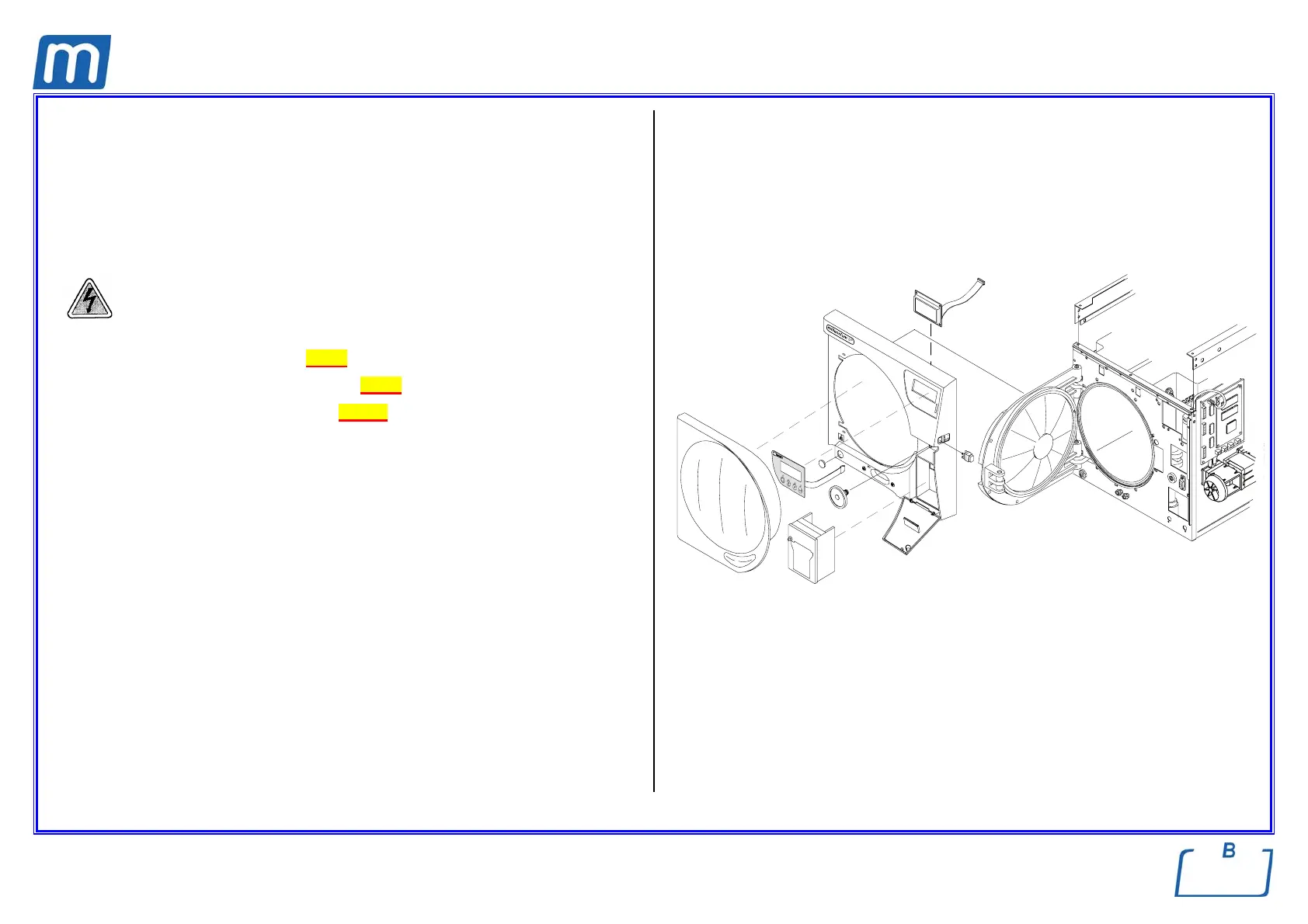
FRONT FRAME ASSEMBLY
A#0BP3000000
PLASTIC FRONT FRAME
C#3BP1830000
Before servicing, switch off the equipment and unplug the power
supply cable from the mains socket
1. Remove the covers (see card Gr7-1 );
2. Remove plastic door cover (see card Gr7-2);
3. Remove the printer unit (see card Gr1-20);
4. Cut the nylon clamp on the mains switch wiring and disconnect it from the
switch;
5. Remove the LCD and keyboard connections from the CPU board;
6. Remove the bacteriologic filter;
7. Remove left and right rails;
8. Unscrew the screws fixing the plastic front cover; the screws are found rear
the front frame and printer compartment;
9. Unlock the four tabs of the plastic cover from the front frame slots around the
chamber circumference;
10. Carefully move left side the front plastic cover and remove it though the door;
11. Remove labels, LCD, keyboard, mains switch, plastic cap from the front
cover and mount them on the new cover;
12. Mount the new front cover, assembly all items and restore connections
proceeding in reverse order as above;
13. Perform a sterilization cycle.



 To Next Page