Rev. 1
Attach.
9
ATTACHMENT H -
RELEASE DOOR LOCKING MECHANISM VIA SOFTWARE-
Before servicing, switch off the equipment and unplug the power
supply cable from the mains socket
1. Remove the covers (see card Gr7-1);
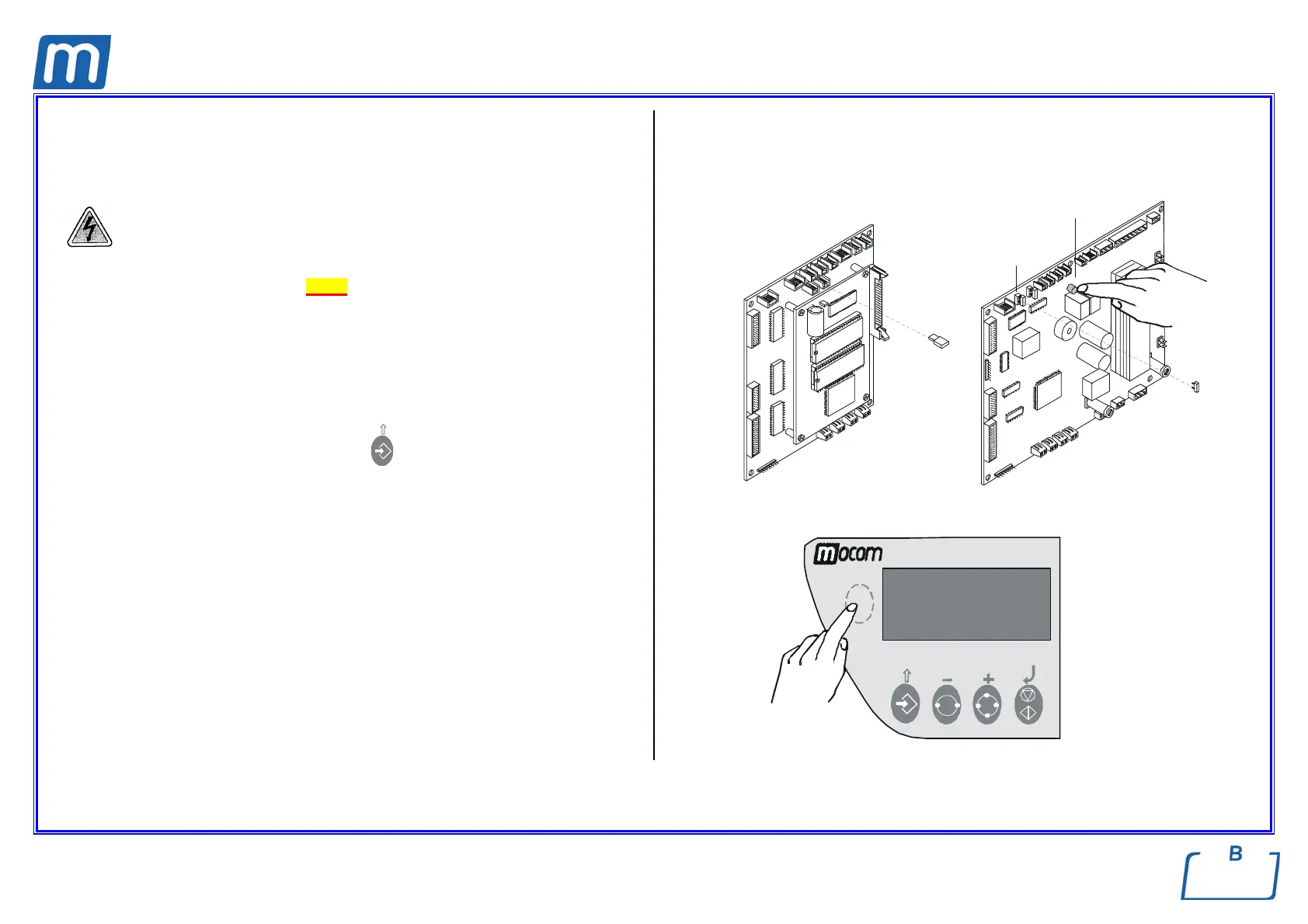
2. Remove the jumper X21 of the CPU board;
3. Press the hidden key on the control panel, switch-on the unit and release the
key only when the message “LOCKING DEVICE” appears on the LCD
display;
4. Press the Start/Stop key to release the door locking mechanism;
5. Open the door, press the arrow-up key
to exit this status, and start the
Self test;
6. GAM type pc boards
Turn off the unit at the end of the Self test, restore the jumper X21 and switch
on the unit again;
TROLL type pc boards
Press the red button at the end of the Self test, turn off the unit, restore
the jumper X21 and switch on the unit again.
7. Perform a sterilization cycle.
X21
GAM TROLL
pulsante
rosso
X21
red push-
button



 To Next Page