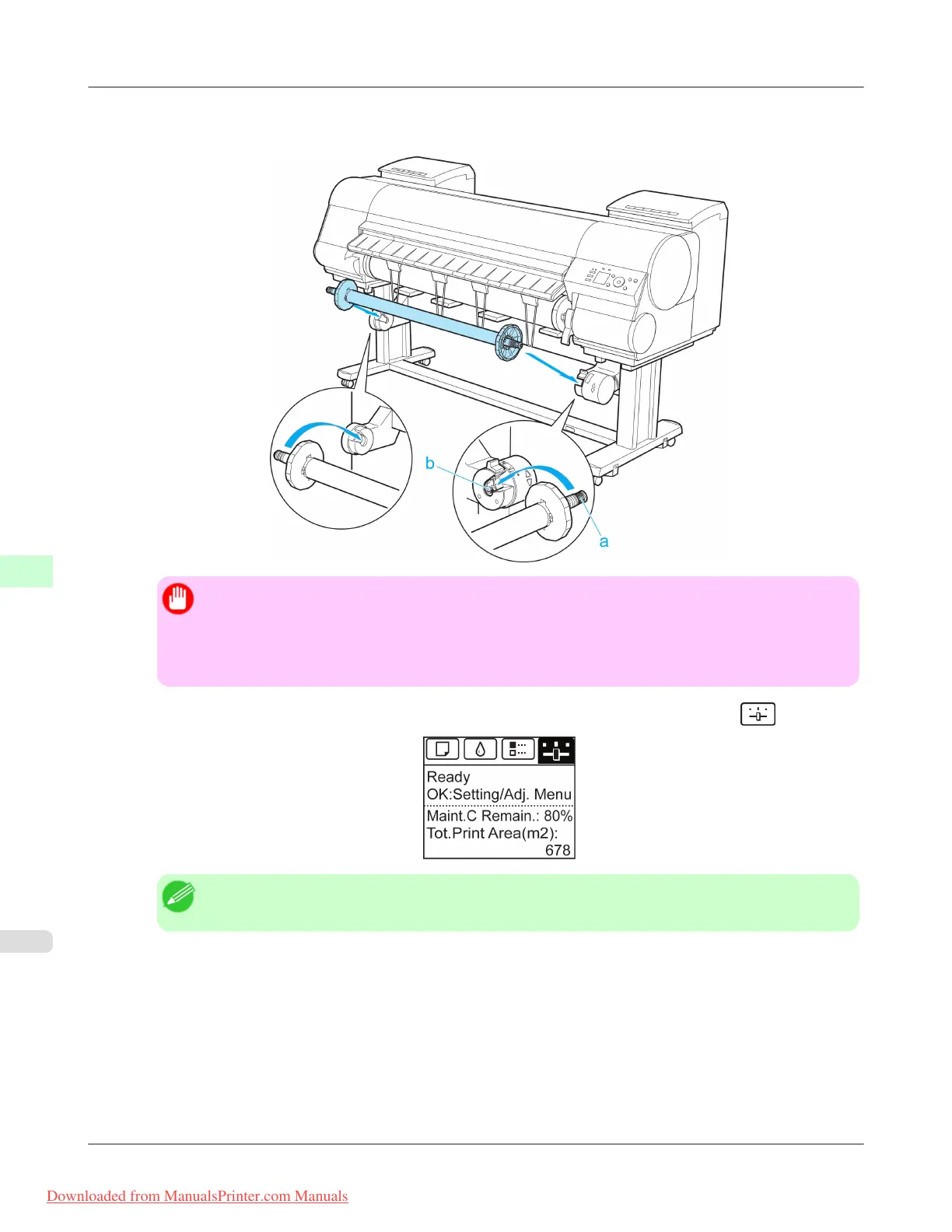
6. Load the Rewind Spool on the Media Take-up Unit so that the gear of the Rewind Spool (a) meshes with the gear of
the Right Media Take-up Unit (b).
Important
• If you attempt to load the Rewind Spool with the left and right ends inverted by mistake, the Media
Take-up Unit cannot be turned on.
• If the gear of the Rewind Spool (a) does not mesh with the gear of the Right Media Take-up Unit (b),
the Media Take-up Unit cannot be turned on.
7. On the Tab Selection screen of the Control Panel, press ◀ or ▶ to select the Settings/Adj. tab ( ).
Note
• If the Tab Selection screen is not displayed, press the Menu button.
8. Press the OK button.
The Set./Adj. Menu is displayed.
9. Press ▲ or ▼ to select Take-up Reel, and then press the OK button.
10. Press ▲ or ▼ to select Auto Feed, and then press the OK button.
The roll is now advanced to the Media Take-up Unit.
Handling Paper
>
Media take-up unit
>
Loading the Rewind Spool on the Media Take-up Unit iPF8300
7
826
Downloaded from ManualsPrinter.com Manuals














 To Next Page