Appendix C: Wiring and Electrical Connections
25-4 SkyView HDX System Installation Manual - Revision E
Table 64: SV-HARNESS-D37 wiring for SV-BAT-320 Connection Wiring
Do not cut off the connector supplied on the SV-BAT-320; instead, assemble a mating
connector as specified above.
25.5 SkyView Equipment Electrical Connections
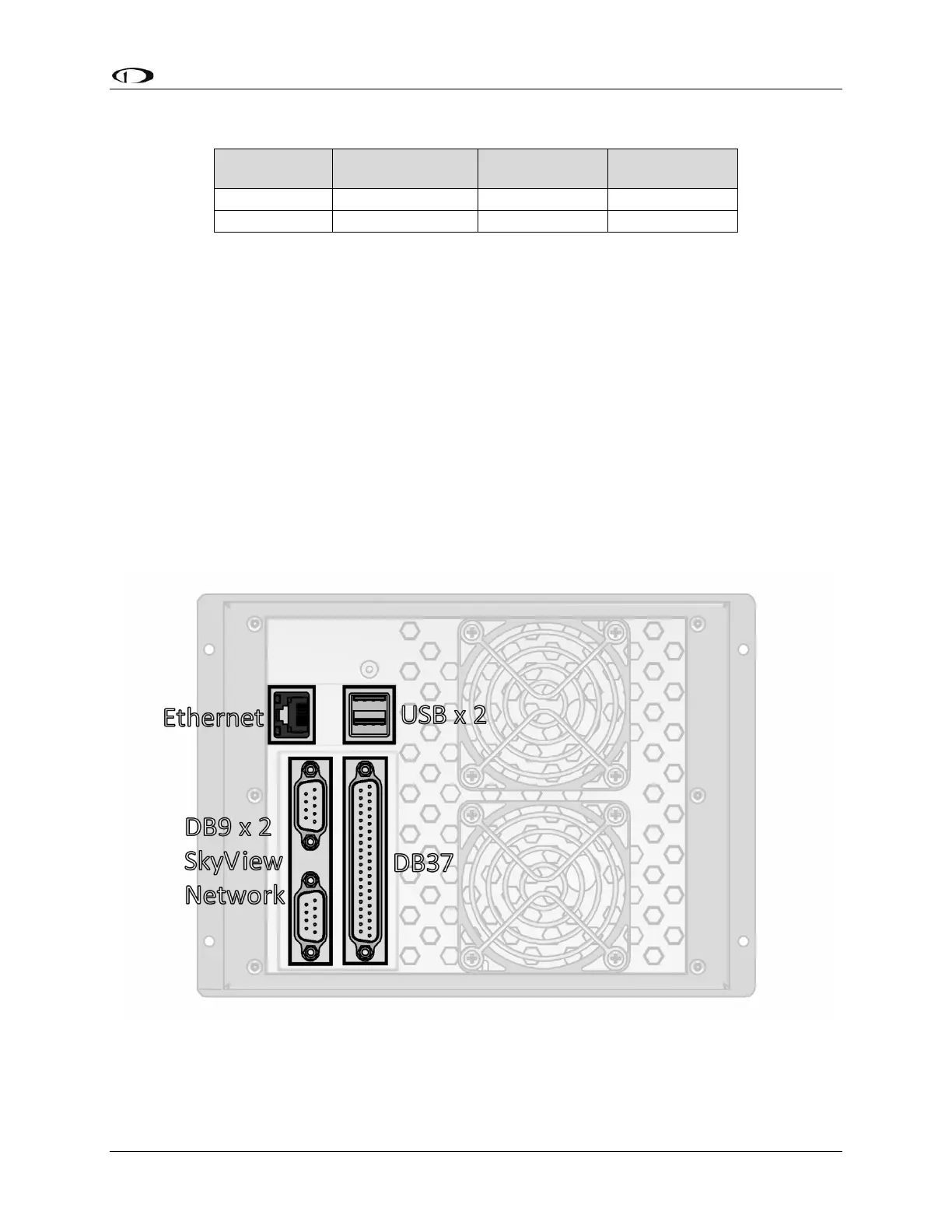
SkyView displays have six (6) connectors on the back of the unit as illustrated in Figure
136:
• One (1) D37M for connection to the SkyView Display Harness (SV-HARNESS-
D37).
• Two (2) D9M SkyView network connectors (SV-NET-xxxx).
• Two (2) Standard 4-pin USB 2.0 jacks for use with USB Series A plugs. Note
that there is also a USB port on the SV-HARNESS-D37 for convenience.
• One (1) standard 8-pin RJ45 connector for use with twisted pair Category 5
Ethernet cable.
Figure 136: SkyView Display Connectors
A SkyView ADAHRS module (SV-ADAHRS-200/201) has two (2) connectors as
illustrated in Figure 137:



 To Next Page