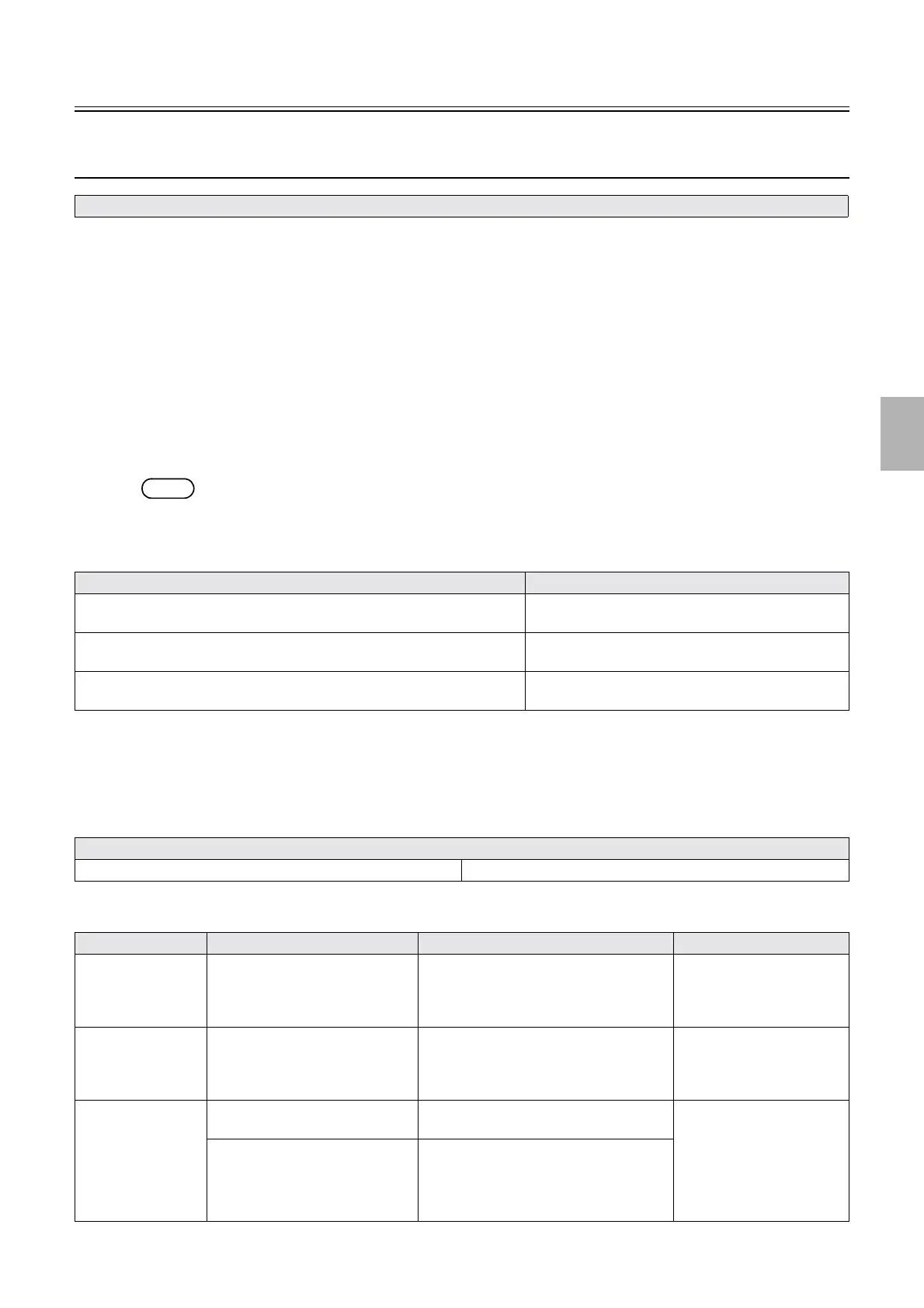
Diagnosis appendix: Diagnosis flowchart
1/3
4. Troubleshooting
4302
4302
Diagnosi s appendi x: Diag nosis f lowchart
Laser temperature control status of Status Display does not change from
Temperature control started to Temperature control completed. [LASER]
!
!!
! Checking procedure
1. Confirm that the system is used in the environment of room temperature 15°C to 30°C.
2. Restart the system.
3. Check if the displayed temperature on Laser Unit Thermosensor goes up when turning on the laser
unit heater via Output Check.
Check if laser unit cooling fan 1/2 operate when turning on laser unit cooling fan 1/2 via Output Check.
☞35310
4. Check if the displayed temperatures of the B laser temperature sensor, R laser temperature sensor
and laser unit temperature sensor change via Output Check.
☞35210
NOTE
• Temperature of the laser unit heater, B laser heater and R laser heater is adjusted at the same time.
5. If there is a change in the displayed temperature, wait for a while. If the temperature does not change,
check the unit for faults.
!
!!
! If temperature of the laser unit thermosensor is not within the range from 15.0°C to
42.0°C
1. Check if there is a wiring connection failure.
2. Make a diagnosis via the displayed temperature on the laser unit temperature sensor.
• For details about Laser temperature control status of Status Display, see ☞31100.
Symptom Cause
☞If temperature of the laser unit thermosensor is not within the range from
15.0°C to 42.0°C
The temperatures are not within the processable range of
the laser unit (15.0°C to 42.0°C).
☞If the temperature of B laser thermosensor is not within the range from
46.7°C to 47.3°C.
Temperature is not in the processable range of B laser
(46.7°C to 47.3°C).
☞If the temperature of R laser thermosensor is not within the range from
46.7°C to 47.3°C.
Temperature is not in the processable range of R laser
(46.7°C to 47.3°C).
Wiring connection failure
Laser control PCB (J/P1522) ↔ laser unit Laser control PCB (J/P1541) ↔ laser power supply (+24 V)
Checking point Checking content How to check Failure part
Laser unit heater Laser unit heater resistance value Remove P1525 (connecting) and measure
the resistance value between Pin 1 and 2. It
is normal if the resistance value is 15 ± 1.5
Ω.
Laser unit (laser unit heater)
Laser Unit
Thermosensor
*1
Laser unit thermosensor resistance
value
Remove P1526 (connecting) and measure
the resistance value between Pin 1 and 3. It
is normal if the resistance value is the same
as that in the list below.
*1
Laser unit (laser unit
thermosensor)
Laser control PCB Laser unit thermosensor standard
voltage
It is normal if the voltage between Pin 3 (+)
of P1522 and the ground is 1.0 V.
Laser control PCB
Power supply to the laser unit
heater
*2
It is normal if the voltage between Pin 7 (+)
and Pin 8 of P1551 is the following.
• When the heater is turned on: 24 V
• When the heater is turned off: 0 V
Distributed by: minilablaser.com



 To Next Page