3/8
2. Replacement and adjustment of parts
22100
22100
Magazine section
!
!!
! Adjusting magazine deck B
IMPORTANT
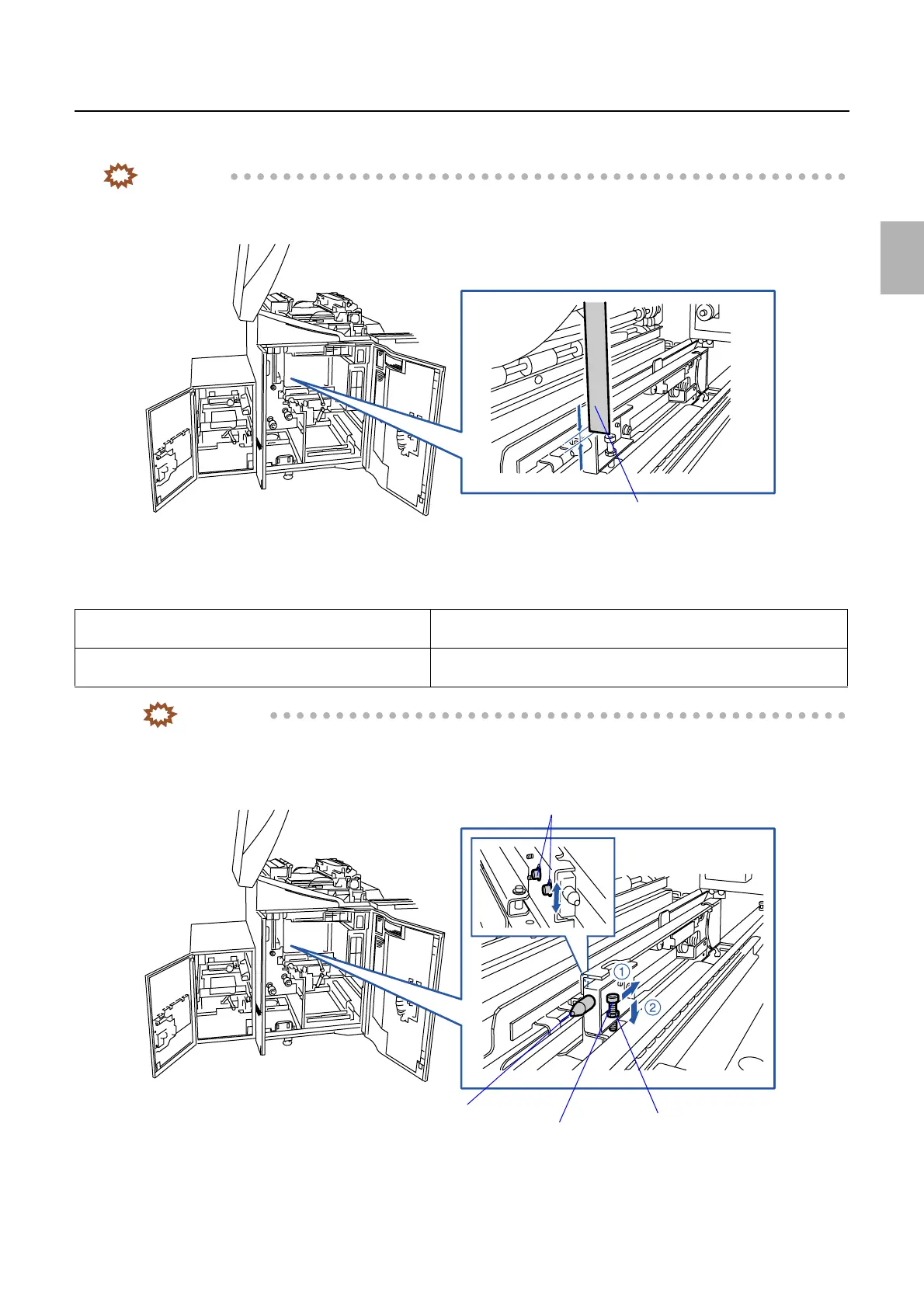
• Measure the dimension shown below before adjusting the positioning pin for magazine deck B. It will help you to
restore after adjustment of the positioning pin.
1. Loosen the fixing screw on the positioning pin for the magazine deck B. (Loosen two fixing screws.)
2. Adjust the positioning pin for the magazine deck B. (One adjusting screw and one nut)
IMPORTANT
• When tightening the fixing screws on the positioning pin, push the pin in the directions indicated by arrows 1
and 2.
• When the adjusting screw is turned 360 degree, the positioning pin moves approximately 0.7 mm.
If the first test print is misaligned to the right. Step 2 Adjust the positioning pin downwards. (Turn the adjusting screw to the
left.)
If the first test print is misaligned to the left. Step 2 Adjust the positioning pin upwards. (Turn the adjusting screw to the
right.)
Ruler
G072374
Nut
Adjusting screw
Positioning pin
Fixing screws
G072378
Distributed by: minilablaser.com



 To Next Page