CHAPTER 5: SETPOINTS 5.3 SYSTEM SETUP
GEK-106310-AF F650 DIGITAL BAY CONTROLLER 5-35
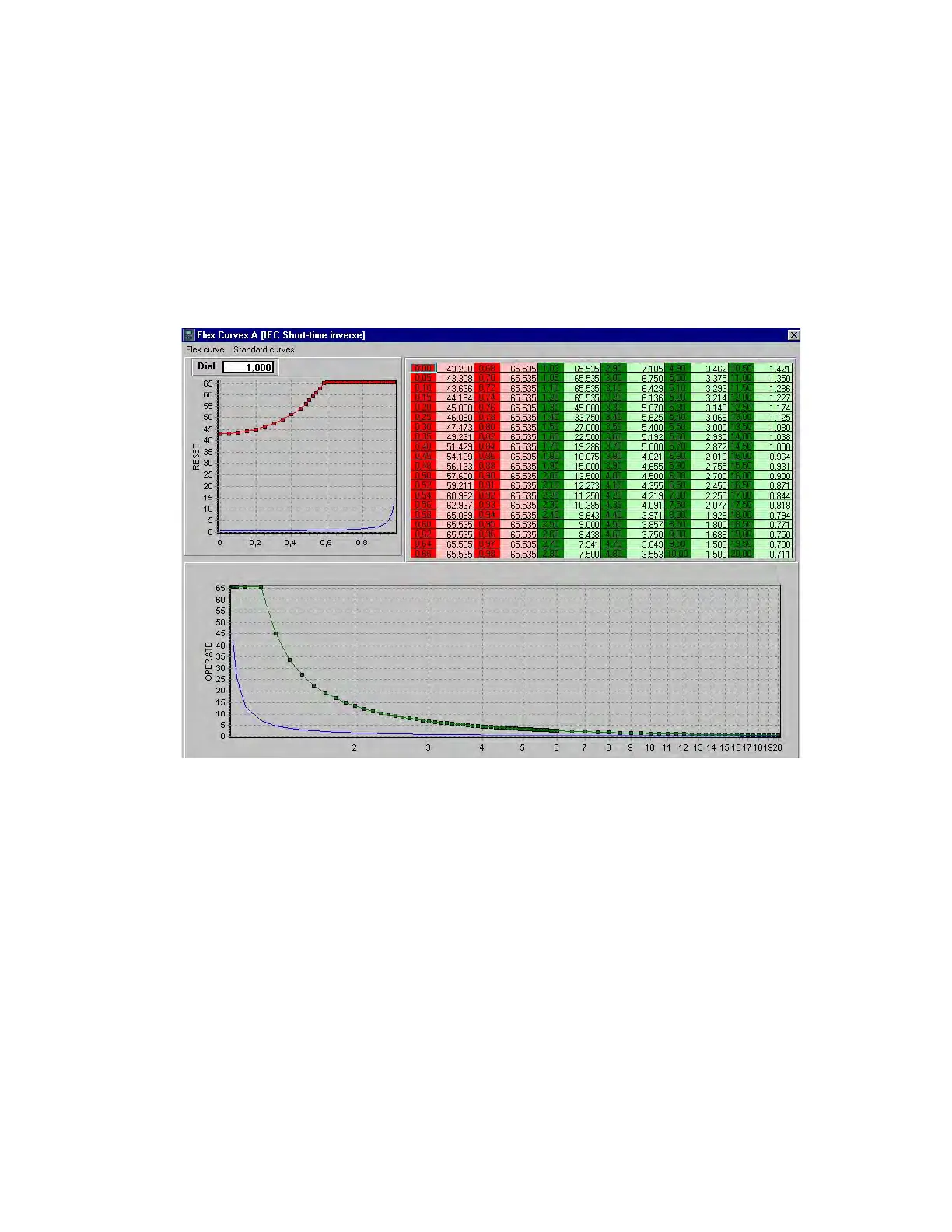
The definition of the curve points can be introduced directly in the Flex Curve settings menu. Alternatively they can be
created using the graphical tool provided by clicking Edit Curve in the Flex curves menu in EnerVista 650 Setup.
In the user curve edit screen (see Figure 5-2: FlexCurves edition), a base curve can be selected, from the Standard Curves
menu. This curve is used as a template to create the user curve. Once the standard curve is viewed, it is possible to make
the user curve (operate, reset or both) reconcile the standard curve, using the Flex curve > set flex curve from the
standard curve, and then modifying any of the points by editing in the table the corresponding value.
The user can also view a different curve model to the one the FlexCurve has been adapted to, and compare both models to
adopt the most appropriate values in each case. If once the user curve has been configured, the user wants to store the
information, the “Flex Curve > Exit with Data” menu must be selected. If the results are not to be saved, the Exit without
Data option must be selected. Now, calculated points must be saved in the Flex Curve using the “Store” option.
Figure 5-2: FlexCurves edition



 To Next Page