EasyManua.ls Logo

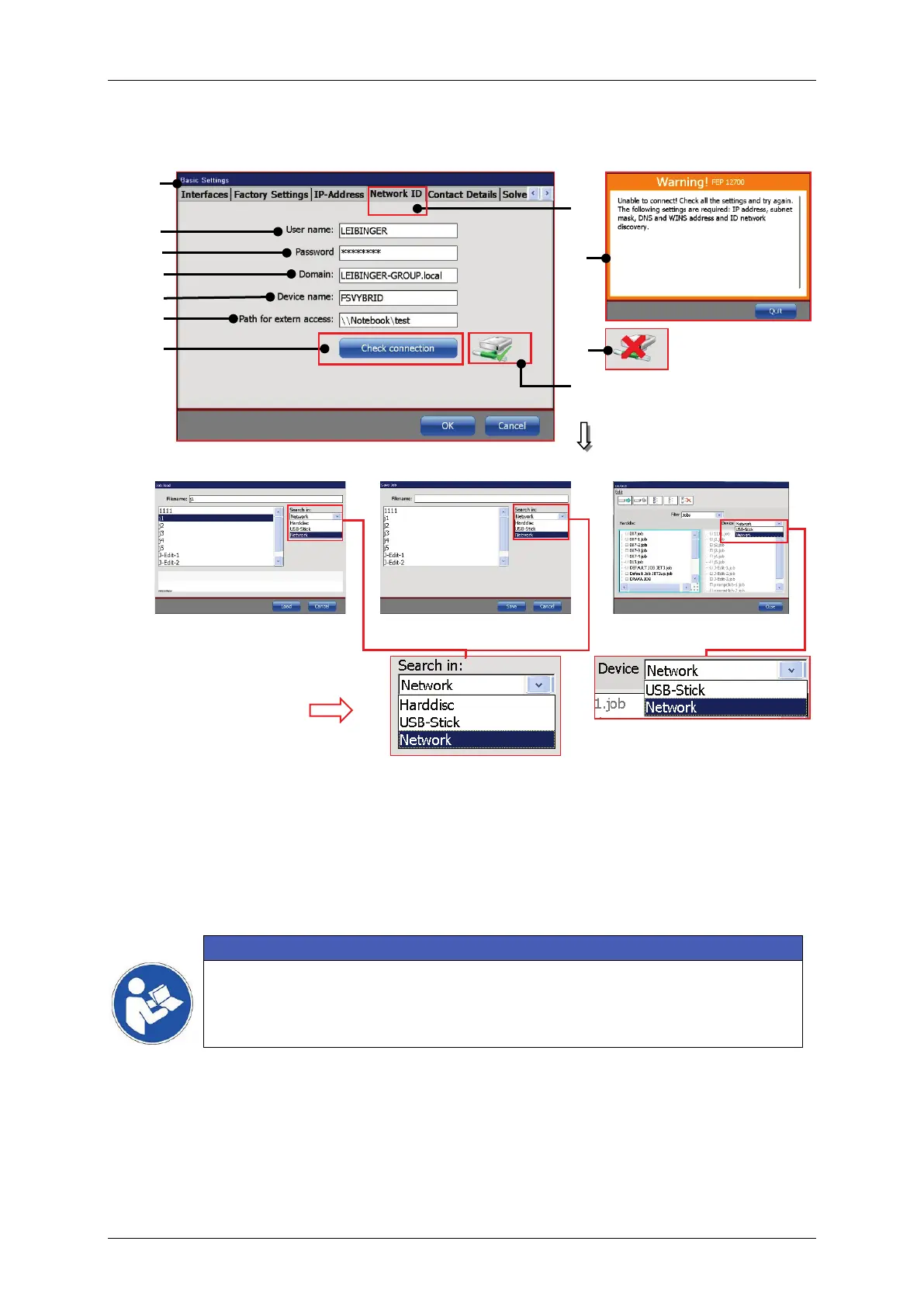
Leibinger JET3 up - Figure 53 Network Path Settings

Leibinger JET3 up
412 pages
Print Icon
To Next Page IconTo Next Page
To Previous Page IconTo Previous Page
Loading...
Group 8 Job Editor Page 141
JET3up Release R1.06
Figure 53 Network path settings
Load file dialog box
Save file dialog box
Explorer
1 Dialog box <Basic Settings>
7 Input <Network path>
2 Tab <Network ID>
8 <Check connection> button
3 – Input <User name>
9 Warning <Connection failed>
4 Input <Password>
10 Icon <No connection>
5 Input <Domain>
11 Icon <Connection established>
6 Input <Device name>
12 <Network> item added
Important
The network connection is established with the <Check connection>
button. A successful connection is indicated with green marked icon (11)

11
12
9
10
1
2
7
3
5
6
8
4

Table of Contents

Other manuals for Leibinger JET3 up

Related product manuals